



Ốp lưng cho Samsung S22 Ultra
 ByckthLikes148Downloads2.4K
Build another version of this model.
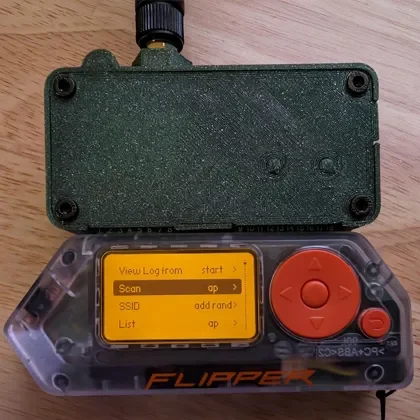
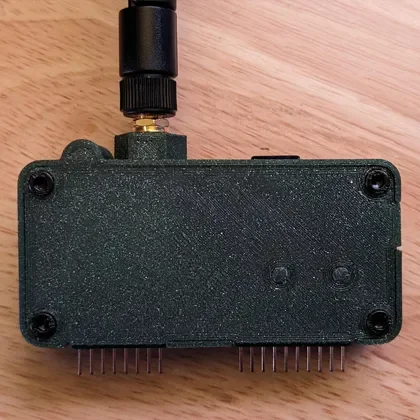
A minimalistic 3D printable case for the Flipper Zero Wi-Fi Dev Board. There are two variations of this case, a larger XL version and a normal size MD version. The XL version has a larger under-cavity for addons such as a GPS module. The MD version has a smaller under-cavity for minimal wiring. Both versions have antenna and/or Micro SD card slot options.
- XL> Fully loaded > Antenna mount > Micro SD card slot (by justcallmekoko):
XL_Full.stl | XL_Full.3mf
- XL> Antenna mount only:
XL_Antenna_Only.stl | XL_Antenna_Only.3mf
- XL> Micro SD card slot only (by justcallmekoko):
XL_SD_Only.stl | XL_SD_Only.3mf
- XL> Barebones > No antenna mount or Micro SD card slot:
XL_Bare.stl | XL_Bare.3mf
- MD> Fully loaded > Antenna mount > Micro SD card slot (by justcallmekoko):
MD_Full.stl | MD_Full.3mf
- MD> Antenna mount only:
MD_Antenna_Only.stl | MD_Antenna_Only.3mf
- MD> Micro SD card slot only (by justcallmekoko):
MD_SD_Only.stl | MD_SD_Only.3mf
- MD> Barebones > No antenna mount or Micro SD card slot:
MD_Bare.stl | MD_Bare.3mf
- XL/MD > Cover
Cover.stl | Cover.3mf
- XL/MD > Buttons
Buttons.stl | Buttons.3mf
The case is designed to be printed in three parts, a top, buttons for the top, a bottom, and then screwed together using 4 x M3x16mm screws w/ 4 x M3 nuts. Place buttons in the top piece and install upside down so buttons don't fall out.
- Using supports when printing can help with the hex holes.
- Printing the first layers slower also helps with the hex holes.
- Print all pieces with 100% infill.
- When the print is done trim with razor around edges so things fit nicely.
- Use double sided tape to keep your GPS module in place.
- Trim your buttons and make sure they slide nicely and stay put when inserted.
- Trim your hex holes and do not force the screws heads in flush, they should slide in nicely.
- Be careful not to pinch wires, use black tape to keep things in place if you need to.
See more designs on my GitHub here: https://github.com/CodyTolene/3D-Printing
Enjoy!
ByckthLikes148Downloads2.4K

 ByftoerringLikes79Downloads183

 ByFosphorLikes20Downloads235

 ByJaronLikes310Downloads1K

 Byw3rN42Likes127Downloads931

 ByDiscotehkLikes35Downloads153

 Byjodinskylab_3390035Likes144Downloads163

 ByfryseeLikes0Downloads141

 ByTomDDLikes89Downloads574

 ByjbfishLikes5Downloads75

 By11pepeLikes3Downloads16

 Byrorys3DLikes0Downloads321