

Table Vise - Modular
 Byvc-designLikes0Downloads545
Build another version of this model.
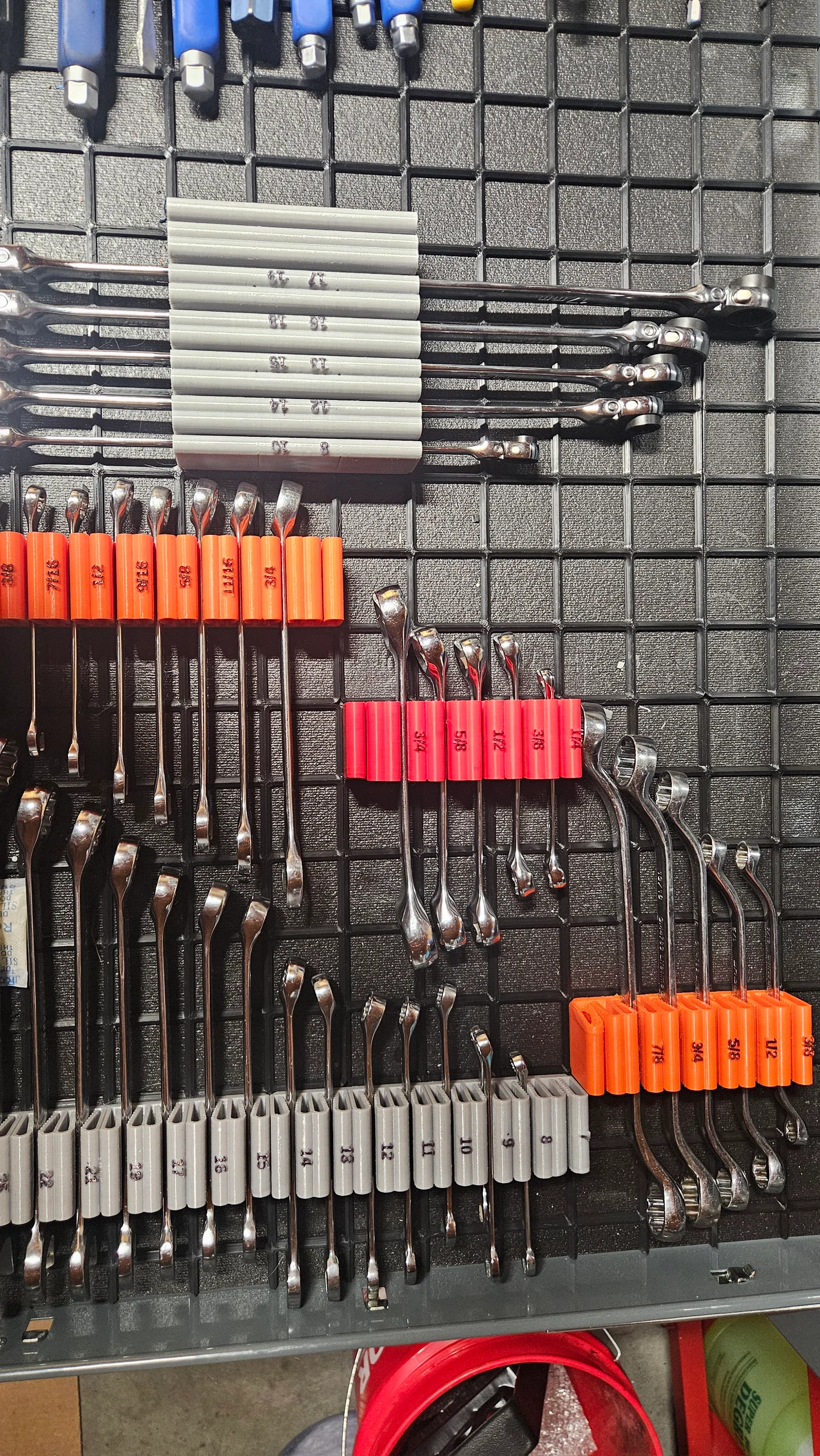
I couldn’t find a Gridfinity wrench organizer that fit my needs, so I used OpenSCAD to dynamically generate this wrench holder with customizable labels. Follow the steps below to set up OpenSCAD and create your own.
I’ve included many generated blanks without labels, plus a few labeled versions I made for myself. In the OpenSCAD file, you can edit the magnet size and add your own labels.
This holder securely fits any wrench type, large or small, so you can toss them in a bag without worrying about them flying everywhere if bumped. Can be used to hold screwdrivers and anything else that can be clicked in.
Printing Instructions
Printed with .4 nozzle 15% infill using petG.
With tree supports and be sure to print on its side for maximium strength.
Download Required Files:
Download gridfinity_modules.scad and gridfinity_cup_modules.scad from the Gridfinity GitHub repository or your source of these modules.
Obtain the STL file wrench holder v2_fixed.stl and place it in your OpenSCAD working directory or update the path in the script accordingly.
Setup:
Open the provided OpenSCAD file in OpenSCAD software (version 2021.01 or newer recommended).
Make sure the included/use statements correctly reference the downloaded .scad module files.
Customize Parameters:
Adjust the parameters at the top of the script such as width, depth, height, and labels to fit your desired size and label text.
Labels should be entered as an array of strings, e.g. labels = [ "8 10", "12 14", "13 15" ];.
Render and Export:
Press F5 to preview or F6 to render the model.
Export the final model as STL for 3D printing.
Byvc-designLikes0Downloads545

 Bythorin-oakenshieldLikes0Downloads539

 ByJPMakesStuffLikes80Downloads352

 ByleonicLikes0Downloads1.4K

 ByVC_DesignLikes679Downloads3.6K

 ByDan Schwartz SchwartzLikes744Downloads3.4K


 ByelitailLikes0Downloads139

 ByperfectLikes0Downloads104

 Bytorii-creative-studioLikes0Downloads457

 Bychubbs8697_2027893Likes585Downloads1.7K

 Byadam-cookLikes0Downloads341