



Ốp lưng cho Samsung S22 Ultra
 ByckthLikes148Downloads2.4K
Build another version of this model.
Summary
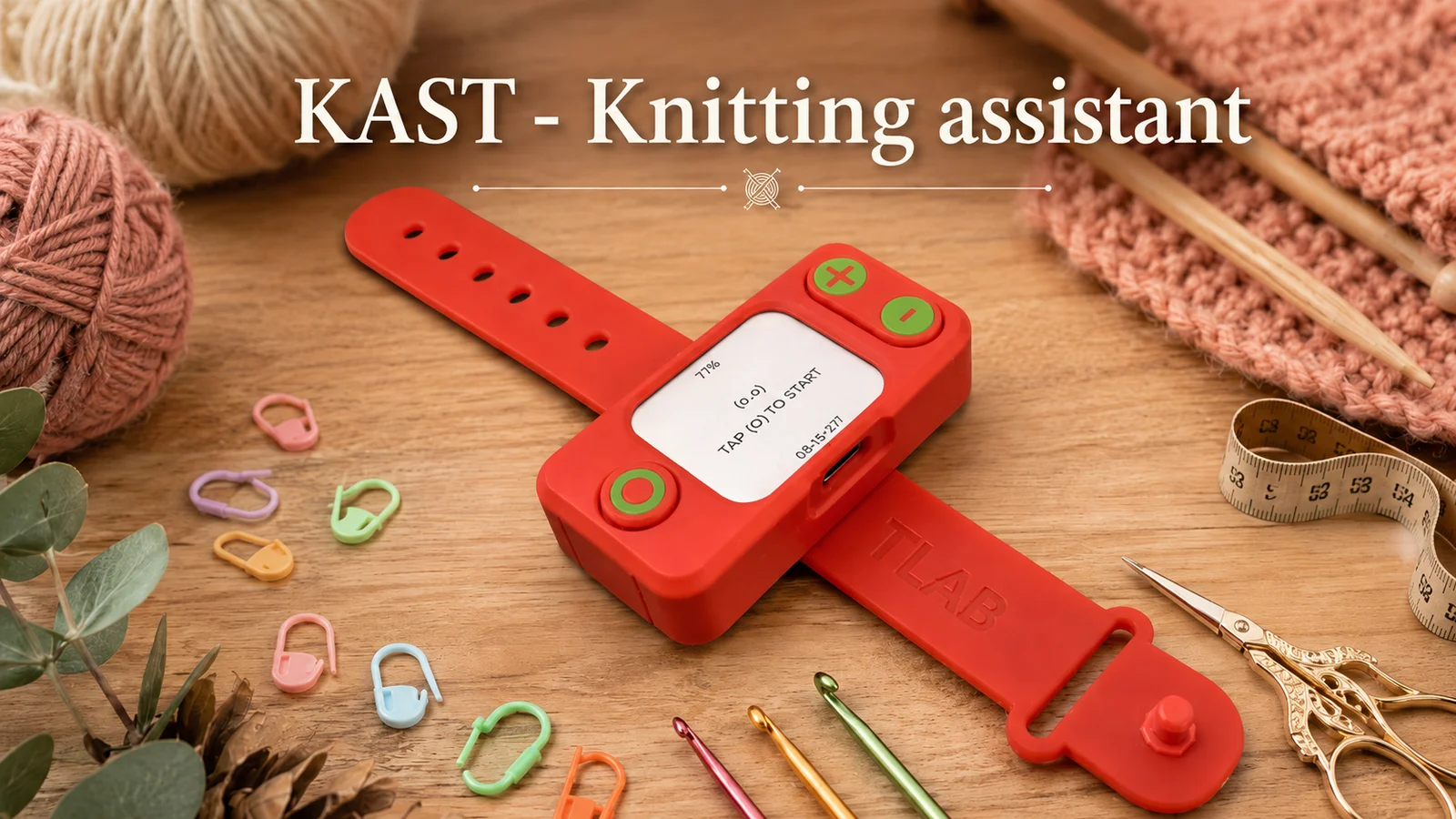
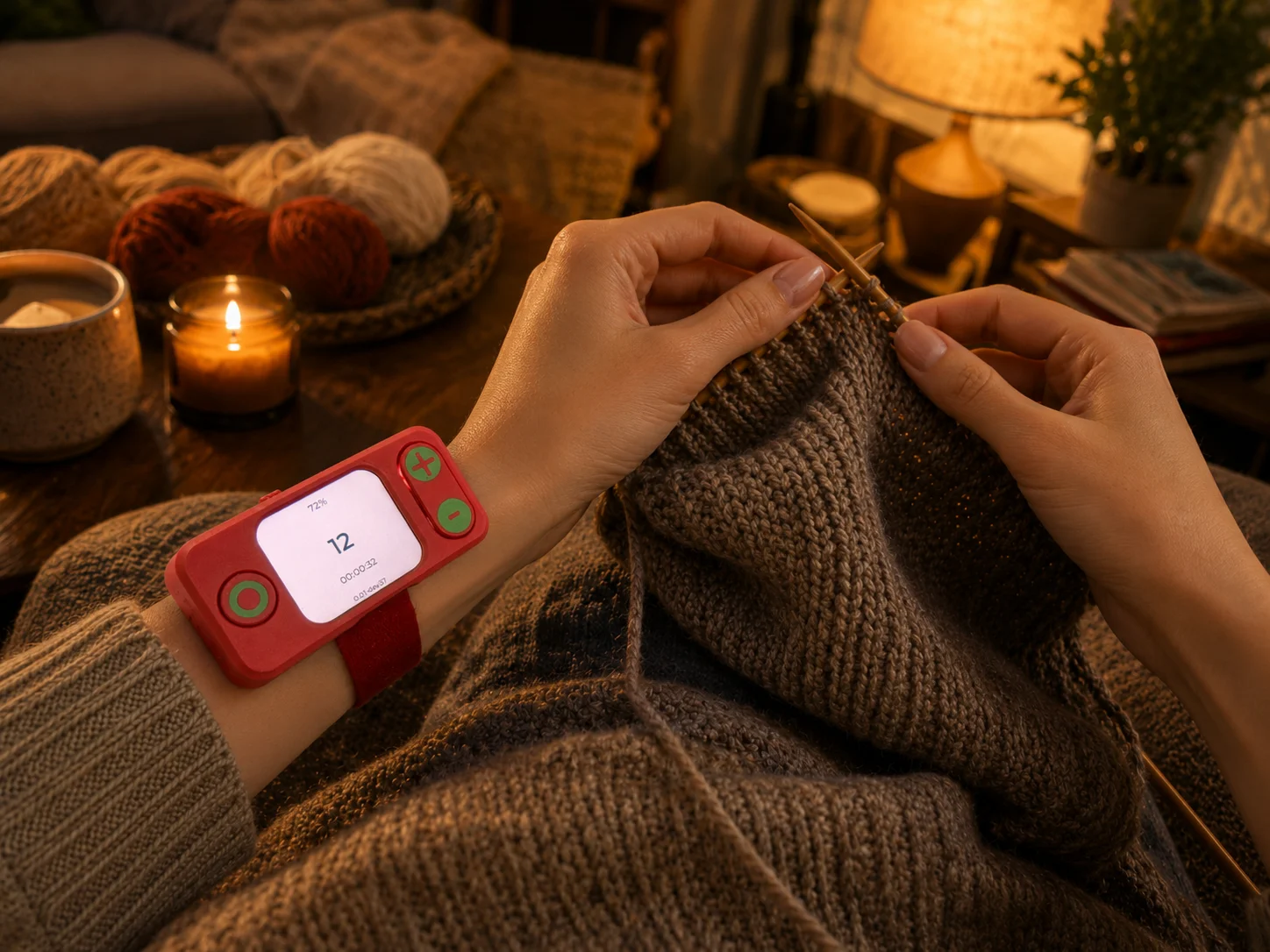
KAST is a 3D printable enclosure for a DIY knitting assistant based on the Waveshare ESP32-S3-LCD-1.69 board. The device is designed to help knitters count rows, show the current row number, and display battery percentage on the built-in screen. It uses three external buttons for adding rows, removing rows, and universal reset / secondary actions.
Full firmware, BOM, wiring notes, and assembly instructions are available on GitHub:
https://github.com/Nikolay-Tyulkin/KAST
Description
KAST is a compact handheld knitting row counter and assistant designed around the Waveshare ESP32-S3-LCD-1.69 development board.
The case is made for a small battery-powered device with a visible screen and three physical buttons. The main screen shows large row digits for easy reading while knitting, plus battery percentage and firmware version information.
The project is intended for knitters who want a dedicated physical row counter instead of using a phone app, notebook, or mechanical clicker. The buttons are simple and direct: one button adds a row, one button removes a row, and the universal button is used for reset confirmation and secondary actions depending on press type.
The firmware is written for ESP-IDF and stores session/history data in NVS. It supports row counting, pause, finish, reset confirmation, statistics, battery percentage display, and firmware version display.
The GitHub repository contains the full build documentation, bill of materials, wiring details, ESP-IDF firmware, flashing instructions, and assembly notes.
Features
3D printable enclosure for a knitting assistant
Designed for Waveshare ESP32-S3-LCD-1.69
Large row counter display
Battery percentage shown on screen
Firmware version shown on screen
Three-button control layout
+ button for adding rows
- button for removing rows
Universal button for reset / secondary actions
Battery-powered portable design
ESP-IDF firmware project
USB access for flashing and charging
Compact handheld form factor
Useful for knitting, crochet, row tracking, and project progress counting
Use Cases
Knitting row counter
Crochet row counter
Handmade project tracking
Portable craft counter
Dedicated alternative to phone counter apps
DIY ESP32-S3 project
Maker desk project
Gift project for knitters
Firmware and enclosure reference for small embedded devices
Print Settings
Material: PLA / PETG
Layer height: 0.16-0.24 mm
Infill: 10-25%
Walls: 2-3
Supports: depends on print orientation and exact case version
Raft/Brim: optional
Print the front face carefully so the display opening stays clean and the board fits without stress.
Required Hardware
Waveshare ESP32-S3-LCD-1.69 board
3 external momentary buttons 12x12 mm
Battery suitable for the board / enclosure version
Wires for buttons and battery connection
Optional screws, inserts, glue, or printed pins depending on the case revision
Button Wiring
Confirmed external button GPIO mapping:
+ button: GPIO2
- button: GPIO16
Universal button: GPIO17
Each button is connected between GPIO and GND
Active level: low / 0
Firmware
The firmware is an ESP-IDF project, not Arduino or PlatformIO.
Firmware and full instructions:
https://github.com/Nikolay-Tyulkin/KAST
Current MVP firmware features:
Row counter
Add row
Remove row
Pause session
Finish session
Reset confirmation flow
Battery percentage display
Customization
The enclosure can be customized for different button styles, colors, battery sizes, and mounting preferences.
You can print the buttons in a contrasting color, add labels or symbols, change the case color, or remix the enclosure for another battery or connector layout.
The screen area should remain clear and readable. For best usability, keep the row digits large and make sure the battery percentage is visible.
Assembly Notes
Print the case parts and test-fit the Waveshare ESP32-S3-LCD-1.69 board before final assembly.
The strap is designed to be cast from silicone. A 3D printable mold for casting the strap is included in the project files. Print the mold from PLA with a recommended layer height of 0.12 mm for a smoother mold surface and better strap finish.
For the strap, use flexible silicone with approximately Shore A 40 hardness. This gives the strap enough flexibility for comfortable use while still keeping it firm enough to hold its shape and lock properly.
Prepare the mold, cast the silicone strap, and let the silicone fully cure before removing the strap from the mold and installing it on the device.
Install the board so the display is aligned with the screen opening. Connect the three external buttons to the confirmed GPIO pins and GND. Check that the USB port remains accessible for firmware flashing and charging.
Flash the ESP-IDF firmware from the GitHub repository. After flashing, verify that the firmware version is visible at the bottom of the screen, the row count starts correctly, the + and - buttons change the row counter, and the battery percentage is displayed.
For battery diagnostics, the firmware logs values such as ADC raw value, ADC millivolts, calculated battery millivolts, and percentage.
Important Note
This is a DIY electronics enclosure and firmware project. It requires assembly, wiring, and firmware flashing.
Check wiring carefully before powering the device. The project is designed for ESP-IDF and the Waveshare ESP32-S3-LCD-1.69 board.
ByckthLikes148Downloads2.4K

 ByBrokentooth_designsLikes30Downloads225

 Bymateusz-tokarzLikes0Downloads137

 BysedimentiLikes0Downloads113

 ByftoerringLikes79Downloads186

 ByFosphorLikes20Downloads238

 ByDiscotehkLikes35Downloads156

 ByJaronLikes310Downloads1K

 Byw3rN42Likes127Downloads935

 ByfryseeLikes0Downloads144


 ByNoahLikes0Downloads203