

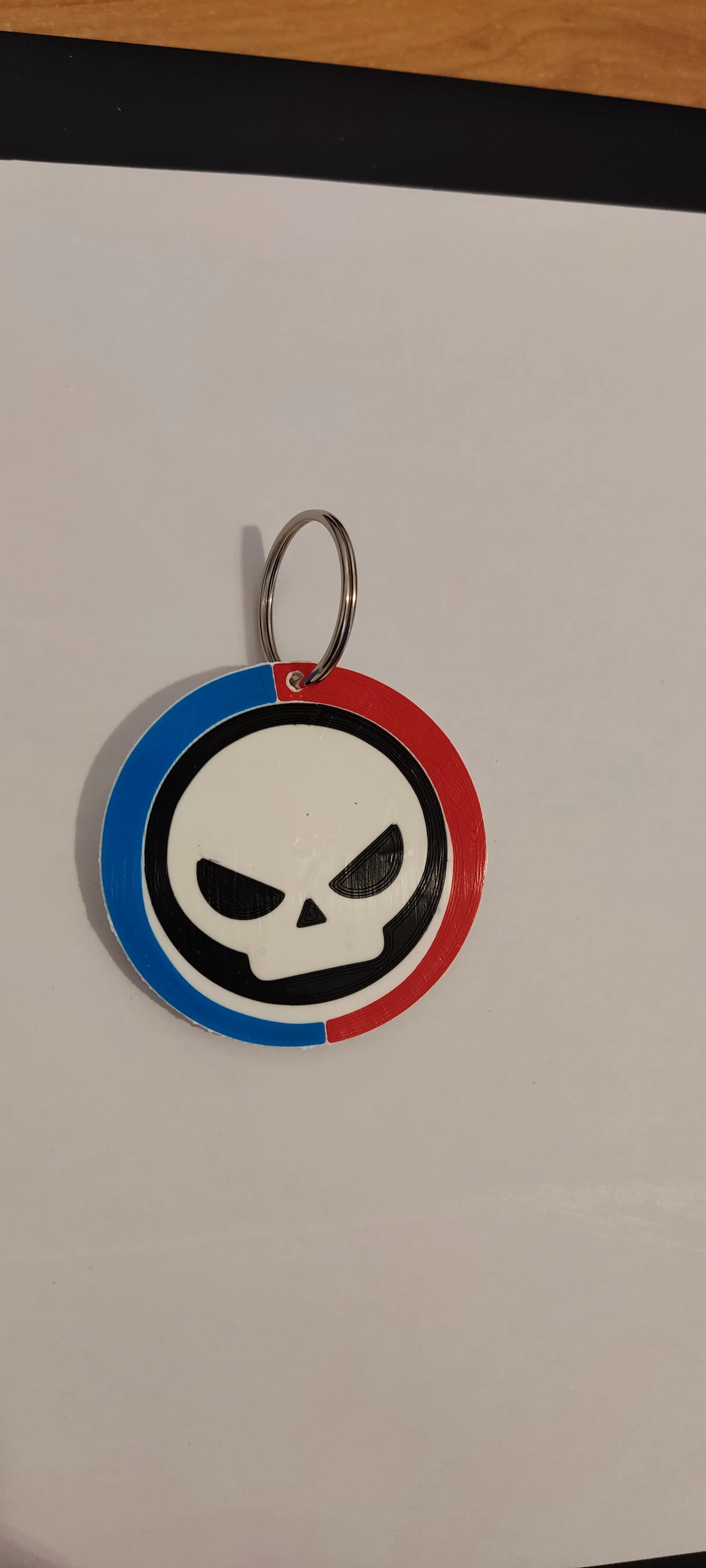


Key organizer Lite - Khung xương tối giản cho EDC
 ByAustin Wolt WoltLikes162Downloads374
Build another version of this model.
archivo STEP, un solo archivo pero en el laminador aparecen varios, cada color por separado.
para realizar el cambio de color en la misma capa se debe cambiar el gcode de inicio para que no haga home y el de final para que mantenga temperaturas, ventilación y bloquee motores.
Se recomienda crear un perfil de impresora nuevo con el gcode modificado para estos trabajos de cambio de color en misma capa
altura de capa 0,24
Salto en z 0,6
relleno 10-15%
sin soportes
sin falda ni balsa
velocidad 40
STEP file, a single file but several appear in the laminator, each color separately.
To make the color change in the same layer, you must change the start gcode so that it does not make home and the end gcode so that it maintains temperatures, ventilation and blocks motors.
It is recommended to create a new printer profile with the modified gcode for these color change jobs on the same layer
layer height 0.24
filling 10-15%
Jump in z 0.6
without supports
speed 40
without skirt or raft
GCODE inicio / GCODE start
; Initial setups
G90 ; use absolute coordinates
M82 ; extruder absolute mode
M900 K0.12 ; K factor
M900 W[extrusion_width] H[layer_height] D[filament_diameter]
M200 D0 ; disable volumetric e
M220 S100 ; reset speed factor to 100%
M221 S100 ; reset extrusion rate to 100%
; Set the heating
M190 S[first_layer_bed_temperature] ; wait for bed to heat up
M104 S[first_layer_temperature] ; start nozzle heating but don't wait
; Home
G1 Z3 F3000 ; move z up little to prevent scratching of surface
G28 X Y
M420 S1 Z10
G1 X3 Y3 F5000 ; move to corner of the bed to avoid ooze over centre
; Wait for final heating
M109 S[first_layer_temperature] ; wait for the nozzle to heat up
M190 S[first_layer_bed_temperature] ; wait for the bed to heat up
; Return to prime position, Prime line routine
G92 E0 ; Reset Extruder
G1 Z3 F3000 ; move z up little to prevent scratching of surface
G1 X10 Y.5 Z0.25 F5000.0 ; Move to start position
G1 X100 Y.5 Z0.25 F1500.0 E15 ; Draw the first line
G1 X100 Y.2 Z0.25 F5000.0 ; Move to side a little
G1 X10 Y.2 Z0.25 F1500.0 E30 ; Draw the second line
G92 E0 ; Reset Extruder
M221 S{if layer_height<0.075}100{else}95{endif}
GCODE final / Final GCODE
G4 ; wait
G92 E0 ; prepare to retract
G1 E-0.5 F3000; retract to avoid stringing
; Anti-stringing end wiggle
G91 ; use relative coordinates
G1 X1 Y1 F1200
; Raise nozzle and present bed
{if layer_z < max_print_height}G1 Z{z_offset+min(layer_z+70, max_print_height)}{endif} ; Move print head up
G90 ; use absolute coordinates
; Reset print setting overrides
M200 D0 ; disable volumetric e
M220 S100 ; reset speed factor to 100%
M221 S100 ; reset extrusion rate to 100%
; Shut down printer
M106 S0 ; turn-off fan
M104 S205
M140 S60
M150 P0 ; turn off led
M85 S0 ; deactivate idle timeout
M84 X Y
LAMINADO CON PRUSASLICER / LAMINATED WITH PRUSASLICER
Importante no repara el archivo ya que deja mal la silueta de crow / Important: it does not repair the file since it leaves the crow silhouette bad
La posición en la que aparece la pieza n el laminador es la correcta, no reorientar
En el primer color se cambiará solo el gcode final para que en el de inicio haga el home, en el resto de colores cambiar gcode inicio y final.
Se elige un color y en los demás en la rueda de la derecha se marca cambiar tipo/volumen negativo (se deja solo un color como pieza y se lamina), después poner otro como pieza y el color anterior pasar a volumen negativo y laminar, así con todos, el ultimo será el blanco y se hará un cambio de color en las 2 ultimas capas)-
The position in which the piece appears on the laminator is correct, do not reorient
In the first color, only the final gcode will be changed so that the start one makes the home, in the rest of the colors change the start and end gcode.
Choose one color and in the others on the wheel on the right you mark change type/negative volume (only one color is left as a piece and laminated), then put another as a piece and the previous color goes to negative volume and laminates, So with all of them, the last one will be white and a color change will be made in the last 2 layers).
Mientras se imprime / While printing
Cuando termine el primer color poner debajo del extrusor un folio para no manchar la pieza, quitar la línea de purga y hacer el cambio de filamento desde la pantalla o manual, al imprimir el siguiente color volvera hacer la línea de purga, esto con todos los colores, cuando haya hecho el blanco y se pause para el cambio de color para hacer la silueta de crow no hace falta quitar la línea de purga pero si tenemos que purgar bien el color nuevo.
When the first color is finished, place a sheet of paper under the extruder so as not to stain the piece, remove the purge line and change the filament from the screen or manually, when printing the next color it will do the purge line again, this with all the colors, when you have made the white and pause to change the color to make the crow silhouette, it is not necessary to remove the purge line but we do have to purge the new color well
ByAustin Wolt WoltLikes162Downloads374


 ByLecso_113752Likes76Downloads327

 Bytovelaermans_3355197Likes63Downloads420

 ByAlexMuLikes41Downloads323

 ByckthLikes148Downloads2.4K

 ByTangoOscarMik_505113Likes31Downloads242

 ByxsynaticLikes27Downloads207

 BySimin03Likes84Downloads194

 ByDerTapirLikes34Downloads167

 ByAkosikaLikes5Downloads51

 ByMichaelCurri_3940753Likes26Downloads145