



Mẫu gảy đàn Guitar (Guitar Pick) in 3D tùy chỉnh độ dày
 ByWolf_115355Likes513Downloads8.4K
Build another version of this model.
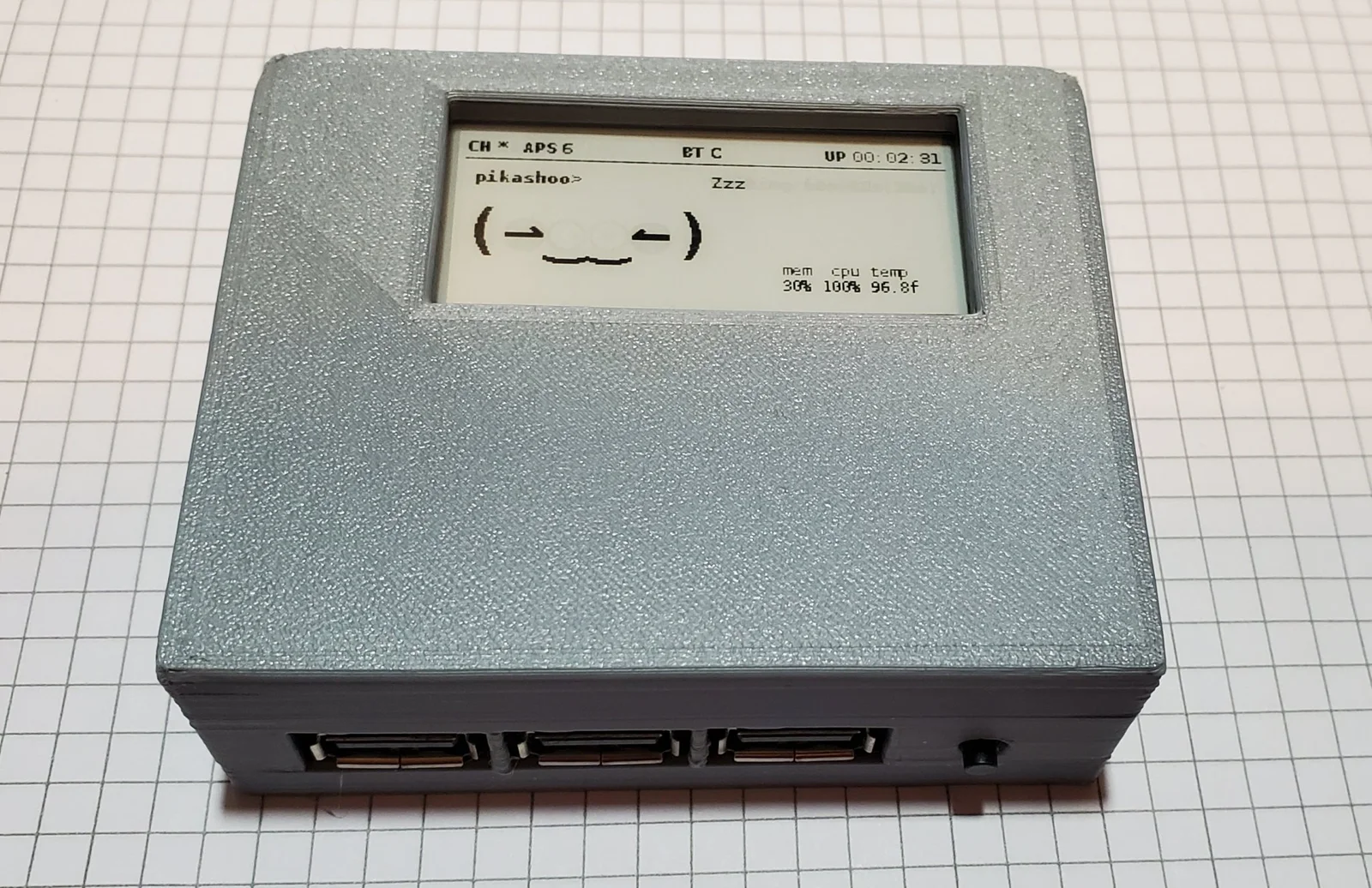
I designed this case for the Geekworm X306 UPS shield. It provides constant power via a 18650 Li-Ion battery. You can plug and unplug the USB-C port on the back to charge the battery as needed, without interrupting the operation of the RPi Zero W.
The X306 shield goes in first, USB 2.0 ports angled slightly in until positioned in their slots, then lay it flat. The screws to mount the shield to the case are M2.3*5. Use 2 screws.
Then you mount the RPi Zero W to the shield, and use the screws included with the shield to affix the RPi in place. Use 4 screws. Then mount the e-ink display onto the RPi Zero W via the headers.
There are thin slots on the sides of the case to see the Battery Charge Level (blue LEDs), and the current Power State (Full, Charging, Powered). See video for more details.
There are slots for all other items. USB, HDMI, SD card, etc.
Depending on your printer, you may want to run layers 32-85 at a slower speed (50mm/s vs 250mm/s) to ensure the vertical structures and bridging are printed properly and to reduce post-processing. If you do so, supports should not be needed.
The print in the pictures/video were done at .20mm with 30% infill.
Excellent for a Pwnagotchi setup.
You'll notice I put a small bit of Tesa tape around the battery. It makes pulling the battery out much easier as it is a TIGHT fit.
If you have need for modifications to the lid or case let me know.
BOM
More details at my site
ByWolf_115355Likes513Downloads8.4K

 ByZED4EverLikes313Downloads5.2K

 ByVC_DesignLikes271Downloads748

 ByfifindrLikes500Downloads4K

 Bymrfixit_324954Likes65Downloads471

 ByDan Schwartz SchwartzLikes744Downloads3.4K

 ByBrokentooth_designsLikes83Downloads446

 ByRobertoGalloc_356815Likes48Downloads112

 ByKNIN_CustomLikes112Downloads430

 ByUpcrid3D_1585693Likes808Downloads2.1K

 ByAdam Záhořák ZáhořákLikes39Downloads250

 ByWilko_SLOLikes935Downloads2K