



Bộ sưu tập 11 nhân vật mô hình Mecca Chameleon in 3D vui nhộn
 ByZED4EverLikes313Downloads5.2K
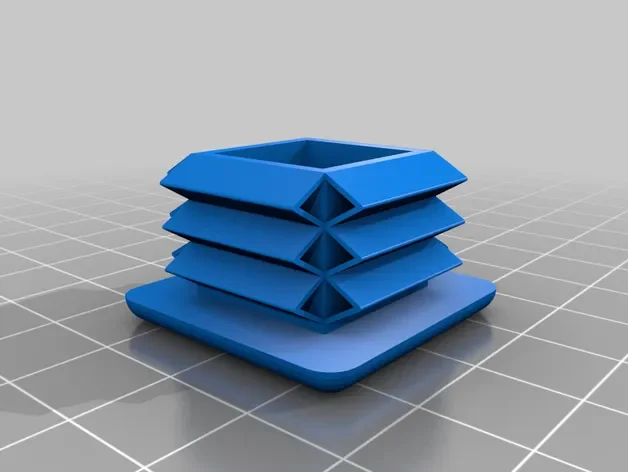
Build another version of this model.
This customizer require 8 parameter.
-Horizontal dimension (X direction)
-Vertical dimension (Y direction)
-The thickness of the tube
-Length of the part inserted on the tube (minimum recommended is 15mm)
-Thickness of the cover (recommended 3mm or more for effective protection)
-The size or height of the gripper. 4mm works fine.
-Thickness of the gripper. For a 0.4mm nozzle I recommend 0.5mm.
-Resolution. Just use half of the layer height you intent to use.
If you got a loose fit, try to decrease the tube thickness on the customizer.
Print your endcap as delivered with no support. I made mine with PETG.
You can find shortcuts for preview, render and STL on the menu bar
ByZED4EverLikes313Downloads5.2K

 ByBasementLABLikes888Downloads1.5K

 Bydan-sabauLikes0Downloads2.6K

 ByowlartLikes30Downloads233

 ByleonicLikes0Downloads1.4K

 ByGradyEnglish_575309Likes30Downloads120

 Byjudhini-printsLikes0Downloads147

 BymoonyxLikes0Downloads704

 ByVC_DesignLikes679Downloads3.6K

 ByDan Schwartz SchwartzLikes744Downloads3.4K

 By12_LH_4014475Likes121Downloads169

 Byvc-designLikes0Downloads494