



Atomic Stack — Hệ thống hộc tủ và khay đựng mô-đun phong cách MCM
 ByGi_TLikes801Downloads1.3K
Build another version of this model.
22/7/2026
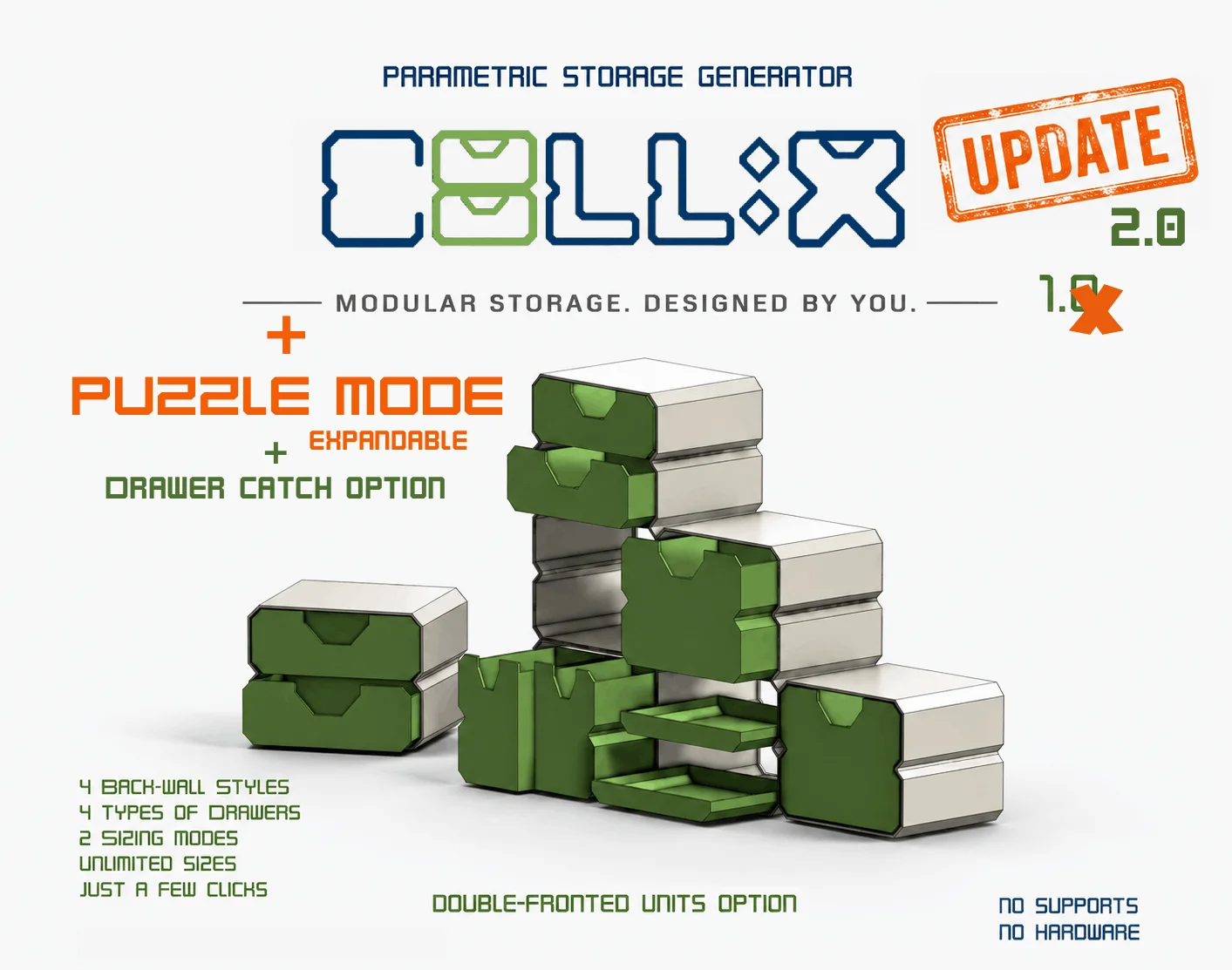
Puzzle Mode added
Drawer catch option added
CELLIX 2.0
Puzzle Mode introduction and Instructions Guide added
Cellix 2.0.1 changed Clearence for Pins minimum to 0mm
23/7/26
Cellix 2.1 Pin fillet optimised - Drawer Catch option automatically merges back wall extensions
User Guides updated to 2.0 - new features included and explained
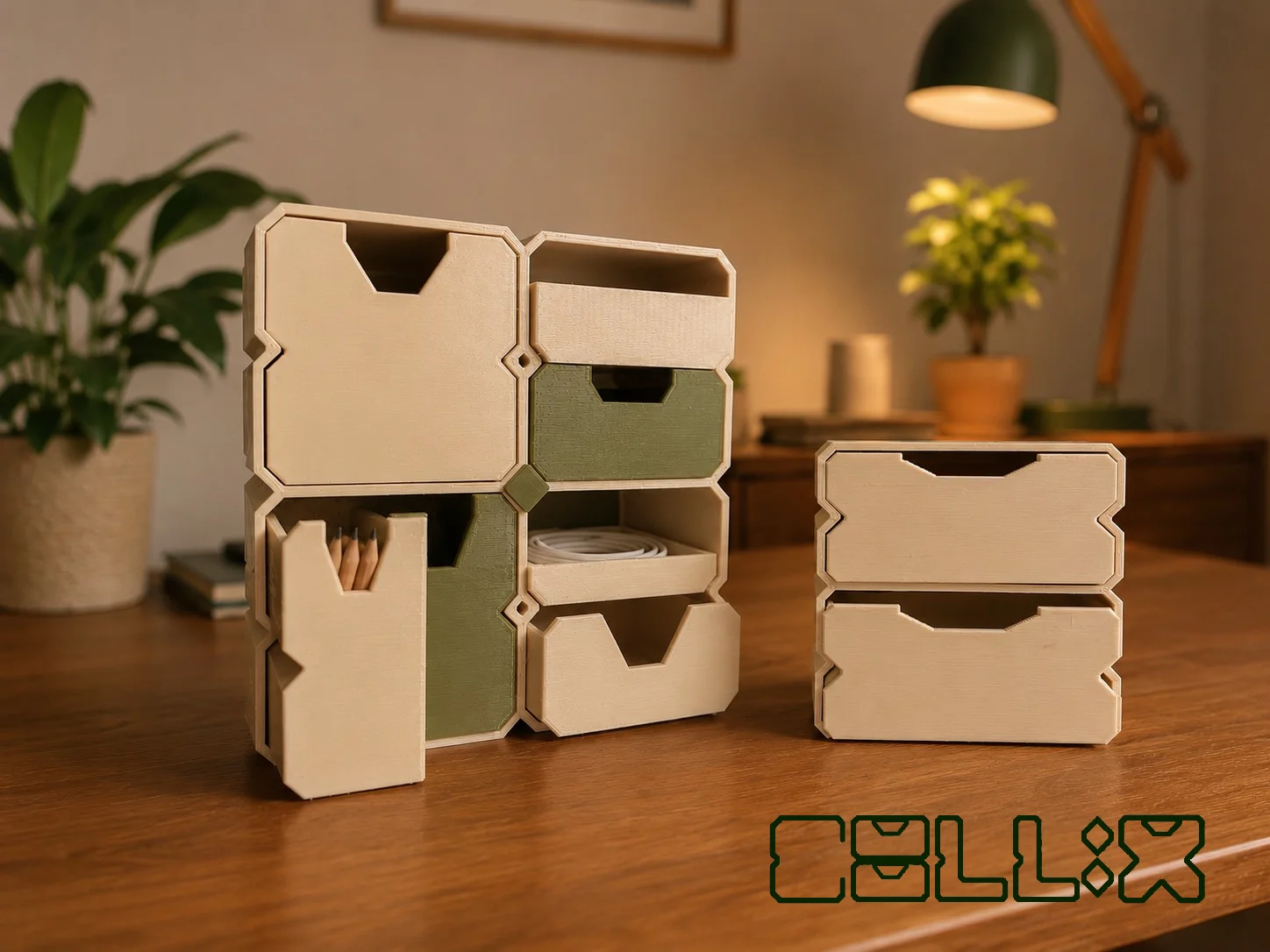
CELLIX is a fully parametric storage system generator running on Onshape. It automatically creates custom storage units and matching 'floating' drawers based on your exact requirements.
Try it, whether you need a compact desktop organizer, a workshop storage cabinet, or even a miniature drawer unit.
You dont need to know CAD, You dont need to have an Onshape account, and it is free
Choose your style
Configure your storage dimensions.
Generate the complete storage system.
Hide the parts you don't want.
Export the required STL files.
Print.
I recommend downloading the User s Guide + the new CELLIX 2.0 PDF as they contain very important information. Below is a short overview of what Cellix can do
Parametric & Calculation Systems
Dual Calculation Modes (CELLIX Mode): Choose between two distinct math engines to define unit dimensions to fit exact spaces or fixed grid steps.
Fully Parametric Scaling: Adjust cell width, depth, height, and wall thickness; ratios auto-scale dynamically.
Customizable Puzzle Pins (CELLIX PUZZLE Mode: Tailor pin style, placement, and fit tolerances when operating in Puzzle Mode.
Clearence settings
Error-Proof Formulas: Built-in dynamic safety logic prevents broken sketches, filleting errors, or failed geometry.
Modular Modes & Layouts
CELLIX Standard Mode: Uniform, stackable grid units for clean desktop or drawer organization.
Puzzle Mode: side-by-side locking system Easy assembly
Puzzle Mode: Mixed-Height Asymmetrical Snap: Combine units of varying depths (e.g., 60 mm next to 30 mm) for stepped, tiered, or L-shaped layouts.
Shell & Drawer Customization
Double-Sided Open Cells: Option for open-backed cells with automaticaly generated 2 fronted drawers
Integrated Drawer Catches: Optional internal stop mechanism to prevent drawers from accidentally sliding out completely.
Horizontal & Vertical Orientations: Modular shells configured for both tall vertical and wide horizontal layouts.
3D-Print Optimized Geometry: Entry chamfers and rail tolerances engineered specifically to prevent first-layer "elephant's foot" binding. No supports
click here and get your STL to print in seconds! (version 2.1)
I will keep uploading custom sizes but in case you have questions or you need a size you cannot find and cannot/do not want, to use the generator, comment and I ll be happy to help any way I can
x
Noodle
CELLIX ist ein vollständig parametrischer Speichersystem-Generator, der auf Onshape läuft. Er erstellt automatisch individuelle Aufbewahrungssysteme und passende „schwebende“ Schubladen – exakt nach deinen Vorgaben.
Probiere CELLIX aus, egal ob du einen kompakten Schreibtisch-Organizer, einen Werkstattschrank oder sogar eine Mini-Schubladeneinheit benötigst.
Du benötigst keine CAD-Kenntnisse, kein Onshape-Konto und die Nutzung ist völlig kostenlos.
So einfach funktioniert es:
Wähle deinen Stil.
Konfiguriere die Abmessungen deines Aufbewahrungssystems.
Generiere das komplette Speichersystem.
Blende die Teile aus, die du nicht benötigst.
Exportiere die gewünschten STL-Dateien.
Drucken.
Ich empfehle dir, sowohl die Bedienungsanleitung (User's Guide) als auch das neue CELLIX 2.0 PDF herunterzuladen, da sie wichtige Informationen enthalten. Nachfolgend findest du einen kurzen Überblick über die wichtigsten Funktionen von CELLIX.
Funktionen
Parametrik & Berechnungssysteme
Zwei Berechnungsmodi (CELLIX-Modus): Wähle zwischen zwei unterschiedlichen Berechnungsmethoden, um deine Einheiten entweder exakt an einen verfügbaren Platz oder an ein festes Raster anzupassen.
Vollständig parametrische Skalierung: Passe Zellbreite, -tiefe, -höhe und Wandstärke an. Alle Proportionen skalieren automatisch mit.
Anpassbare Puzzle-Pins (CELLIX Puzzle-Modus): Lege Position, Ausführung und Toleranzen der Verbindungspins individuell fest.
Einstellbare Passung (Clearance): Passe die Fertigungstoleranzen für optimale Druckergebnisse an.
Fehlersichere Formeln: Integrierte Sicherheitslogik verhindert fehlerhafte Skizzen, Fillet-Probleme und ungültige Geometrien.
Modulare Modi & Layouts
CELLIX Standard-Modus: Einheitliche, stapelbare Rastereinheiten für saubere Schreibtisch- oder Schubladenorganisation.
Puzzle-Modus: Seitlich verriegelbares Stecksystem für eine einfache Montage.
Puzzle-Modus – Asymmetrische Kombinationen: Kombiniere Einheiten mit unterschiedlichen Tiefen (z. B. 60 mm neben 30 mm), um abgestufte, terrassenförmige oder L-förmige Layouts zu erstellen.
Gehäuse- & Schubladenanpassung
Beidseitig offene Zellen: Optional offene Rückseiten mit automatisch erzeugten Schubladen, die von beiden Seiten zugänglich sind.
Integrierte Schubladenanschläge: Optionaler Anschlag verhindert, dass Schubladen versehentlich vollständig herausgezogen werden.
Horizontale und vertikale Ausrichtung: Gehäuse können sowohl für hohe vertikale als auch breite horizontale Layouts erzeugt werden.
Für den 3D-Druck optimierte Geometrie: Einführfasen und Führungstoleranzen wurden speziell entwickelt, um Probleme wie den „Elefantenfuß“ der ersten Schicht zu vermeiden. Kein Stützmaterial erforderlich
ByGi_TLikes801Downloads1.3K

 ByfifindrLikes709Downloads1.7K

 ByMaxMustermann_579464Likes77Downloads176

 Bydona3d_Likes456Downloads681

 ByGray_m4Likes36Downloads137

 ByWilko_SLOLikes935Downloads2K

 ByRobertoGalloc_356815Likes549Downloads1.8K

 ByMatthew_GhostLikes350Downloads942

 ByUpcrid3D_1585693Likes808Downloads2.1K

 By12_LH_4014475Likes121Downloads166

 ByVC_DesignLikes721Downloads2.9K

 Bymarketar_4049646Likes42Downloads138