


Khay Đựng Terraforming Mars: The Dice Game Kèm Tháp Xúc Xắc - Đã Có Chỗ Cho Bản Mở Rộng!
 Byrezips_533396Likes52Downloads391
Build another version of this model.
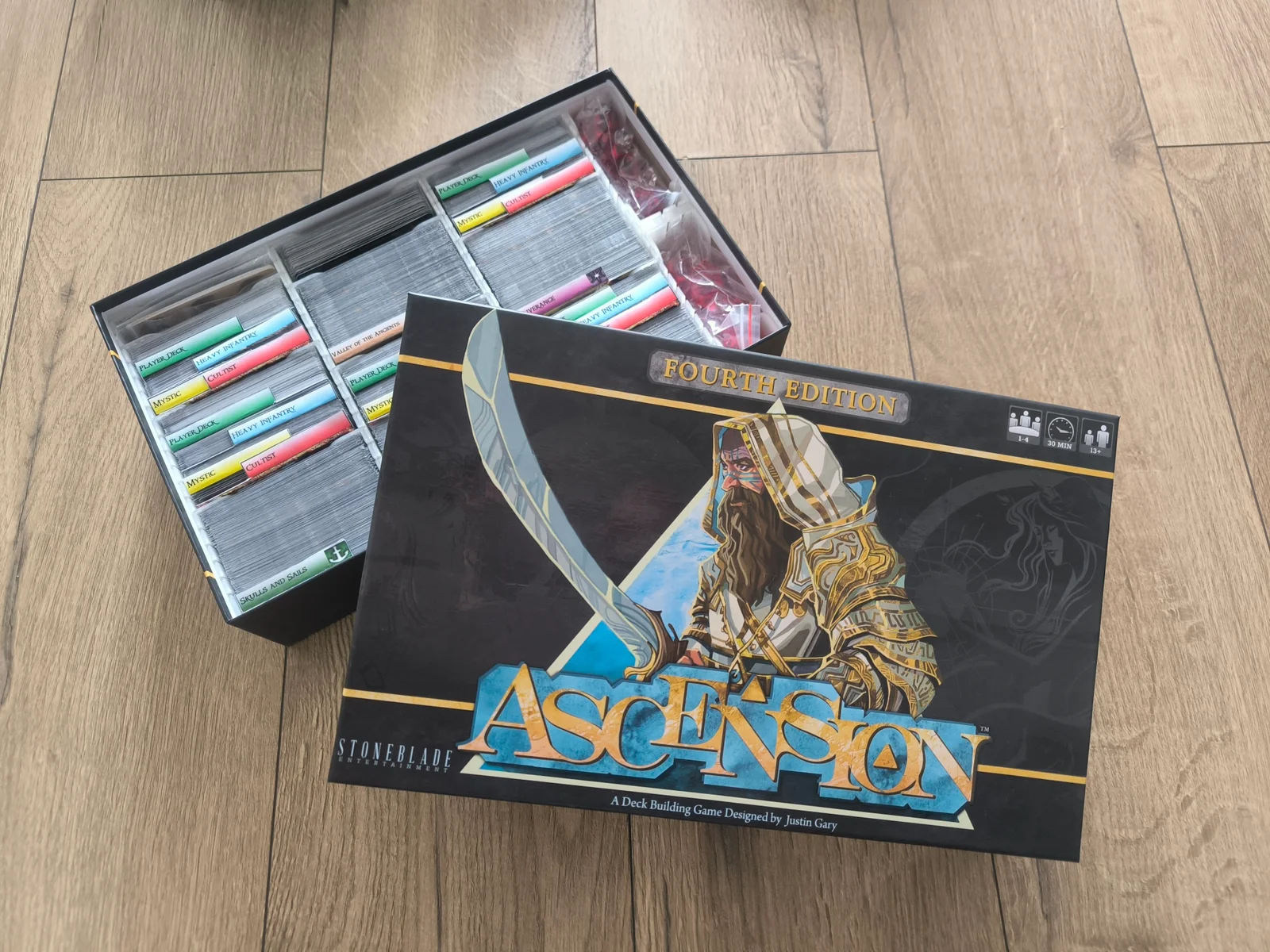
Hi everyone, i created Insert for Ascension Deckbuilding Game, because i could not find one that i would like.
Its made to fit multiple expansions in 2+ boxes.
I have 2 size boxes -
First edition V01 - inside parametrs 33,2cm x 20,5cm x 8cm
Fourth edition V02 - inside parametrs 32,6cm x 20,1cm x 8,4cm
------------------
Print:
Fourth edition V02 (cards)
V02 - Card Tray 01 -3x
V02 - Card Tray Divider -Optional
Chose
V02 - Card Tray 02 -2x + Spacer -1x
or
V02 - Tokens 01 -2x + V02 - Tokens 01 LID -2x
-
Fourth edition V02 (Player Board)
V02 - Tokens Player Bord Box 01 -2x
V02 - Tokens Player Bord Box 01 LID -2x
V02 - Tokens Player Bord Box 02 -3x
V02 - Tokens Player Bord Box 02 LID -3x
-
First edition V01 (cards)
V01 - Card Tray V01 -3x
V01 - Card Tray V01 Divider -Optional
Chose
V02 - Tokens 02 -1x + V01 - Tokens 02 LID -1x + V01 - Tokens 01 LID -1x + V01 - Tokens 01 -1x
or
V01 - Tokens 02 -3x + V01 - Tokens 02 LID -3x
------------------
No supports needed for printing
I Am using thin sleaves (66*90mm)
I have used: The-Boardgame-Insert-Toolkit
I have used: Fusions360 for personal use
------------------
My print setup in Prusa Slicer
Nozzle - 6mm
Layers and perimeters:
Solid Layers - Top = 0; Bottom = 0
Perimeters - 3
Seam position - Aligned
Perimeter generator - Arachne
Infill
Fill density - 40% or 30%
Fill pattern - Cubic
Byrezips_533396Likes52Downloads391

 BybobmakesLikes4.3KDownloads16K

 ByMichaelMike_1463371Likes0Downloads8

 BytjdesignLikes13Downloads94

 Byewr2sanLikes208Downloads817

 BySortirus_659392Likes2Downloads2

 Bysmarzony_1925451Likes0Downloads1

 ByChenAmit_1331561Likes0Downloads0

 ByJoe_84156Likes38Downloads241

 ByShadowLink_29661Likes2Downloads3

 Byclicktoselect_542024Likes2Downloads7

 ByMZ4250Likes147Downloads910