



Hộp Trượt Tham Số Tùy Chỉnh – Giải Pháp Lưu Trữ Thông Minh
 ByRobertoGalloc_356815Likes549Downloads1.8K
Build another version of this model.
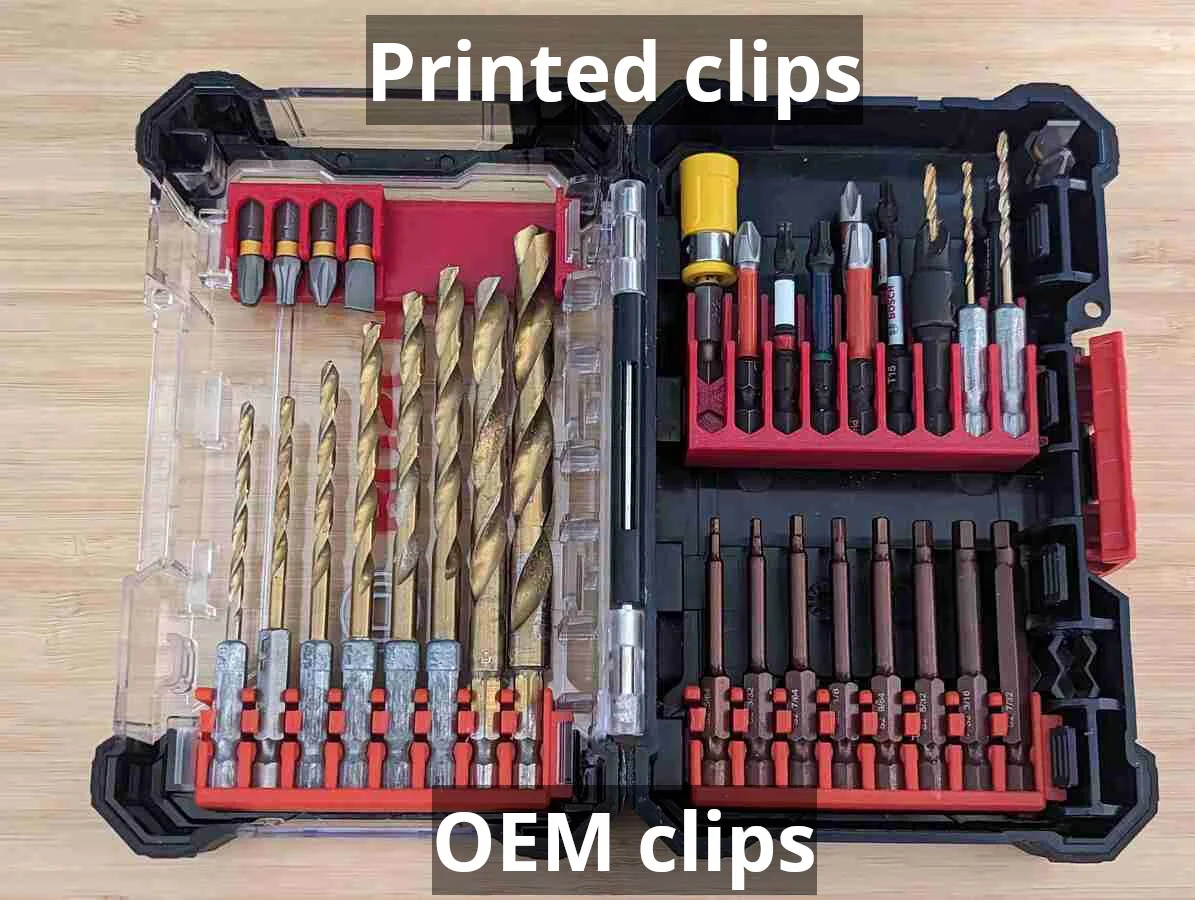
Put the "custom" into your Bosch Custom Case with custom 3D-printed bit clips! These cases have slots for swappable clips of drill and drive bits, but the OEM clips are only available with bits included. Create your own bit clips with this model!
Open custom-case-bits-insert.scad in OpenSCAD, and use the Customizer options to configure your bit clip:
Bit clips print with no supports. Bit slot walls bend slightly when inserting/removing bits, so I like printing my clips using PETG. PLA should also work fine.
Before making this model from scratch, I printed a couple clips using Benjamen Johnson's bit clip model on Thingiverse. His web site has more models for the Bosch Custom Case system, and his Thingiverse page has a variety of useful models for various toolbox systems.
I also have replacement latches for Bosch Custom Case / Pick and Click cases!
ByRobertoGalloc_356815Likes549Downloads1.8K

 ByVC_DesignLikes721Downloads2.9K

 ByUpcrid3D_1585693Likes808Downloads2.1K

 ByWilko_SLOLikes935Downloads2K

 ByTater_364200Likes486Downloads1.6K

 ByfifindrLikes709Downloads1.7K

 Bywhilex_1739192Likes644Downloads1.1K

 ByGi_TLikes801Downloads1.3K

 ByzeroflowLikes186Downloads1.2K

 ByMatthew_GhostLikes350Downloads939

 ByNightmareart_1489516Likes3Downloads191

 ByZED4EverLikes313Downloads5.2K