



Còi Tàu Hơi Nước Mini
 ByfifindrLikes500Downloads4K
Build another version of this model.
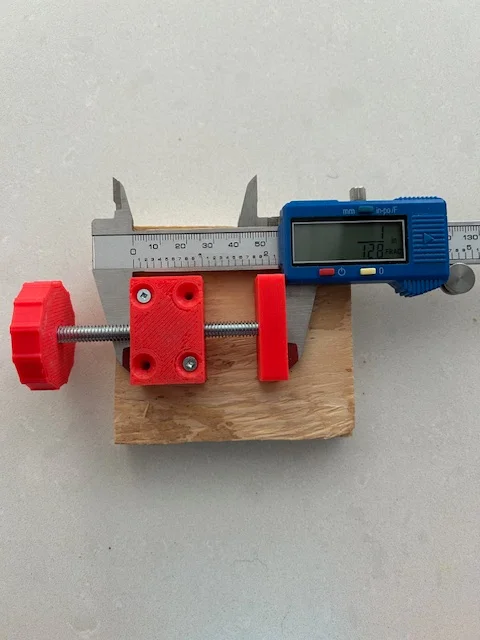
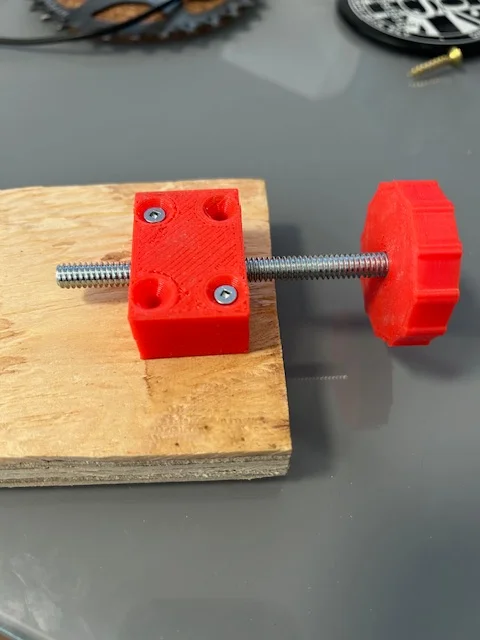
Very simple micro adjuster that can be set either loose or tight. Each full rotation moves the micro-adjuster screw 1/20th of an inch.
I needed a micro-adjuster for some router and lathe jigs I'm making. I had some spare ¼" bolts and nuts, and a bunch of 3d knob designs that also fit ¼" hardware, so …
You can use pretty much any ¼" hex head or carriage bolt more than 1" long. Just select an appropriate knob from the models
The attachment holes on the body are sized for #6 screws or bolts.
The minimum print is a body top, body bottom and your choice of one knob. An end stop is optional.
Using two embedded nuts allows you to adjust the tightness of the screw. First, attach a knob to the bolt of your choice. Then, insert the ¼" bolt of your choice into two ¼" nuts:
Turn the nuts to position them so that they will both slot into the micro-adjuster body (you can use either the top or bottom piece of the body).
The fit is precise. You will need to align the bolts with the slots in the body carefully, oriented so that an edge points down into the body:
However, there is enough play such that turning either nut 60 degrees (so that adjacent faces come into the same plane) is enough to tighten or loosen the friction fit of the bolt.
This allows you to adjust the tightness of the jig. I recommend marking the bolt faces so that that you can re-find the precise position. I used a sharpie / permanent marker to mark one face T (for tight) and the adjacent face L (for loose).
Once you have the desired friction fit, you can enclose the nuts and bolt using the other half of the body.
ByfifindrLikes500Downloads4K

 ByVC_DesignLikes679Downloads3.6K

 ByDan Schwartz SchwartzLikes744Downloads3.4K

 Bychubbs8697_2027893Likes585Downloads1.7K

 Byquibeck_3353173Likes965Downloads1.9K

 ByRungeKuttaLikes229Downloads1.2K

 ByEadubsLikes228Downloads1.3K

 ByWolf_115355Likes513Downloads8.4K

 ByJeremyVillalo_760366Likes68Downloads764

 ByZED4EverLikes313Downloads5.2K

 Bykjus_448782Likes314Downloads673

 BySchmitzBertLikes95Downloads627