



Steam Machine Companion Cube / Vỏ đựng Weighted Storage Cube
 ByJaronLikes310Downloads1K
Remix of Mainboard Framework v2 (kèm file FreeCAD và STEP) By ManelTo
Build another version of this model.
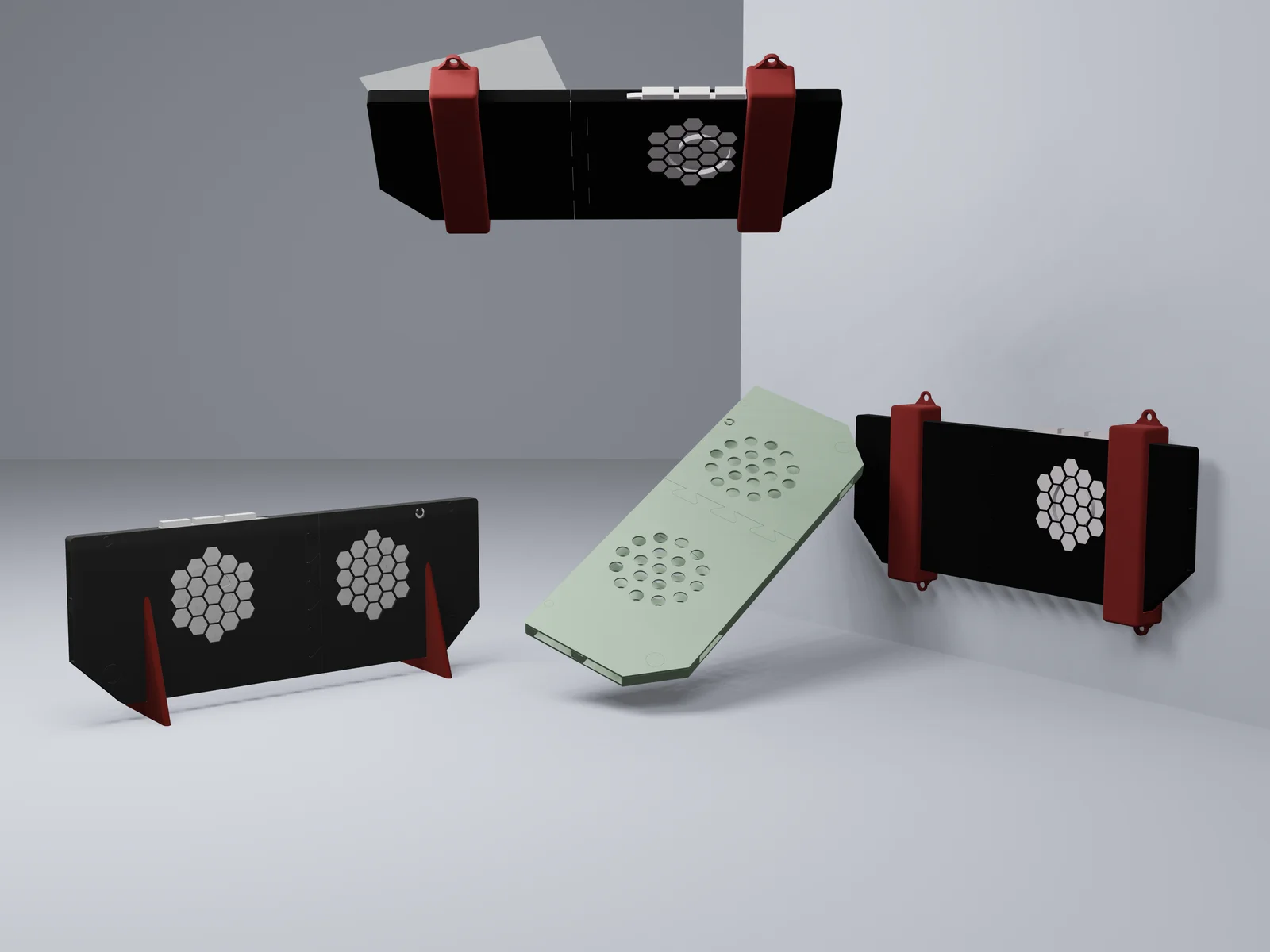
This collection features some of the best Framework accessories, redesigned for easier use, printing, and customization. Inspired by Framework’s original dimensions, each part has been carefully modelled to bring everything you need into one convenient package. If you have any ideas for other designs simply leave a comment and I will design and publish it
The parts are designed to be straightforward to print and assemble, with sturdy press-fit joints and compact pieces that can be printed on most 3D printers with a build area of at least 175mm x 100mm. Whether you’re a seasoned maker or just getting started, these accessories are made to be user-friendly and reliable.
Below, you’ll find a complete list of the parts included, along with clear instructions to help you print and assemble them.
The cases are the centrepiece of this model, designed to provide full access to all ports, including slots for Wi-Fi chips, expansion cards, and other key components. They are also optimized for airflow, featuring evenly spaced openings over the fan and main components. These openings are available in circular and hexagonal patterns, but if you’d like additional or custom designs, feel free to leave a comment, and I can create one for you. Alternatively, you can download the included STEP file to modify the design yourself.
For best results, print the case in a durable, heat-resistant material like PETG, as the airflow from the mainboard can reach up to 60°C under heavy use. While PLA may work as we have made generous vent openings should help manage heat effectively but PETG is highly recommended.
Suggested print settings:
To assemble the case:
Enjoy a sleek, functional case with excellent airflow and full port accessibility!
This collection includes three types of stands: Vertical and Multi Mount, each designed to suit different setups while maintaining full airflow and port accessibility.
Vertical Mount:
A simple and efficient design to hold your case upright. It ensures stability without blocking any ports or restricting airflow. It’s recommended to print two stands, but you can print more if needed. Assembly is as simple as sliding the stand onto your case.
Multi Mount:
This mount secures your mainboard underneath or against any surface that can accommodate screws. It fully supports your case while maintaining airflow and leaving ports accessible. To assemble, slide the stand over your case and use the 5mm holes provided to screw it into place.
With these stands, you can set up your mainboard in a way that fits your workspace while keeping everything accessible and ventilated.
ByJaronLikes310Downloads1K

 Byw3rN42Likes127Downloads930

 ByJwidessLikes34Downloads372

 ByckthLikes148Downloads2.4K

 Byjodinskylab_3390035Likes144Downloads162

 ByTomDDLikes89Downloads573

 ByBroBuilds3D_4455044Likes32Downloads451

 ByVikingptty_1943738Likes50Downloads228

 ByBrokentooth_designsLikes30Downloads223

 ByJKMCZLikes11Downloads174

 ByftoerringLikes79Downloads181

 ByFosphorLikes20Downloads233