


Mô hình nến cột sống - Trang trí Halloween
 ByFlorianProchn_367378Likes180Downloads539
Build another version of this model.
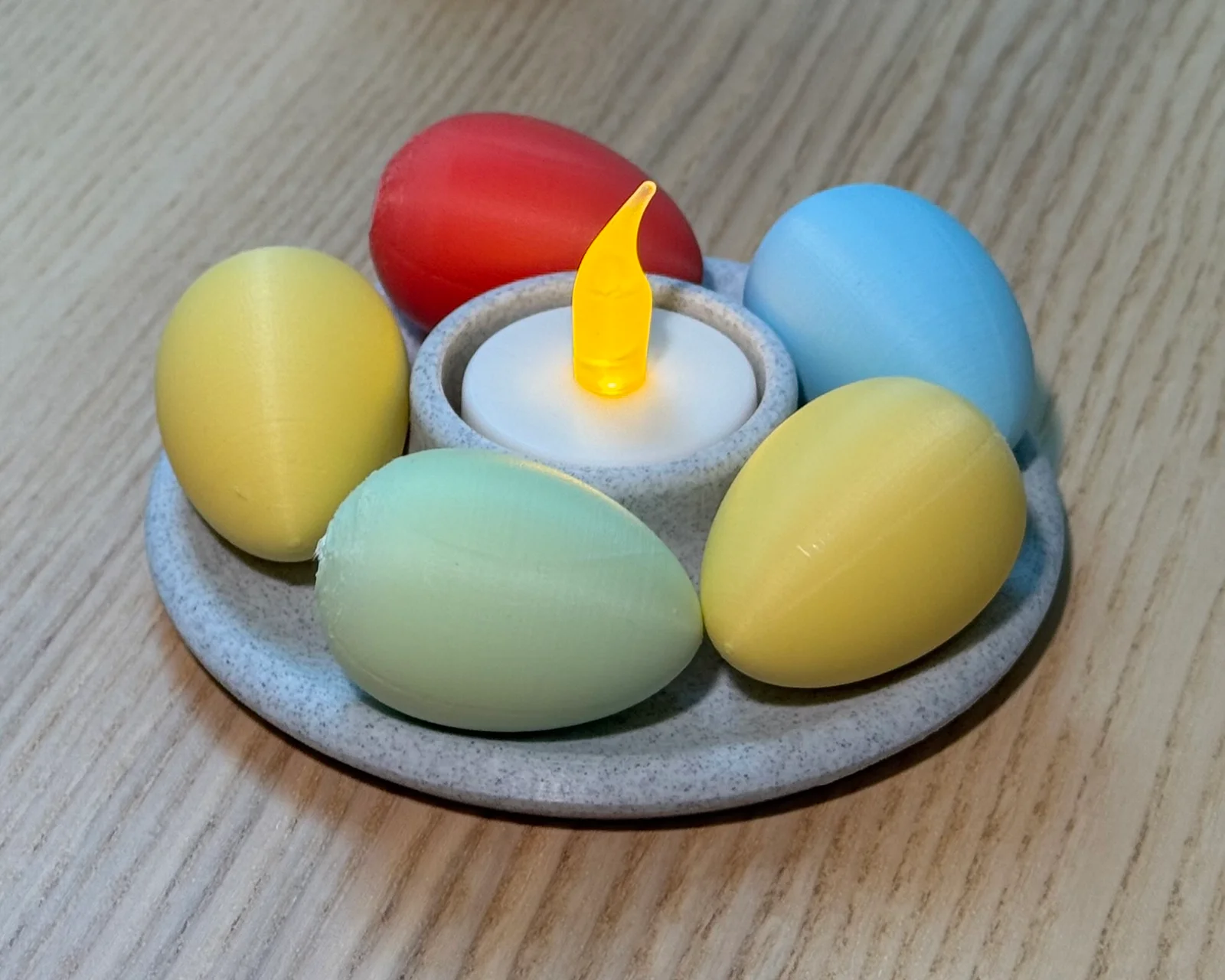
Celebrate Easter with this festive, fully parametric LED candle holder!
Designed to fit any light—whether a tealight, stick candle, or anything in between—this model brings cozy illumination to your space with a seasonal twist.
The base features a subtle groove intended to hold small decorative Easter eggs, perfect for adding pops of pastel color like green, red, yellow, and blue.
Ideal for centerpieces, shelves, or holiday displays, this print blends clean design with cheerful Easter charm.
⚠ FOR LED CANDLES ONLY – real flames can melt or ignite plastic.
.f3d file with editable parametersJust load up the included .f3d file in Autodesk Fusion 360, change the parameters according to your needs.
I have prepared a few bases for candles, feel free to let me know if you help with a specific size.
Parameters
You find the parameters in the “Modify” dropdown in the toolbar, then select “Change parameter” in the bottom. Then change the value in the “Expression” column, click “OK” and the model updates after a few seconds, export a new **.stl** file and happy printing
Model is optimized for printing, no need for supports or brims.
I recommend a high number of top layers for best surface finish.
Material
Any material will do
Nozzle
Any size, my makes are 0.4mm
Layer height
Any, recommend as small as possible for best surface finish
Perimeters
3
Shell
Top: ≥4
Bottom: ≥2
Infill
Recommend ≥15% for weight and better surface finish.
Gyroid seem like a good choice here.
Disable “Automatic infill combination”, for me, it caused some poor top surface in combination with Gyroid infill, results may vary.
Brim
No
Support
No
Speed
Medium to fast
Options
Enable “Avoid crossing perimeters”
Print the egg with the pointy end upwards, enable supports for stabilizing. I adjusted the infill to aim for about 10g, which seemed like a good weight and feel.
Material
Any material will do
Nozzle
Any size, my makes are 0.4mm
Layer height
Any, recommend as small as possible for best surface finish
Perimeters
3
Shell
Top: 3
Bottom: 3
Infill
Any infill will do, I adjusted this to get the desired weight
Brim
No
Support
Yes, organic, enable “Support on build plate only”
Speed
Medium to slow
Options
Enable “Avoid crossing perimeters”
Enable “Automatic infill combination”
ByFlorianProchn_367378Likes180Downloads539

 ByMaxTLikes527Downloads1.7K

 ByJasonBurnham_646776Likes163Downloads980

 ByCraftswomanczLikes3.8KDownloads15.7K

 ByKamilWiniszew_352975Likes282Downloads1.4K

 ByCriticalp_3D_1869193Likes12Downloads55

 ByCrazy3DLikes321Downloads1.1K

 ByERiK004Likes185Downloads1K

 ByMadMaxLikes185Downloads793

 Bybij910Likes10Downloads36

 ByAmalthea_559742Likes125Downloads953

 Byxfer8_273624Likes323Downloads682