
Large file collection Máy In 3D
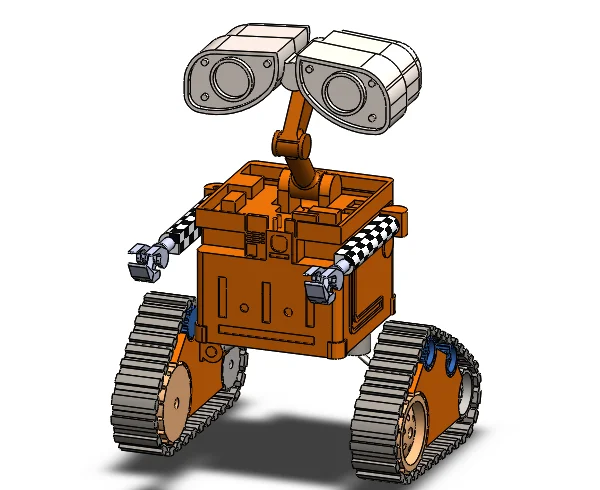
Robot Wall E (WALL-E) - Mô hình SolidWorks
- Downloads
- 123
- Likes
- 8
- Views
- 1,060
- Remixes
- 0
- Comments
- 0
Files 35 4.4 MB
- Wall_E_Robot_1777015241.SLDASMSLDASM · 1.7 MB
- Wall_E_Robot_stl_file_-_Hand_2-1_1777015242.STLSTL · 26.5 KB
- Wall_E_Robot_stl_file_-_Hand_1-5_1777015243.STLSTL · 46.5 KB
- Wall_E_Robot_stl_file_-_face_leg_2-1_1777015244.STLSTL · 177.2 KB
Make a variant with AI
Build another version of this model.
Details
- Model ID
- #333545
- Category
- Máy In 3D
- Published
- License
- Creative Commons — Public Domain
Description
Conceptualization and Planning:
- Gather reference images and dimensions of WALL-E to understand the proportions and details.
- Plan the assembly structure, identifying major components like the body, head, arms, tracks, and various mechanical details.
Part Modeling:
- Body: Start by designing the main chassis, ensuring it has the right shape and proportions.
- Head: Model the head with its distinctive binocular eyes, paying attention to the curvature and detailing.
- Arms and Hands: Create articulated arms with joints and hands that can hold objects, ensuring they have realistic movement.
- Tracks: Design the track system with individual links, wheels, and suspension details.
Assembly:
- Import individual parts into an assembly file.
- Use mates and constraints to position and connect parts accurately, allowing for realistic movement.
- Test the articulation of arms, head rotation, and track movement to ensure functionality.
Print spec
- Formats
- sldasmstl
- Model files
- 35
- Total size
- 4.4 MB
- Largest file
- 1.7 MB