


Thùng rác in Vase Mode
 BybobmakesLikes2.5KDownloads17.5K
Remix of Thẻ Tên Vòng Cổ Cho Thú Cưng By Sm_4739
Build another version of this model.
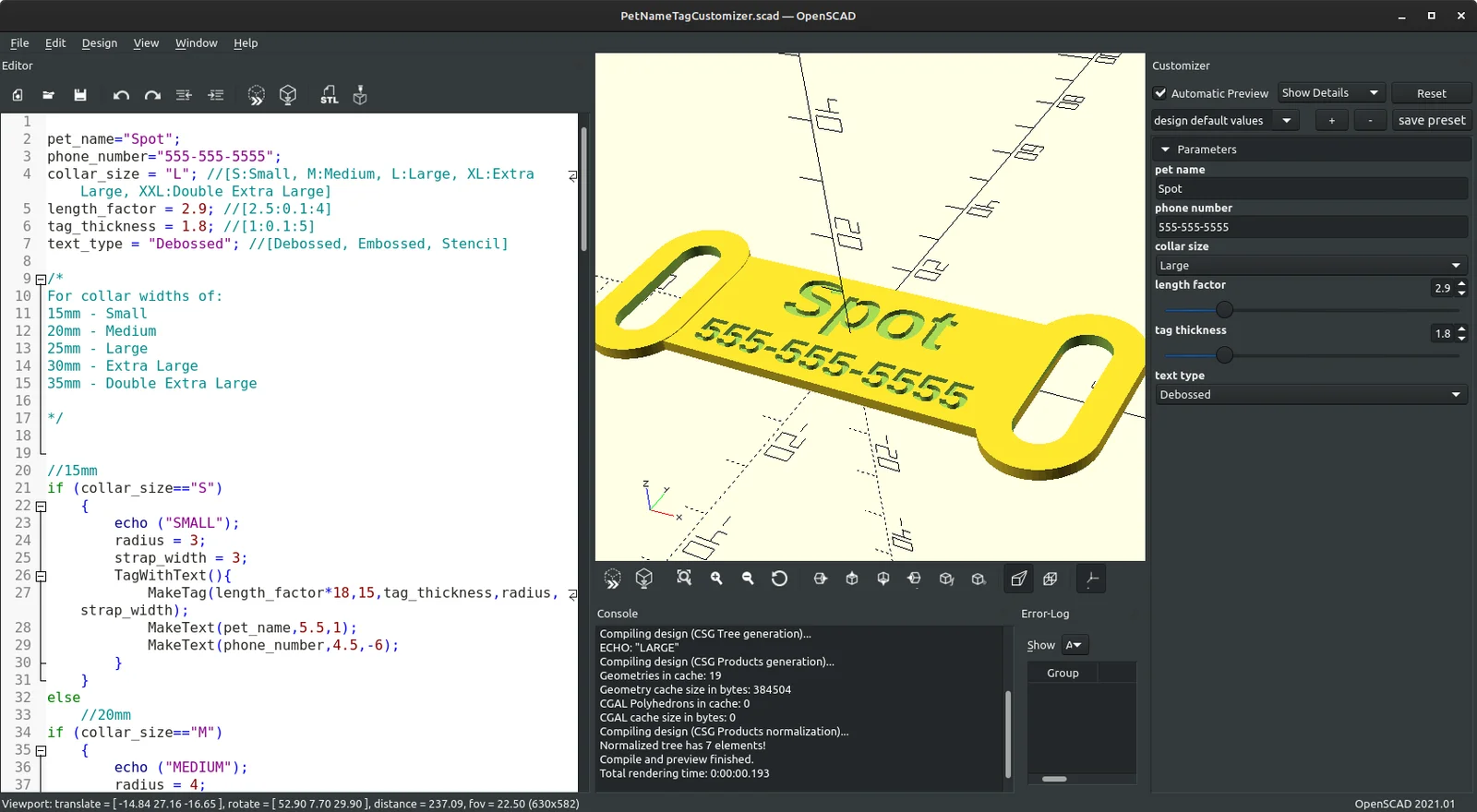
I remixed (or maybe forked?) the customizable Pet Name Tag https://www.printables.com/model/438922-pet-collar-tag/files by https://www.printables.com/@Sm_4739. In addition to embossed text I added options for debossed (engraved) text and stenciled text.
To use this model first you must install OpenSCAD .
OpenSCAD is a scripted CAD program that is free, open source, and runs on most operating systems.
Don't worry you won't have to learn how to script or CAD! Simply open the .scad file and use the customizer to make your .stl. The Customizer window should appear on the right hand side after you open PetNameTagCustomizer.scad with OpenSCAD. If it's not there, click on “Window” at the top and then “Customizer” in the drop-down menu. Click on the “Parameters” tab to see all the values you can adjust. Type in the name of your pet, your phone number, and select the Size and Text Type that you want. Adjust the Length Factor and Tag Thickness to suit your taste and then press F6 to render and then F7 to export your .stl.
If you want to use the Stencil option you will need to use a stencil font. I used the Stardos Stencil font available here: https://fonts.google.com/specimen/Stardos+Stencil
You will need to install this font and restart OpenSCAD to use the Stencil option. If you wish to use a different font you will need to change the font assignment lines at the very end of the script. Some information on using fonts in OpenSCAD can be found here: https://en.wikibooks.org/wiki/OpenSCAD_User_Manual/Text#Using_Fonts_&_Styles
You will probably want to print the .stl in a flexible filament like TPU. If you have more than one color of flexible filament you can insert a color change above the Tag Thickness height for embossed text or above half the Tag Thickness height for debossed. Text should be very visible even with one color especially if you use the stencil option.
BybobmakesLikes2.5KDownloads17.5K

 Byquibeck_3353173Likes1.5KDownloads11.5K

 Bym-collectableLikes0Downloads3.9K

 ByJackLikes145Downloads762

 ByTommy3DLab_2023125Likes636Downloads2.5K

 Bymoleculecrtr_1215658Likes544Downloads2K

 By178222178222_2484344Likes449Downloads1.7K

 ByEldordLikes499Downloads1.4K

 ByowlartLikes107Downloads203

 ByVaclav_ZahradkaLikes181Downloads1.2K

 ByStuart800_1278696Likes77Downloads231

 Bytjfenwick_306961Likes385Downloads1K