



Mô hình 3D dao Karambit CS:GO
 Bybonzai000Likes716Downloads16.8K
Build another version of this model.
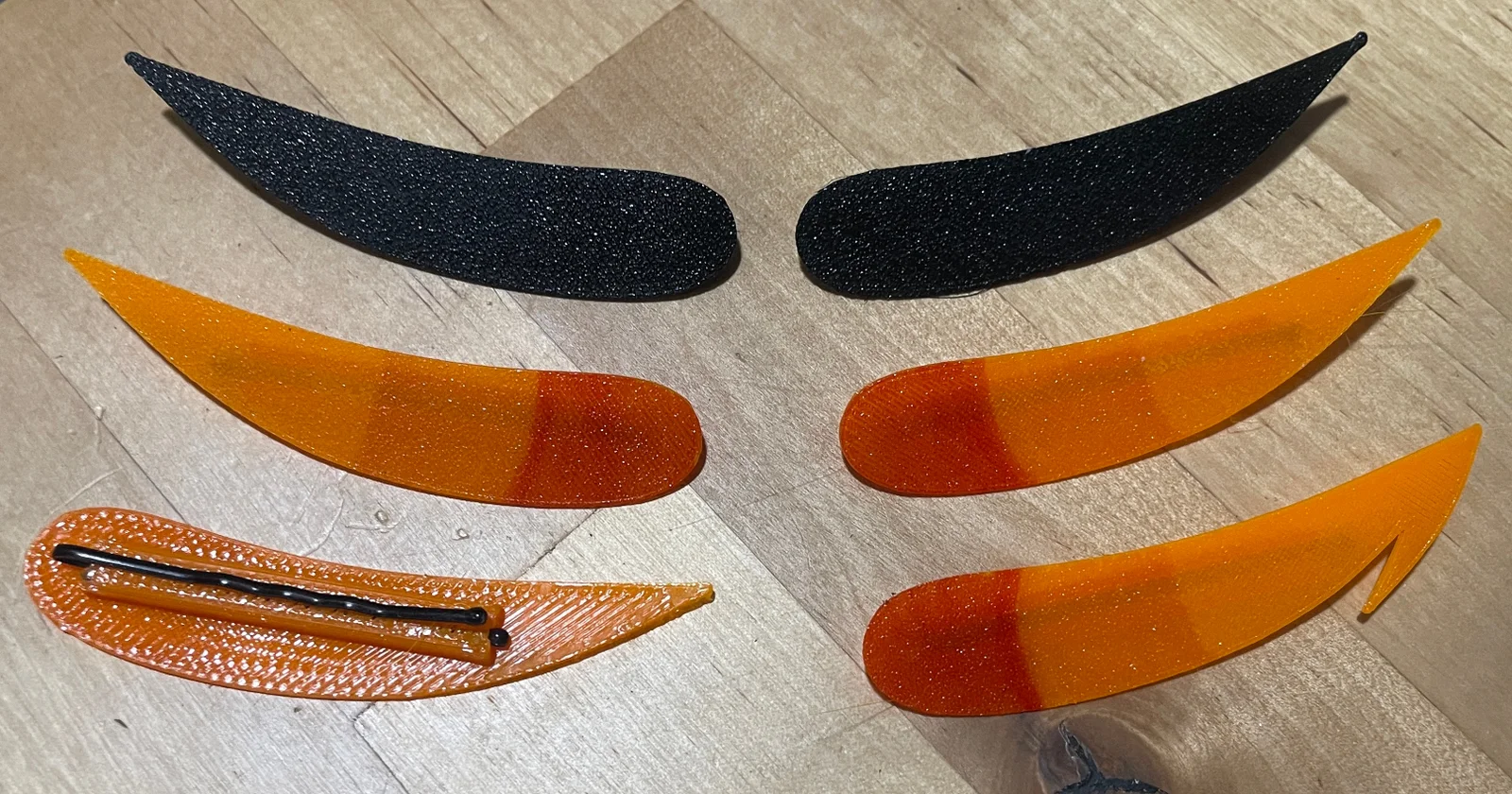
Hair pins designed loosely after troll horns from Homestuck, as you may be able to infer from the preview photo. Includes a plain version and a hooked one for those who prefer that (I would have also made other ones but ran out of time, the Blender file is included if you wish to remix these)
Probably also useable as generic devil horn-style pins, just don't print them in bright orange. See my black test versions for refrance
(I may or may not have made these as a highly specific form of procrastination, hence running out of time)
Calling it assembly is kind of pushing it, all you need to do is jam a bobby pin into the channel on the back. Colours you can do in whatever way you prefer; best results can probably be had with an AMS or toolchanger, but I did mine by just printing them in Devil Design's orange PETG and colouring in the darker bits with sharpies. Specifically, reddish orange for the base, and yellow for the middle as apparently that somehow darkens the orange slightly
For those wishing to remix these, they are modeled by taking a plane and applying a subdivision surface modifier to it, smoothing it out. Under Advanced, "Use Creases" is checked, and pointy vertices like the tip are given a 1.0 vertex crease (Ctrl+V with the vertex selected) in order to keep the subsurf from rounding them over. Then, the vertices of the plane are arranged in edit mode, mostly freehanding it, until the desired shape is reached
Additions to the plain horn, like the hook, are done by modeling a similar plane overlapped with the plain horn and adding a Boolean modifier to the plain horn plane in Union mode
All planes are also given a Solidify modifier to give them some volume, in my case set to 50cm thickness which due to Blender's unit scaling translates to 0.5mm. Depending on your material of choice you may want to increase this to 1mm, or 1m in Blender
Bybonzai000Likes716Downloads16.8K

 Bypokon_nurdspaceLikes429Downloads1.8K

 ByDC_8576Likes454Downloads1.8K

 Bysuspicious-scoobyLikes0Downloads160

 Byjorge-cano-gorrachateguiLikes0Downloads409

 ByFotisMintLikes340Downloads2.5K

 ByjaztermarealLikes127Downloads458

 ByJasonMastersLikes52Downloads529

 BytheStonefoxLikes111Downloads206

 BydaklLikes0Downloads136

 Bymagic-3d-printingLikes0Downloads452

 Byondrus-czLikes0Downloads264