




Kẹp giữ sợi Filament
 Bytinx_1344834Likes1.2KDownloads6K
Remix of Giá đỡ Camera Nebula Trục X cho Ender 3 V3 KE By AleMaker3d
Build another version of this model.
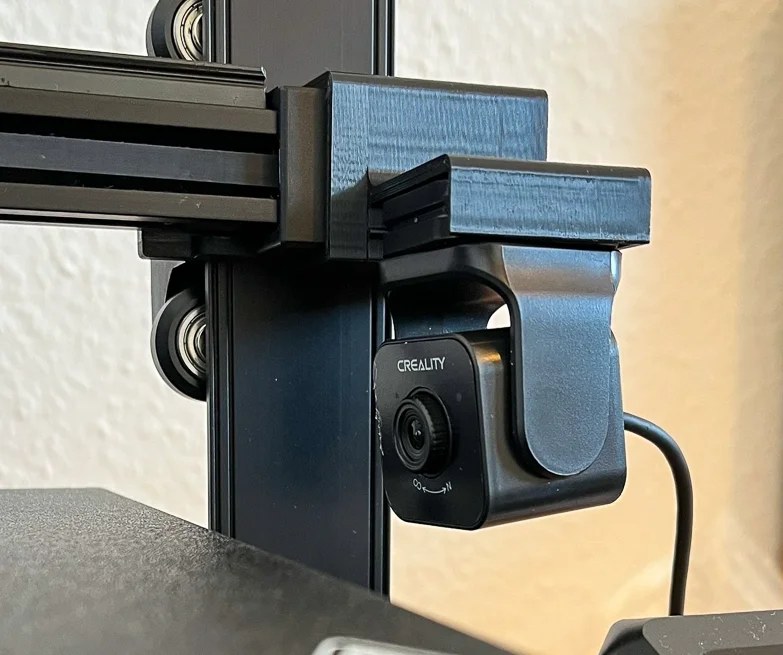
Want to see your Ender 3 V3 KE prints growing and rising up with the Creality Nebula camera? Then you'll need the z-axis mount that moves up while printing! Always have the best lookout on your print!
With this camera clip for the Ender 3 V3 KE, the camera will always show the print head, moves up while printing and have the nozzle visible at all times! Attach it, remove it. It just clips on and stays on - also while printing circular infills 🙃
The camera is placed in such a way, that it won't collide with the print head!
The camera clip will just snap on the X-axis and this updated version designed in such a way, that the print head will not collide or bump into the camera, even when tilted. Attach or remove the clip when needed. No tools needed.
Installation: Slide the camera in until the end and then turn the camera around that the creality name is readable and above the lens. This way, the image is shown correct.
Tip: For extra stickyness of the clip on the axis, or if your printer tolerances don't fit (or if you don't want to remove it for a long while), put a small piece of thin double-sided tape on one inner wall. Use the wall facing the camera clip for the tape. Remember: use tape on the clip that mount to the axis - not the camera!
Best print settings:
Check before printing: print just a piece of the bottom to check if your printer matches the measurements and tolerances before printing the whole object (use negative objects to exclude the upper part). If it is too lose, shrink it a tiny tiny bit - or otherway around, if it does not fit all.
Based on and thanks to Alehandoro VR for the original idea: Nebula Camera Mount in X Axis for Ender 3 V3 KE
Bytinx_1344834Likes1.2KDownloads6K

 ByGeek5DLikes147Downloads491

 Byprusa-researchLikes0Downloads2.7K

 Bydet-manLikes0Downloads176

 Bygummiegecko8477Likes0Downloads168

 Bychukwufumnanya-arinzechukwuLikes0Downloads153

 BydalleLikes0Downloads151

 ByBrokentooth_designsLikes17Downloads159

 BynasikLikes0Downloads123

 Byarhi_585078Likes64Downloads547

 ByHanzo3dLikes155Downloads417

 BydarienLikes0Downloads1K