



Fortnite Pirate Shop Token
 Bylarp3dLikes0Downloads1.4K
Build another version of this model.
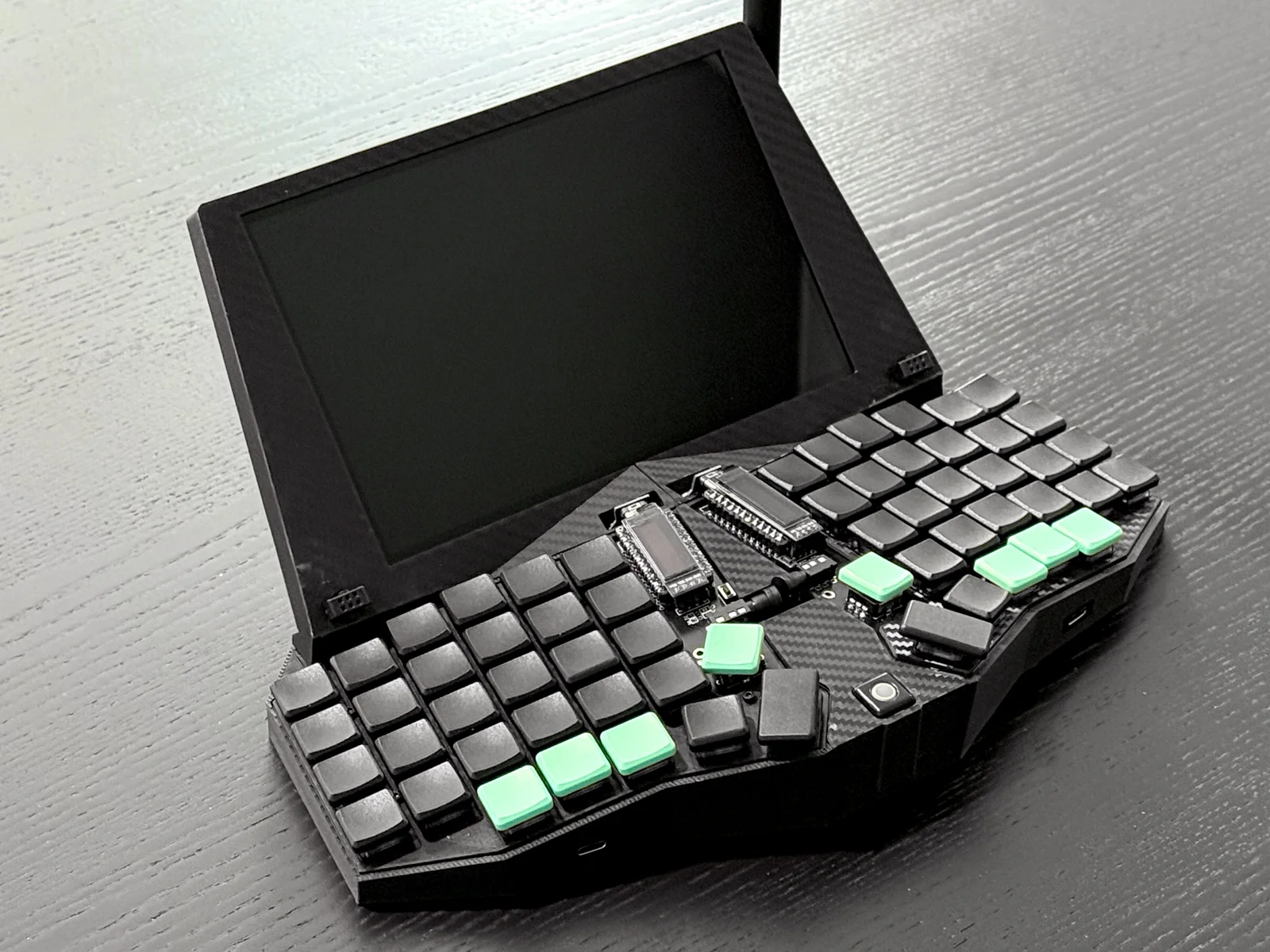
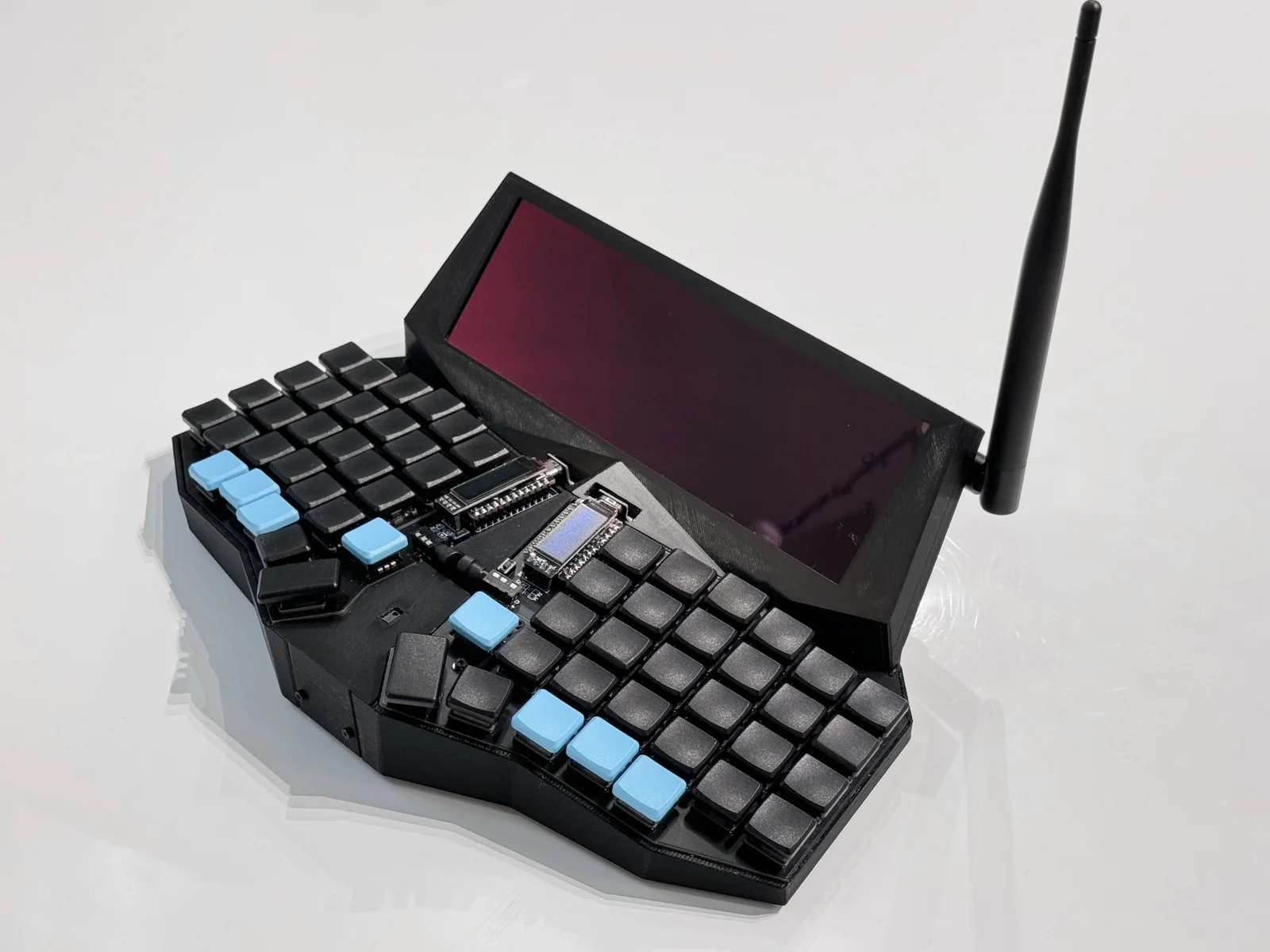
The vecdec is a versatile ergonomic computing device built in the style of a cyberdeck around a split ergonomic mechanical keyboard. It was created because a laptop with this split keyboard or any split keyboard, did not exist. The vecdec in computing form uses relatively low power and is easily expandable with areas for mounting breakout boards internally and SAO ports externally. It can also be used as an external keyboard.
versatile ergonomic computing device
vecdec 1.1, with larger screen, trackball, USB and SAO ports and retaining meshtastic radio
vecdec 1.0, highly portable Pi-based cyberdeck with split keyboard and meshtastic radio
This is the first release with a compact candybar screen and gesture sensor. After using it quite a bit for almost a year, it's great for note taking, light hacking and dev work, aided greatly by i3wm. Web browsing is good enough, but video is not ideal given the proliferation of vertical video. The Anker external USB battery pack is more than sufficient for hours of note taking. A case sleeve ensures it is easy to slip in and out of a backpack.
Hackaday features an excellent write-up on this version, thanks to Tom Nardi: The Vecdec Cyberdeck Is More Than A Pretty Case
This release includes a bigger screen to help address the drawbacks of 1.0's screen resolution. The gesture sensor was replaced with a small trackball and text selection is now more precise than using the touchscreen. For meshtastic, the sx1262 hat was replaced in favor of the MeshAdv mini hat. MeshAdv mini has the E22 chip, GPS and Qwiic connectors.
Two SAO ports were added, which can be used to daisy chain external i2c breakouts for rapid prototyping, or of course, for SAOs. These are easier to connect thanks to a tiny Qwiic SAO board or if using the MeshAdv hat, directly from the hat.
The keyboard tray was revised, and the keyboard now sits on rubber isolators similar to those used on UAVs, quieting the typing experience. The isolators required the trays to be a few mm deeper. The trays now have provisions for 4 USB ports since the Pi's ports are now concealed. One port is connected to the left keyboard half enabling use as an external keyboard. The three remaining are connected to the Pi with DIY USB ribbon cables and connectors.
To connect the vecdec as an external keyboard, the top left most USB port is used. To use it as a standalone cyberdeck, power is supplied to a rear USB-C port.
Spec
Version
Split keyboard (sofle choc)
all
LoRa radio (meshtastic)
all
3d printable on 250mm x 210mm bed
all
400x1280 screen
all
1280x800 screen
1.1
SAO ports with i2c (2x)
1.1
Trackball
1.1
i2c hub
1.1
Front USB ports (2x)
1.1
Side USB ports (2x)
1.1
Rubber keyboard isolation
1.1
400x1280 screen
1.0
Gesture sensor
1.0
part
description
link
SAO adapter
Created a custom SAO adapter for connecting to Pi i2c bus, KiCad files in repo. Does not support full SAO v1.69bis spec, but has 3.3v, GND, i2c.
i2c hub
Qwiic hub for connecting i2c devices.
https://www.adafruit.com/product/5625
LoRa hat
LoRa radio hat for use with meshtastic. v1.0 used the sx1262 based board from waveshare, and while Adafruit's hat also works, the MeshAdv hat is the most fully featured and supported. The i2c qwiic connectors are also convenient.
https://github.com/chrismyers2000/MeshAdv-Mini
u.FL to SMA connector
Minimal length required, approx 6"
u.FL to SMA connector
915mHz antenna
Right angle antenna, can use antenna with up to 20mm thumb screw, which is most
PAJ7620U2 (HiLetgo)
Gesture sensor, HiLetgo version used. Others may need modification.
https://www.amazon.com/HiLetgo-PAJ7620U2-Recognition-Detection-Recognize/
Trackball breakout (Pimoroni)
i2c trackball with RGBW LED, x/y and click
https://shop.pimoroni.com/products/trackball-breakout
4 pin JST M+F connector
Any 4 pin connector is suitable, 1' in length for use in connecting the gesture sensor to sx1262 hat.
Waveshare 7.9" 400x1280 touchscreen
Included instructions need updates, see below for modifications
https://www.waveshare.com/7.9inch-HDMI-LCD.htm
Waveshare 8" 1280x800 touchscreen
Included instructions need updates, see below for modifications
https://www.waveshare.com/product/displays/lcd-oled/lcd-oled-1/8inch-dsi-lcd-c.htm
Right angle USB-C adapter
These vary slightly, the STL was designed for use with the linked version
https://www.amazon.com/AuviPal-Adapter-Connector-Extender-MacBook/dp/B0BNMDRWR6/
Anker 733 Power Bank (GaNPrime PowerCore 65W)
Components as listed need a 5v 3a power supply, the Anker works very well
https://www.anker.com/products/a1651
DIY USB-C to USB-A cable
.5m in length is sufficient, most available DIY connectors should work, but may require modifications to STL on USB-C side
https://www.amazon.com/ChenYang-Type-C-Upward-Angled-Degree/dp/B096YCP762/
Raspberry Pi 4
Best to use with a heatsink, no fan required with this configuration
2mm heatset nutserts
4x for securing back shell to screen bezel, 2x for front plate
M2x10 hex head fastener
Use with above heatset nutserts, 6x
4mm heatset nutserts
2x for securing screen bezel to keyboard trays
M4x12 hex head fasteners
Use with above heatset nutserts, 2x
Rubber feet
STL holes are 5mm. Feet are marketed as glass table top bumpers. Optionally secure with CA glue. These have been omitted from 1.1 and unless are extra shallow, will not fit in the case.
https://www.amazon.com/Bumpers-Grippers-Adhesive-Furniture-Cabinet/dp/B0CL9Y6BJF/
USB C female to USB A female
Adds USB-C port to keyboard half for an easier connection to an external device
https://www.amazon.com/Duttek-Adapter-Female-Connector-Compatible/dp/B08JHYKF3T
M2 rubber standoffs
Acoustic isolation that dampens the case sounds when clicked
https://www.amazon.com/FPVDrone-Anti-Vibration-Mounting-Standoffs-Controller/dp/B07RZSX647/
The parts below are deviations from Brian Low's build guide.
part
description
link
sofle choc RGB v2
open source split ergonomic keyboard
https://brianlow.notion.site/Sofle-Choc-Build-Guide-c4bbbaece6e746f7a5956842af567e79
ec12 rotary encoder (8.5mm shaft length) part # EC12E1220301
lower profile than the EC11, but loses the click. Press in the MBK keycap for a mechanical fit, but secure with cyanoacrylate (super) glue. Alternatively, use a knob.
https://www.digikey.com/en/products/detail/alps-alpine/EC12E1220301/21721660
Pro Micro (Elite-C) microcontroller
Can use a cheaper microcontroller but will likely have to modify the STL slightly
https://www.diykeyboards.com/parts/electronics/product/elite-c
female headers 2.54mm
These are lower profile and allow the Elite-C to sit slightly closer to the board
male pins 10x.6mm
These thin pins are commonly used to connect LED strips and are the correct diameter for the low profile headers. The pins need to be removed with pliers. Place layer of painters tape above female headers, insert pins, place microcontroller on top, solder, then clip pin excess from top of microcontroller
https://www.amazon.com/50pcs-Black-Connector-Clutch-Adapter/dp/B074CDLB2H/
TRRS audio cable
Ultra low profile right angle
https://www.amazon.com/Riipoo-3-5mm-AUX-Audio-Cable/dp/B07429HJRJ/
Print with the following flat surfaces facing down on the build plate: screen bezel face, keyboard bottom, veneers, top of back shell.
The only part requiring supports is the back shell, but the screen bezel optionally can use supports at the cable pass through. Tree/organic supports work well.
Secure the keyboard trays and screen bezel with heatset nutserts and hex head screws
Tolerance on some parts might need adjustment depending on the filament and printer used
Secure thin veneer pieces with cyanoacrylate glue
The entire software side of the vecdec is documented at https://github.com/svenscore/vecdec
Bylarp3dLikes0Downloads1.4K

 ByJaronLikes310Downloads1K

 Byw3rN42Likes127Downloads940

 ByTomDDLikes89Downloads583

 ByJwidessLikes34Downloads381

 ByBroBuilds3D_4455044Likes32Downloads460

 ByckthLikes148Downloads2.4K

 Bynexgen-3d-printingLikes0Downloads397

 ByVikingptty_1943738Likes50Downloads236

 By3dwakeLikes0Downloads368

 ByBrokentooth_designsLikes30Downloads230

 Byslava-kuzminLikes0Downloads291