




Pocket Memory — SD & microSD Case | Print in Place
 By3dwakeLikes0Downloads366
Build another version of this model.
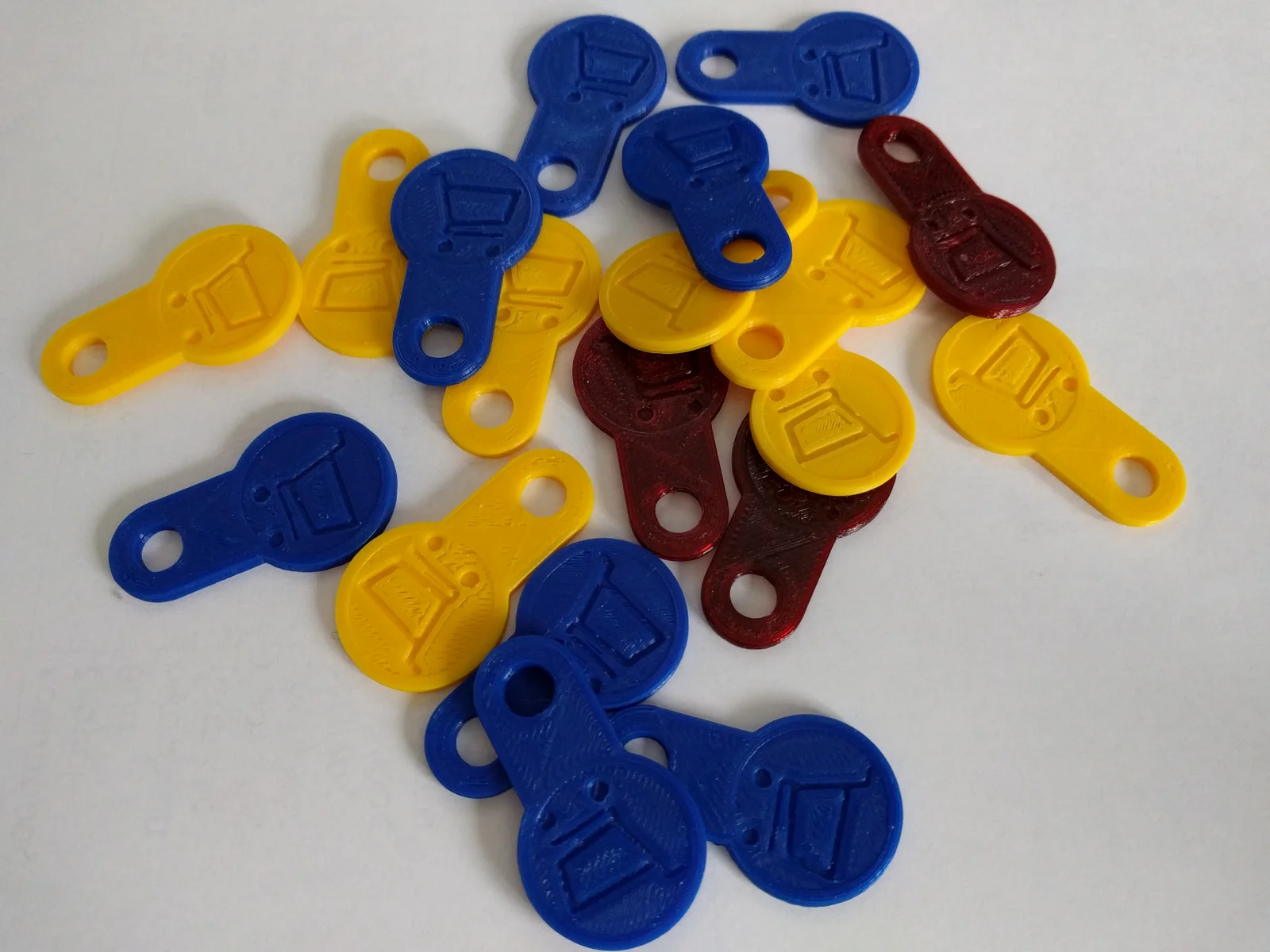
Print and keep one of these in your keychain. While at your favorite supermarket, use this to release a shopping cart/trolley. Pull it back and put again in your pocket. Happy shopping !
This is my favorite print to hand out to friends and loved ones to advocate 3d printers. It prints fast with no special settings in any material PLA, ABS, PETG, all work great.
I offer two parts,
- etched troley logo
- 2nd color trolley logo
To print in two colors I like to choose Multimaterial Painting from the slicer, use the “smart fill” and click on the parts of the troley.
Some basic printing guidelines:
Layer Height : 0.2mm
Perimeters : 2
Infill : 20%
For multimaterial printing use also
Solid Layers Top : 5
Solid Layers Bottom : 2
---- A little about the design ----
This is my first 3d printer design back in 2014. The idea of course is not mine, there used to be dummy coins for shopping carts like these long before 3d printers were invented. (I've seen injection molded ones and metal CNCed variants)
This tiny design of mine was initially done when I was learing SolidWorks, and was posted on different 3d printer platforms. At some point I was hinted that there were people printing and selling them on ebay, they were even using my original picture. Some of these were taken down as the license is non-commercial.
The trolley icon design is open source, I downloaded it from www.pixshark.com (Nowadays the site doesn't exist anymore)
If you want to touch up or engrave your own logo, the source drawing is available in OnShape.
It's parametric for selecting 1€ or 2€ coins single/dual color.
Or else you can copy it and touch up on your own.
You can find it in Onshape here
https://cad.onshape.com/documents/57db73fb49555cab8dbc6d20/w/fbf43edba5f21bb953c7c569/e/7a8d3c7b7da288888c88fd4e
By3dwakeLikes0Downloads366

 ByAustin Wolt WoltLikes162Downloads384

 BylclabLikes0Downloads294


 BynasikLikes0Downloads228

 Bylarp3dLikes0Downloads1.4K

 ByMartinL_2160Likes15Downloads116

 Byrorys3DLikes0Downloads331

 ByLecso_113752Likes76Downloads338

 Bytovelaermans_3355197Likes63Downloads429

 ByAlexMuLikes41Downloads333

 ByckthLikes148Downloads2.4K