

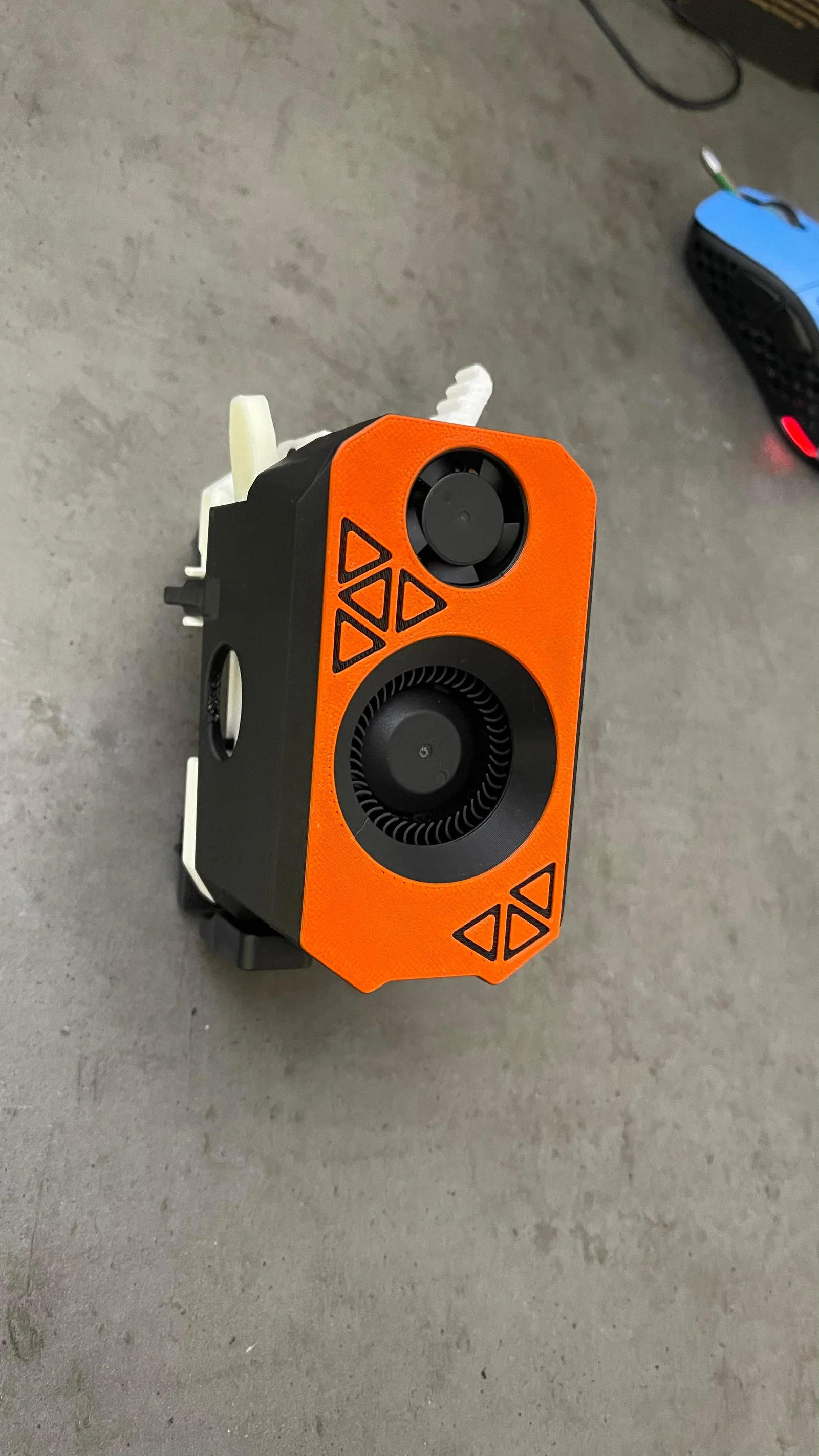

V5 Toolhead cho SV08 & Voron – Hỗ trợ Hotend CN3D HF (Đồng thau & Đồng mạ Niken)
 ByNadirLikes25Downloads110
Build another version of this model.
⚠ Note: These parts are printed in ABS with tight fits. ABS shrinkage and warping can affect tolerances, so proper filament tuning is essential. We strongly recommend watching our filament tuning video before printing.
⚠ This upgrade can be used on the SV08 only if you have the SV Zero stock toolhead.
This mod upgrades your toolhead to be multicolor-ready and adds several functional improvements.
🔧 What’s New / Key Benefits
Dual filament sensors
1 sensor before the extruder
1 sensor after the extruder
Integrated filament cutter
Improved toolhead shroud
Uses a dedicated toolhead fan
Significantly improved part cooling airflow
This is the same improved shroud we already published, now integrated into this upgrade
Here you can see how to salvage your parts from your existing toolhead.
🧰 Required Parts - Bill Of Materials
Sovol Zero Toolhead https://tidd.ly/4pgwrdx
1× 2510 axial fan (24V) – recommended: 12k rpm GDS Time https://s.click.aliexpress.com/e/_c3U3UuOd
1× OLFA Japan blade https://s.click.aliexpress.com/e/_c3WNzxiD KB4-F/5
2× mini microswitches https://s.click.aliexpress.com/e/_c3bZZ2dj Straight
2× 3.5 mm ball bearings https://s.click.aliexpress.com/e/_c3zETvZP
4× M3 nuts https://s.click.aliexpress.com/e/_c4lPbwYZ
1× M2.5 nut https://s.click.aliexpress.com/e/_c44eINNf
**1× M2.5 heat-set insert (**M2.5xL3xOD3.5) https://s.click.aliexpress.com/e/_c3olfaYD
10× M3 heat-set inserts (4.5 mm OD × 3 mm length) https://s.click.aliexpress.com/e/_c3olfaYD
4× M3×16 screws https://s.click.aliexpress.com/e/_c4lPbwYZ
2× M3×8 screws https://s.click.aliexpress.com/e/_c4lPbwYZ
2× M2.5×15 screws https://s.click.aliexpress.com/e/_c44eINNf
1× M2.5×18 screw https://s.click.aliexpress.com/e/_c44eINNf
4xM1.6x6 screw https://s.click.aliexpress.com/e/_c3TIgUO5
4× N52 neodymium magnets (4×4×3 mm) https://s.click.aliexpress.com/e/_c2IPiWhb
1× ECAS04 fitting https://s.click.aliexpress.com/e/_c3CvbE0v
Before the extruder:
PTFE tube 3 mm ID / 4 mm OD (ideal for long distances) https://s.click.aliexpress.com/e/_c4eF0BvR
After the extruder:
Creality Capricorn PTFE with 1.9 mm ID https://s.click.aliexpress.com/e/_c2QaLQJB
Thin electrical wire for filament sensors
4 wires × 20 mm https://s.click.aliexpress.com/e/_c3L4RlrL
Use 2 colors (one color per sensor)
Ground wire can be shared
Example: 2× black (ground), 1× purple, 1× gray
10–15 mm of soft velour or electrical tape
For this project we highly recommend a precision hex key set that includes 0.9 mm, 1.27 mm, 1.3 mm up to 3 mm.
These small sizes are essential, as M1.6 screws require very small hex keys, and tolerances can vary depending on the screw manufacturer.
This set covers everything needed for this build and offers great value for the price.
https://s.click.aliexpress.com/e/_c3TE0JmD
🖨 Printing Recommendations
Material:
Walls:
Infill:
20% gyroid
If using grid: 30%
Top layers: 5
Bottom layers: 5
Layer height: 0.2 mm
All parts were tested in Polymaker PLA, and the final version was printed in Polymaker ABS.
Thanks to Polymaker for providing filament for testing.
❤ Support & Affiliates
Affiliate links to all parts used in this project are included.
If you choose to build this upgrade using those links, it will not cost you anything extra, and it directly helps support us in developing more upgrades like this.
Recommended fan: 2510, 24V, ~0.06A
Connect to PA2 and 24V (see wiring diagram in repo)
toolhead_fan and configure it to turn on when extruder > 50 °C[generic_fan toolboard_fan]
pin: extra_mcu:PA2
heater: extruder
heater_temp: 50.0
Simple and reliable
Fan switches ON when the extruder > 50 °C
Fan switches OFF when the extruder cools down
No extra sensor needed
✅ Best if you just want a “follow the hotend” fan behavior
OR
[temperature_fan toolboard]
pin: extra_mcu:PA2
control: watermark
max_delta: 3.0
sensor_type: temperature_mcu
sensor_mcu: extra_mcu
min_temp: 0
max_temp: 100
target_temp: 38.0
max_power: 1.0 # 100%
shutdown_speed: 1.0
Uses the MCU’s internal temperature sensor
Fan ramps automatically to keep MCU around 38 °C
More precise thermal control, especially in enclosed printers
Will stay on even if the hotend is cold, if the MCU is heating up
✅ Best for toolhead boards inside hot chambers (like SV08 Max with enclosure)
For open printers (or if you want simplicity): use Option 1 (generic_fan).
For enclosed printers or if you want the fan only when the MCU gets hot: use Option 2 (temperature_fan).
If you decide to splice the hotend fans no need to declare nothing in Klipper!
The simplest solution is to connect the fan directly to the hotend cooling fan’s V+ and PWM wires, since this board does not have any spare fan ports.
There are other wiring options if you want independent fan control, but in practice this isn’t really necessary. If the hotend is powered, you’re most likely printing anyway—so it makes sense for the toolboard fan to run at the same time.
The simplest solution is to connect the fan directly to the hotend cooling fan’s V+ and PWM wires, since this board does not have any spare fan ports.
There are other wiring options if you want independent fan control, but in practice this isn’t really necessary. If the hotend is powered, you’re most likely printing anyway—so it makes sense for the toolboard fan to run at the same time.
Alternative Solution (Advanced / Optional)
# 4th fan via BLTouch CTRL -> MOSFET IN
[fan_generic toolboard_fan]
pin: PB1 # <-- REPLACE with BLTouch CTRL pin on the toolhead MCU
max_power: 1.0
shutdown_speed: 0.0
cycle_time: 0.010 # 10ms PWM (good general starting point)
hardware_pwm: False # set True only if your MCU pin supports hardware PWM
ByNadirLikes25Downloads110

 Bytinx_1344834Likes1.2KDownloads6K

 ByreddLikes216Downloads2.1K

 ByJasonOlliff_519145Likes241Downloads2K

 Byeoyilmaz_384382Likes17Downloads92

 Byarhi_585078Likes64Downloads535

 ByltloweLikes26Downloads118

 ByHanzo3dLikes155Downloads410

 ByGeek5DLikes147Downloads480

 ByBrokentooth_designsLikes23Downloads401

 By3DSourcererLikes48Downloads372

 ByWyomingWolf_261196Likes52Downloads422