



Kẹp giữ sợi Filament
 Bytinx_1344834Likes1.2KDownloads6K
Build another version of this model.
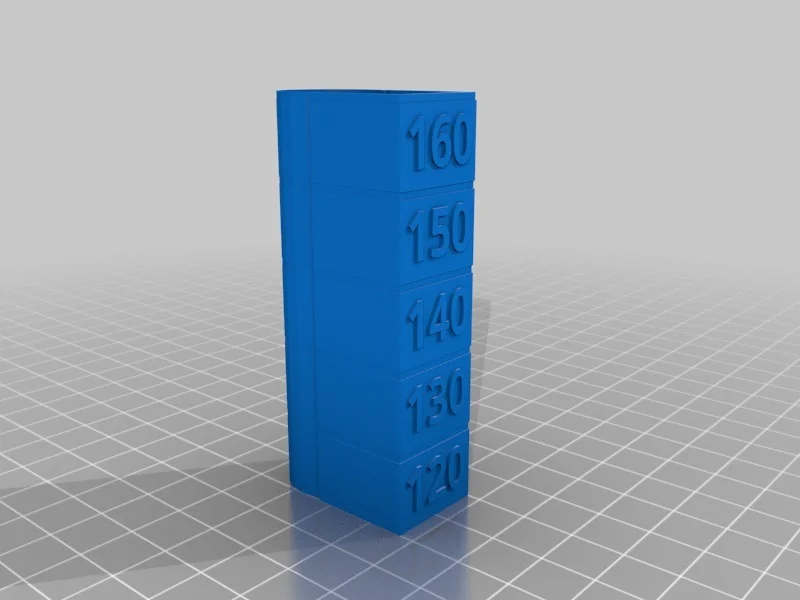
I wanted to see how fast I could push my printer and still get quality prints. I couldn't find a good speed test tower, so I made one.
Here is the gcode I used in Slic3r PE (goes in printer settings, custom gcode, after layer change) to change speed at the various layers :
;[layer_z]
{if layer_num==5}M220 S120{endif}
{if layer_num==77}M220 S130{endif}
{if layer_num==152}M220 S140{endif}
{if layer_num==227}M220 S150{endif}
{if layer_num==302}M220 S160{endif}
I started with a base print speed of 60mm/s, and once completed, looked for artifacts, ghosting, etc until I determined the optimal speed the printer could print and still maintain quality.
Using this method I was able to test print speeds from 72-96 mm/s in one print.
Printer Brand:
Prusa
Printer:
i3 MK3
Rafts:
No
Supports:
No
Infill:
N/A
Filament:
Category: 3D Printing Tests
Bytinx_1344834Likes1.2KDownloads6K

 ByWyomingWolf_261196Likes52Downloads428

 Byprusa-researchLikes0Downloads2.7K

 ByBlackky98Likes25Downloads207

 Bypjs37Likes0Downloads155

 Bygafyx3dLikes0Downloads120

 Byduo3dprintLikes0Downloads152

 BylaserbaconLikes0Downloads171

 ByswimLikes0Downloads108

 Byarhi_585078Likes64Downloads540

 ByleopoldmozartLikes0Downloads135

 By3d-mmakerLikes0Downloads114