

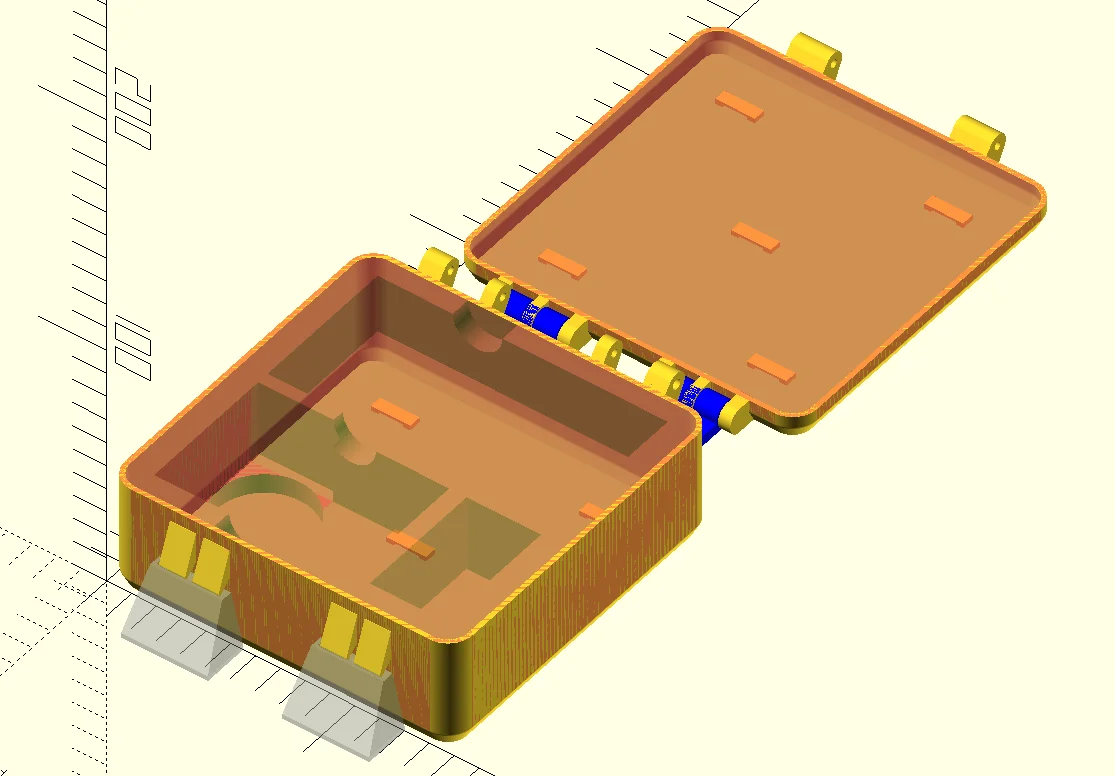


Hộp Trượt Tham Số Tùy Chỉnh – Giải Pháp Lưu Trữ Thông Minh
 ByRobertoGalloc_356815Likes549Downloads1.8K
Build another version of this model.
This is the case generator used to make https://www.printables.com/model/741467-case-for-dji-osmo-action-4
If you are interested, please find the project on Github: https://github.com/kvtorp/openscad-case. It even includes a handy Ant build script (because openSCAD does not support exporting multiple STLs from the same script https://github.com/openscad/openscad/issues/4809)
---
The case is a "suitcase" style box with hinged lid and clasp(s), which can be imported in a slicer and printed. Notice that a multimaterial printer is required (preferably at least 4 materials), multicolor will not be enough (AMS and MMU will not work)
Everything but cutouts in the "foam" are controlled in the file dimensions.scad
If you want cutouts in the "foam", and want to define them in openSCAD, add them in the file Parts/box-inset.scad You can also wait and add (subtract) them in the slicer later.
Use the provided box.3mf and lid.3mf files, and substitute the parts with your own parts. Or set up the prints all on your own, see below
Use 2 color-coordinated PETG filaments on extruders 1 and 2. In the following, it is assumed that the case will be printed from extruder 1, and buckles and text from extruder 2. Use PLA on extruder 3, for supports. DO NOT ENABLE SUPPORTS - they are part of the model (the autogenerated supports become very high and thin and do not print well). Use a very soft TPU/E on extruder 5. TPE88 from Filament PM works well for me, even though it is a PITA to load.
For both the PLA and TPU/E, set the bed temperature to 85 C to match the PETG bed temperature.
In Layers and perimeters:
In Multiple extruders:
As I am writing this, I just saw Jo Prusa's video on using segmented regions for interlocking heterogeneous materials. I might make an update if I can make it work locally
Place box.stl, and then add all the other box- STLs as parts.
If the box is not too big, the lid can be placed on the same plate, or you can print it separately.
Place lid.stl, and then add all the other lid- STLs as parts.
For box-inset.stl and lid-inset.stl, add special infill and Layers and Perimeters settings:
This makes the inset print as a sponge. The inset patches are meant to be solid, do not change print settings for these
For box-supports.stl, add special Layers and Perimeters settings:
This avoids spending too much filament on the supports.
Slice and print!
ByRobertoGalloc_356815Likes549Downloads1.8K

 ByVC_DesignLikes721Downloads2.9K

 ByUpcrid3D_1585693Likes808Downloads2.1K

 ByWilko_SLOLikes935Downloads2K

 ByshoheiyLikes0Downloads429

 ByTater_364200Likes486Downloads1.6K

 ByfifindrLikes709Downloads1.7K

 Bywhilex_1739192Likes644Downloads1.1K

 ByGi_TLikes801Downloads1.3K

 ByzeroflowLikes186Downloads1.2K

 ByMatthew_GhostLikes350Downloads942

 ByNightmareart_1489516Likes3Downloads193