



Kẹp giữ sợi Filament
 Bytinx_1344834Likes1.2KDownloads6K
Build another version of this model.
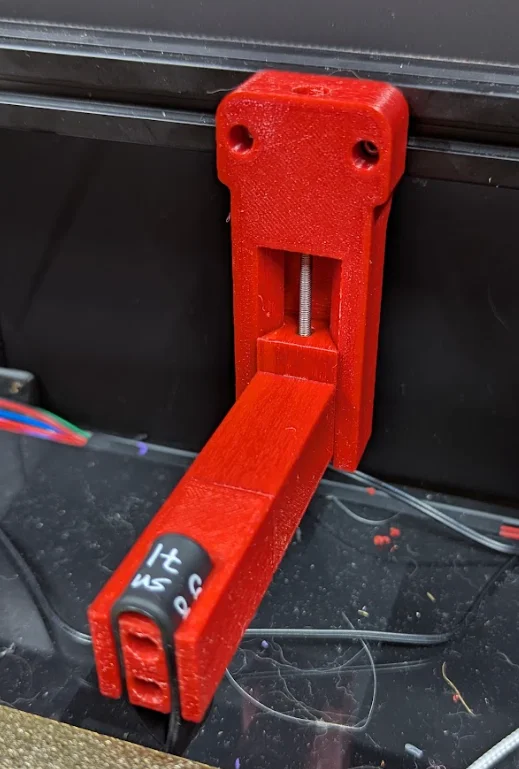
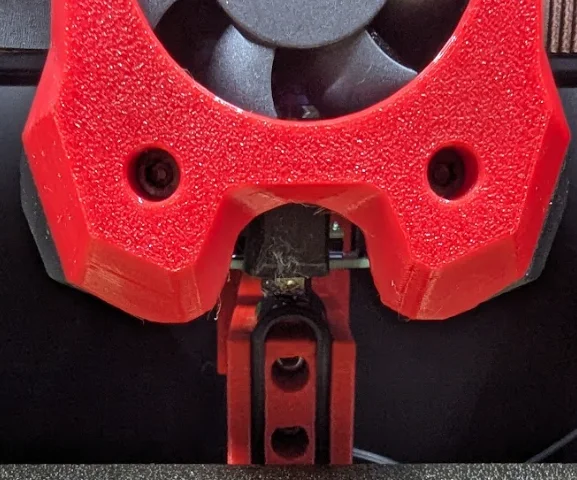
This is a simple nozzle park that mounts to the rear gantry of a Trident (Or the V2.4). Just cut up a small bit of silicone (I used a common silicone wristband, but silicone egg ring or similar should work as well) and wedge it into the holder.
The mount is fixed in Y distance, but you can simply modify the “Silicone Holder” part in CAD software (or even scale in Y in slicer) to make it longer/shorter to fit to your printer.
There is an M3x50 adjustment screw for Z to make it very easy to get to the correct level. Just move the nozzle over the silicone part, then screw in the Z adjustment screw until it is sitting at the correct height.
The other three horizontal M3x50 screws are there to connect the silicone holder to the arm, and also to add additional strength inside the arm. The length of these screws isn't critical, use whatever you have as long as they can fit.
There is also a different mount option that includes a shelf and wiper to make filament purge poops (thanks to @addj20 on discord who had the base design for the “toilet” ), and a removable bucket to catch them in (the bucket is only useful on printers with a high clearance such as a Trident, for anything else you can just have a box on the ground underneath).
I've lined the “shelf” with Aluminium tape to help reduce the chance of the purge sticking to the part.
MACROS
The Klipper macros are included, all that is needed is to modify the variable_park_x and variable_park_y in the NOZZLE_PARK macro for where you mount it on your printer, and then to set the variable_purge_side to ‘left’ or ‘right’ depending on which side of the parking spot you will be purging. Default is ‘left’, if you mirror the park/purge to be on the other side then change this to ‘right’.
To use the purge macro, run PURGE FILAMENT TEMP=260 LENGTH=50 (changing the temperature and desired purge length to whatever you want, defaults are 260 and 50). The macro will move to the purging location and divide the requested LENGTH into 50mm chunks (rounding up, LENGTH=110 will do 3 purges for a total of 150mm) then it will park the nozzle and go back to the previous nozzle temperature.
BOM
Item
Qty
M3x5x4 Heatset Insert
1
M3 Hammerhead nut
4
M3x10 SHCS
4
M3x50 SHCS
4
Bytinx_1344834Likes1.2KDownloads6K

 BySmolboiLikes39Downloads121

 By3DSourcererLikes48Downloads377

 Byprusa-researchLikes0Downloads2.7K

 ByAnthonyDouri_1604724Likes24Downloads224

 ByBrokentooth_designsLikes17Downloads147

 Byarhi_585078Likes64Downloads542

 ByhartkLikes59Downloads119

 Bypanda-studioLikes0Downloads251

 ByHanzo3dLikes155Downloads415

 ByPrintStructorLikes0Downloads132

 BydarienLikes0Downloads1K