



Steam Machine Companion Cube / Vỏ đựng Weighted Storage Cube
 ByJaronLikes310Downloads1K
Build another version of this model.
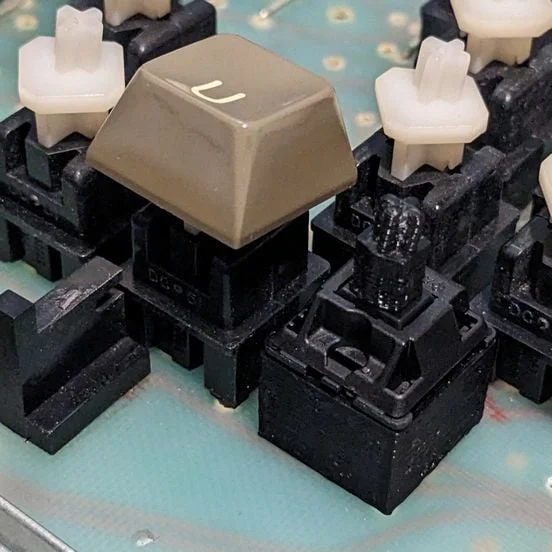
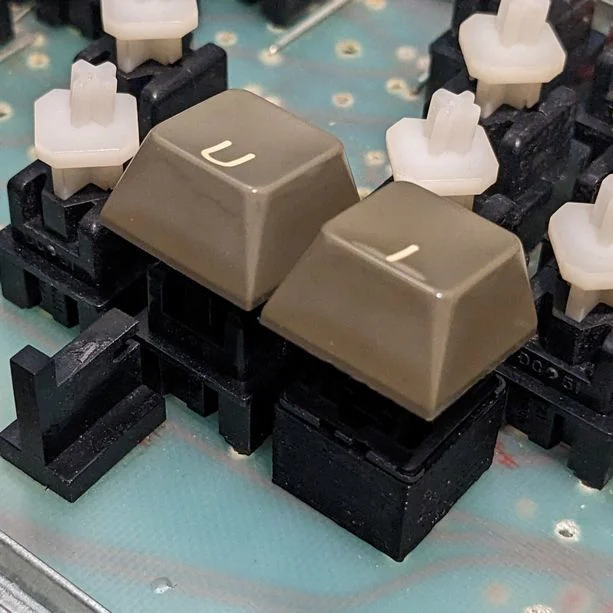
These parts let you replace defective (and soon-to-be-defective) Datanetics DC-51 switches used on some Apple II+ keyboards with commonly available Cherry MX ones.
Disable support generation for the keycap adapters.
Enable support generation for the switch adapters.
The stems on both sides need a snug fit, be careful if you have to remove a keycap from the adapter - breaking and subsequently fishing out a stem is not fun. (For what it's worth, I had this happen multiple times with earlier iterations of my model in PLA, only once with PETG.)
The infill setting hardly matters as there are so few spaces where it can be used at all.
Print spares.
You'll need to partially unscrew the spacebar stabilizer retainer clips to install or remove the stabilizer wire with the switch adapters installed, due to their larger footprint at that height versus the DC-51 switches.
Note: The MX stem hole in the keycap adapter is slightly oversized: 1.25 mm thick cross whereas official Cherry spec says 1.17±0.02 mm. (Source: https://www.cherrymx.de/en/dev.html)
Switch base: https://www.tinkercad.com/things/12udcAePK2T?sharecode=B7vT58ra5Wn6TgHJFJEuySpw54i0qUaYmlDvqpZHiow
Keycap adapter: https://www.tinkercad.com/things/lMbRnojhf6x?sharecode=COgzbTb4wd9uu2e7dFD94oSeaHVAVPKaNBmTjfTRfY8
(I might revisit this using a more capable parametric CAD program, but won't commit on the how and when yet.)
Used this Cherry MX switch model by user "gcb" : https://www.thingiverse.com/thing:421524
Though it is not used in my final models, this Datanetics DC-51 keystem model by user "option8" helped a great deal with early iterations of my design : https://www.thingiverse.com/thing:480528
Thanks to the Applefritter forums for their feedback: https://www.applefritter.com/content/cherry-mx-datanetics-dc-51-keyboard-switch-adapter
ByJaronLikes310Downloads1K

 Byw3rN42Likes127Downloads935

 ByTomDDLikes89Downloads575

 ByJwidessLikes34Downloads375

 ByBroBuilds3D_4455044Likes32Downloads454

 ByckthLikes148Downloads2.4K

 Bynexgen-3d-printingLikes0Downloads394

 ByVikingptty_1943738Likes50Downloads234

 ByBrokentooth_designsLikes30Downloads226

 Byslava-kuzminLikes0Downloads284

 ByJKMCZLikes11Downloads178

 Byjodinskylab_3390035Likes144Downloads168