

Tiêu đề UniFi Protect G3 Instant mount cho Prusa MK4 Tổng hợp Mount 3

3 Phần gắn để đính kèm camera tức thì của UNIFI G3 vào khung của máy in Prusa MK4 của bạn.


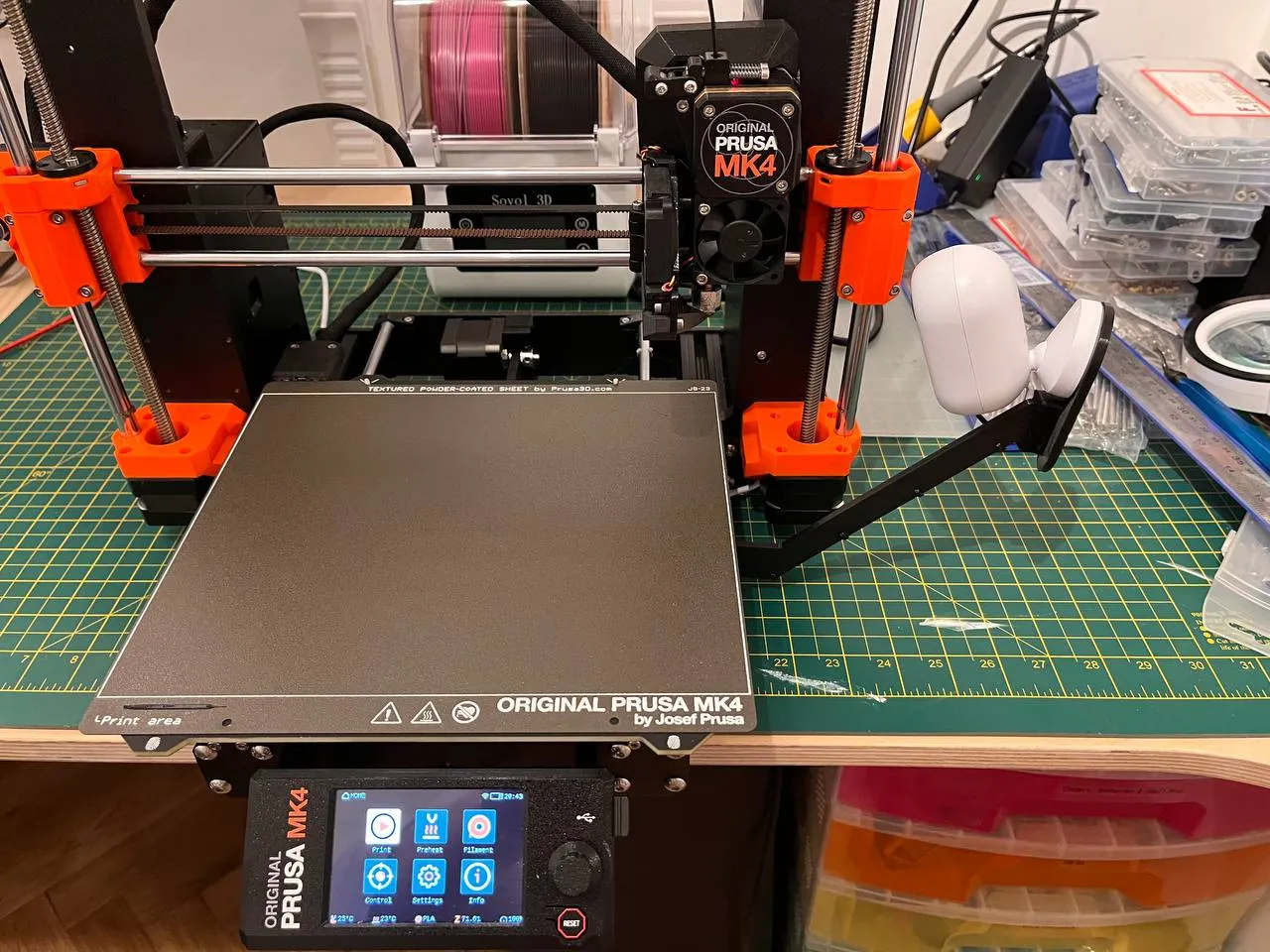


Mô tả
OnShape project - https://cad.onshape.com/documents/7ca4a2cedd0166110213dc38/w/2735e1ed24d69d217bf57c18/e/c62c91193d2c7f199bf17cbd.
The bracket bolts onto the right rear frame extrusion, allowing the arm and camera mount plate to be connected to the frame. You can then attach the G3 Instant camera circular mount onto the camera mount plate.
Since the G3 Instant camera is not intended to be used for close-up macro use, you may want to disassemble it (use a spudger to split the two molded case halves apart), and manually change the focus of the lens. A guide can be found at https://www.reddit.com/r/Ubiquiti/comments/otcsxt/manual_focus_for_g3_instant_completed_with/ and https://imgur.com/a/PJYjIkL.
You can then use the following shell script to upload images directly from your UniFi Protect camera (via RTSP – refer to the UniFi Protect documentation) to PrusaConnect:
#!/usr/bin/env bash set -Eeuo pipefail
shopt -s extdebug # shellcheck disable=SC2154
trap 'declare rc=$?;>&2 echo "Unexpected error (exit-code $rc) executing $BASH_COMMAND at ${BASH_SOURCE[0]} line $LINENO"; exit $rc' ERR main () { # Enable RTSP streaming for your UniFi Protect camera and paste the URL here. declare rtsp_stream="rtsps://10.10.10.10:7441/AbCdEfGh12345678?enableSrtp" declare token="YOUR_PRUSACONNECT_CAMERA_TOKEN_HERE" # Generate a new fingerprint with 'uuidgen'. declare fingerprint="YOUR_ARBITARY_PRUSACONNECT_CAMERA_FINGERPRINT_STRING_HERE" declare printer_uuid="YOUR_PRUSACONNECT_PRINTER_UUID_HERE" while sleep 10 do if ffmpeg \ -y \ -loglevel quiet \ -rtsp_transport udp \ -i "$rtsp_stream" \ -vframes 1 \ -q:v 1 \ -f image2pipe - \ | curl https://webcam.connect.prusa3d.com/c/snapshot \ -X PUT \ -H "Content-Type: image/jpg" \ -H "fingerprint: $fingerprint" \ -H "token: $token" \ --data-binary @- then printf "." else printf "?" fi done
} main "$@"
Refer to the following links for additional documentation pertaining to the operation of the script above:
Giấy phép
