

Các nguyên tố Bảng tuần hoàn tuỳ biến (OpenSCAD)

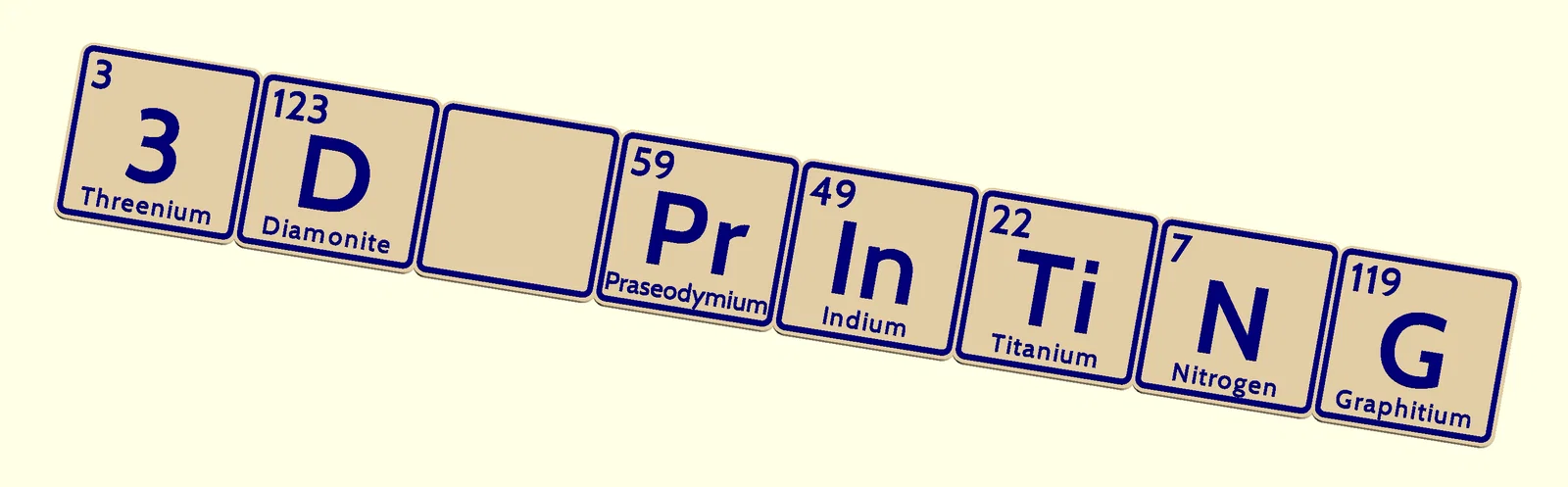
Bộ tile các nguyên tố Bảng tuần hoàn để in 3D và làm filament swap, kèm script OpenSCAD tuỳ biến tạo từng ô hoặc ghép chữ/tên. Có sẵn STL và hỗ trợ xuất SVG cho tài liệu/khắc laser.
Mô tả
Giới thiệu
Nền tảng của dự án này là một script OpenSCAD có thể dùng để tạo từng ô (tile) đơn lẻ hoặc ghép thành một dòng chữ hay một cái tên bằng các nguyên tố trong Bảng tuần hoàn. Script có rất nhiều tuỳ chọn. Có thể tạo đủ 118 nguyên tố bằng một batch file (có kèm file .sh cho Linux).
Tất cả các nguyên tố (và một số phần bổ sung) đã được tạo sẵn. Các file STL nằm trong một thư mục.
Mẹo in 3D
Các tile được thiết kế để dùng với filament swap.
Để swap màu đẹp, mình hay thêm một skirt mỏng 2 line bao quanh mẫu và cho skirt cao đúng tới layer mà mình đổi filament. Skirt sẽ được in trước, nên lúc swap sẽ không bị dính/lem do filament rỉ ra trong quá trình đổi.
Với nozzle 0.4 mm, mình thấy tile kích thước 40 x 40 mm vẫn cho chữ đọc được.
Đa số máy in 3D có bed khoảng 23 x 23 cm, và khi xoay mẫu 45 độ thì có thể in được một mẫu gồm 7 tile.
Không dùng OpenSCAD
Nếu không dùng OpenSCAD, bạn chọn một file STL làm sẵn trong thư mục.
Type1
Style “Type1” có kích thước 45 x 45 mm, dày chỉ 2.0 mm. Nếu layer height là 0.2 mm, thì 3 lớp trên cùng có thể được in bằng màu khác thông qua filament swap.

Dùng OpenSCAD
OpenSCAD có phần “Customizer”. Bạn có thể dùng nó để thay đổi thiết lập và ghép chữ từ các nguyên tố. Các thiết lập có thể được lưu (ra file json) để lần sau dùng lại y như cũ.
OpenSCAD là phần mềm miễn phí: https://openscad.org/
Sau khi cài, tải script “Elements.scad”. Mở script bằng OpenSCAD. Bên phải sẽ có “Customizer”. Nếu không thấy Customizer, bạn vào menu để bật lại.
Có nhiều thiết lập để thử. Khi thấy kết quả ổn, nhấn F6 để render rồi export ra file STL.
Trong Customizer, mình đặt tên các phần như sau:

Trong Customizer, bạn cũng có thể tạo một Fantasy Element. Ví dụ:

Xuất SVG
Tuỳ chọn tạo file svg có thể xuất ra SVG độ phân giải cao để dùng trong tài liệu và khắc laser. Sau khi render mẫu bằng F6, bạn có thể export kết quả ra file svg.
File svg có thể chỉnh lại phần fill và kiểu stroke. Ví dụ chỉnh bằng Inkscape. Inkscape là công cụ thiết kế vector miễn phí: https://inkscape.org/
Font dùng ở đây là “Bitstream Charter:Bold”.

Dùng OpenSCAD, script và batch file
Script có một bảng chứa các nguyên tố. Bạn có thể thêm các nguyên tố hư cấu (fictional) vào bảng đó.
Batch file có thể tạo tile đơn hoặc tạo chữ bằng các nguyên tố. Khi cần generate nhiều đoạn chữ theo một style nhất định, dùng batch file sẽ tiện hơn nhiều.
Batch file là một file .sh cho Linux. Nó nên nằm chung thư mục với script. Đổi tên từ “make_elements.sh.txt” thành “make_elements.sh”. Trong terminal, gõ “sh make_elements.sh” để tạo các tile.
Bản OpenSCAD 2023 chạy nhanh hơn bản 2021. Mình khuyên bạn dùng bản OpenSCAD mới nhất và nhanh nhất.
Các mẫu nguyên tố khác và website hữu ích
Một website hay để tạo chữ từ các nguyên tố là: https://www.lmntology.com/
Các con số ở đó có thể dùng trong script của mình. Các nguyên tố hư cấu được dùng để có thể tạo ra mọi đoạn chữ.
Wikipedia có thông tin rất tốt về các nguyên tố và về các nguyên tố hư cấu.
Bạn cũng có thể tìm thêm nguyên tố hư cấu tại https://fandomium.fandom.com/
User @jfdor có một kèm theo source script OpenSCAD.
User @ThomPatterson có mẫu kèm source Fusion360.
Giấy phép
Giấy phép là CC0 (Public Domain). Bạn có thể tạo chữ bằng tên và bán chúng. Ví dụ làm quà sinh nhật cho ai đó, hoặc làm tên một thành phố.
Mục tiêu của mình là góp phần hỗ trợ việc học các nguyên tố trong Bảng tuần hoàn, theo hướng nghiêm túc hoặc vui vui đều được.
Giấy phép

Tìm hiểu thêm về giấy phép này tại https://creativecommons.org/share-your-work/public-domain/cc0/
File mô hình

Element_003.stl

Element_007.stl

Element_008.stl

Element_009.stl

Element_010.stl

Element_011.stl

Element_015.stl

Element_017.stl

Element_018.stl

Element_019.stl

Element_020.stl

Element_021.stl

Element_022.stl

Element_023.stl

Element_025.stl

Element_027.stl

Element_029.stl

Element_034.stl

Element_031.stl

Element_065.stl

Element_036.stl

Element_032.stl

Element_026.stl

Element_037.stl

Element_033.stl

Element_024.stl

Element_051.stl

Element_030.stl

Element_075.stl

Element_028.stl

Element_047.stl

Element_039.stl

Element_038.stl

Element_073.stl

Element_041.stl

Element_045.stl

Element_035.stl

Element_042.stl

Element_053.stl

Element_049.stl

Element_052.stl

Element_050.stl

Element_046.stl

Element_071.stl

Element_077.stl

Element_078.stl

Element_056.stl

Element_068.stl

Element_016.stl

Element_005.stl

Element_004.stl

Element_062.stl

Element_043.stl

Element_061.stl

Element_002.stl

Element_095.stl

Element_064.stl

Element_103.stl

Element_040.stl

Element_013.stl

Element_085.stl

Element_081.stl

Element_101.stl

Element_098.stl

Element_070.stl

Element_060.stl

Element_107.stl

Element_074.stl

Element_083.stl

Element_058.stl

Element_055.stl

Element_097.stl

Element_072.stl

Element_099.stl

Element_006.stl

Element_082.stl

Element_092.stl

Element_079.stl

Element_108.stl

Element_102.stl

Element_012.stl

Element_089.stl

Element_105.stl

Element_094.stl

Element_014.stl

Element_063.stl

Element_054.stl

Element_091.stl

Element_104.stl

Element_067.stl

Element_076.stl

Element_109.stl

Element_106.stl

Element_084.stl

Element_057.stl

Element_110.stl

Element_069.stl

Element_066.stl

Element_086.stl

Element_044.stl

Element_059.stl

Element_090.stl

Element_001.stl

Element_048.stl

Element_113.stl

Element_121.stl

Element_088.stl

Element_114.stl

Element_112.stl

Element_093.stl

Element_100.stl

Element_123.stl

Element_117.stl

Element_080.stl

Element_087.stl

Element_126.stl

Element_115.stl

Element_125.stl

Element_127.stl

Element_096.stl

Element_119.stl

Element_111.stl

Element_116.stl

Element_131.stl

Element_128.stl
Element_124.stl

Element_136.stl

Element_129.stl

Element_134.stl

Element_135.stl

Element_120.stl
Element_122.stl

Element_139.stl
Element_118.stl

Element_132.stl

Element_130.stl

Element_146.stl

Element_138.stl

Element_137.stl

Element_148.stl

Element_Glitter.stl

Element_141.stl

Element_140.stl

Element_154.stl

Element_133.stl

Element_150.stl

Element_151.stl

Element_142.stl

Element_Stardust.stl

Element_143.stl

Element_149.stl

Element_144.stl

Element_MoonDust.stl

Element_145.stl

Element_PixieDust.stl

Element_Text_H2O.stl

Element_153.stl

Element_152.stl

Element_147.stl

Element_Text_3Dprinting.stl

Element_Text_genius_at_work.stl
Elements.scad
make_elements.sh.txt
Chưa có bản in nào được khoe. Hãy là người đầu tiên!
Remix (0)
Có thể bạn quan tâm
Đang tìm các mô hình liên quan...


Chưa có bình luận nào. Hãy là người đầu tiên!