



Mẫu gảy đàn Guitar (Guitar Pick) in 3D tùy chỉnh độ dày
 ByWolf_115355Likes513Downloads8.4K
Build another version of this model.
I made this mount to hold a button underneath the steam controller 2's trigger and make it behave more like the original controller's clicky triggers, providing tactile feedback before the trigger is fully pulled. This is only useful if you want separate behaviors for the soft and full trigger pulls.
At the time of writing, there doesn't seem to a way in Valve's controller config software to set a threshold for the full pull signal to fire, which makes the mount finicky to print, and the model will probably require adjustments if you don't use the exact same button I'm using. However, I've uploaded the step file for people to adjust.
The current design holds a 6.2mmx6.2mmx7.3mm tactile button underneath. I originally tried a Kailh mouse switch, but it was too light. I ended up using this switch, which has a 160gf actuation and gives a bit stiffer feel than the original controller.
If you decide to use another button, I would recommend selecting something with a relatively large amount of travel and an actuation in the range of 100-200 gf. Preferably, the button should have the pins coming out the bottom as well. And if the button isn't 7.3mm tall, you will need to adjust the height of the mount accordingly.
The current design is for the right trigger, so if you want left, mirror the part. For the full pull signal and button click to line up, the height of the mount, as measured from the bottom surface to the surface which will touch the bottom of the button, needs to be 6.45 mm, +/- a few hundredths of a mm. Therefore, I recommend printing at a layer height which divides 6.45 (so, 0.15 mm). I used ASA, but material is probably not that important.
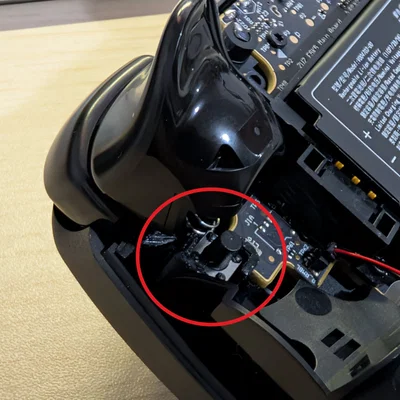
I suggest following the iFixit guide for controller disassembly. I've also written the steps below and included some images from my controller.
Snip the metal pins off of your button and press it into the mount. You can secure it with glue, though I would only do this after you've tested the controller to make sure the button is actually at the right height.
Unscrew the seven T6 screws on the back of the controller and remove the back cover.
Remove the battery (start by lifting the right side), unscrew the 4 T6 screws which hold the battery frame, and remove the frame.
Slide out the silver pin which holds the trigger in place, then remove the trigger. There is a spring underneath the trigger, don't lose it.
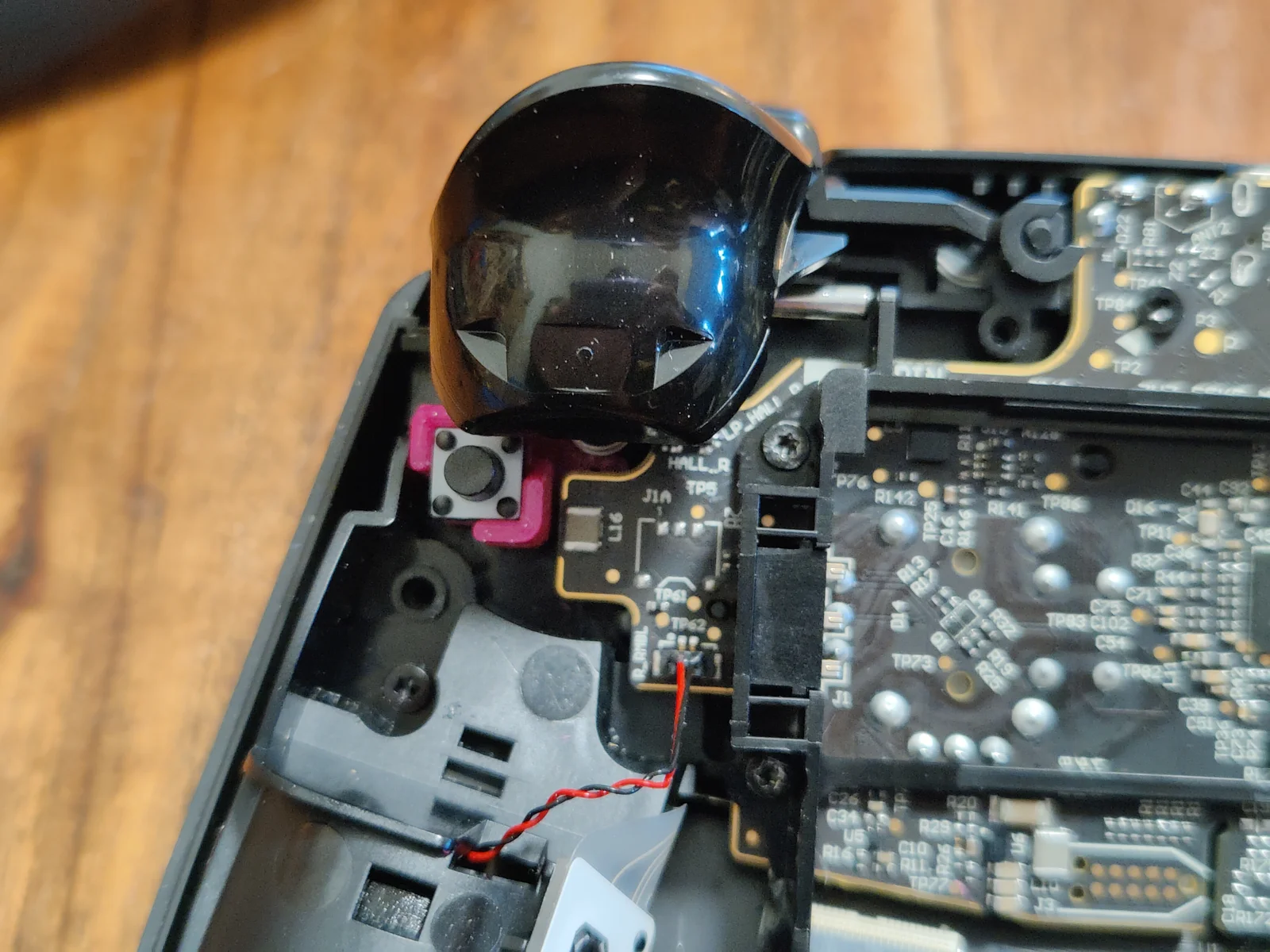
Unscrew the T6 screw at the very corner of the controller, right underneath the bumper. You will reuse this screw to secure the button assembly.
Insert the button assembly, making sure it is pressed down as far as possible. The bigger C-shaped opening wraps around the base of the post which holds the trigger spring. The smaller C-shaped opening should line up with the screw hole in the corner of the controller. Then secure with the T6 screw.
Reinstall the trigger, battery frame, battery, and back cover.
Test the controller out. If the full pull isn't firing at all, the button is too high and needs be lowered. If the full pull fires before the button click, the button is too low and needs to be raised (which you could test out with little paper shims).
This mod will not be as precise as a proper dual-stage trigger where the button is actually wired with the rest of the controller, though for me it gets the job done. If anyone has a better design, please let me know, I miss my steam controller 1 triggers ...
Anyways, back to playing Rocket League.
ByWolf_115355Likes513Downloads8.4K

 ByZED4EverLikes313Downloads5.2K

 ByVC_DesignLikes271Downloads748

 ByfifindrLikes500Downloads4K

 Bymrfixit_324954Likes65Downloads471

 ByDan Schwartz SchwartzLikes744Downloads3.4K

 ByBrokentooth_designsLikes83Downloads447

 ByUpcrid3D_1585693Likes808Downloads2.1K

 ByAdam Záhořák ZáhořákLikes39Downloads250

 ByWilko_SLOLikes935Downloads2K

 Bychubbs8697_2027893Likes585Downloads1.7K

 Byquibeck_3353173Likes965Downloads1.9K