



Mẫu tranh treo tường nghệ thuật phong cảnh thiên nhiên Nature Decor
 ByCodyMeyer_2545340Likes163Downloads720
Build another version of this model.
Thank you for downloading my works. If you would like to sell my designs, past and future, a commercial license can be obtained from my MakerWorld or Patreon page.
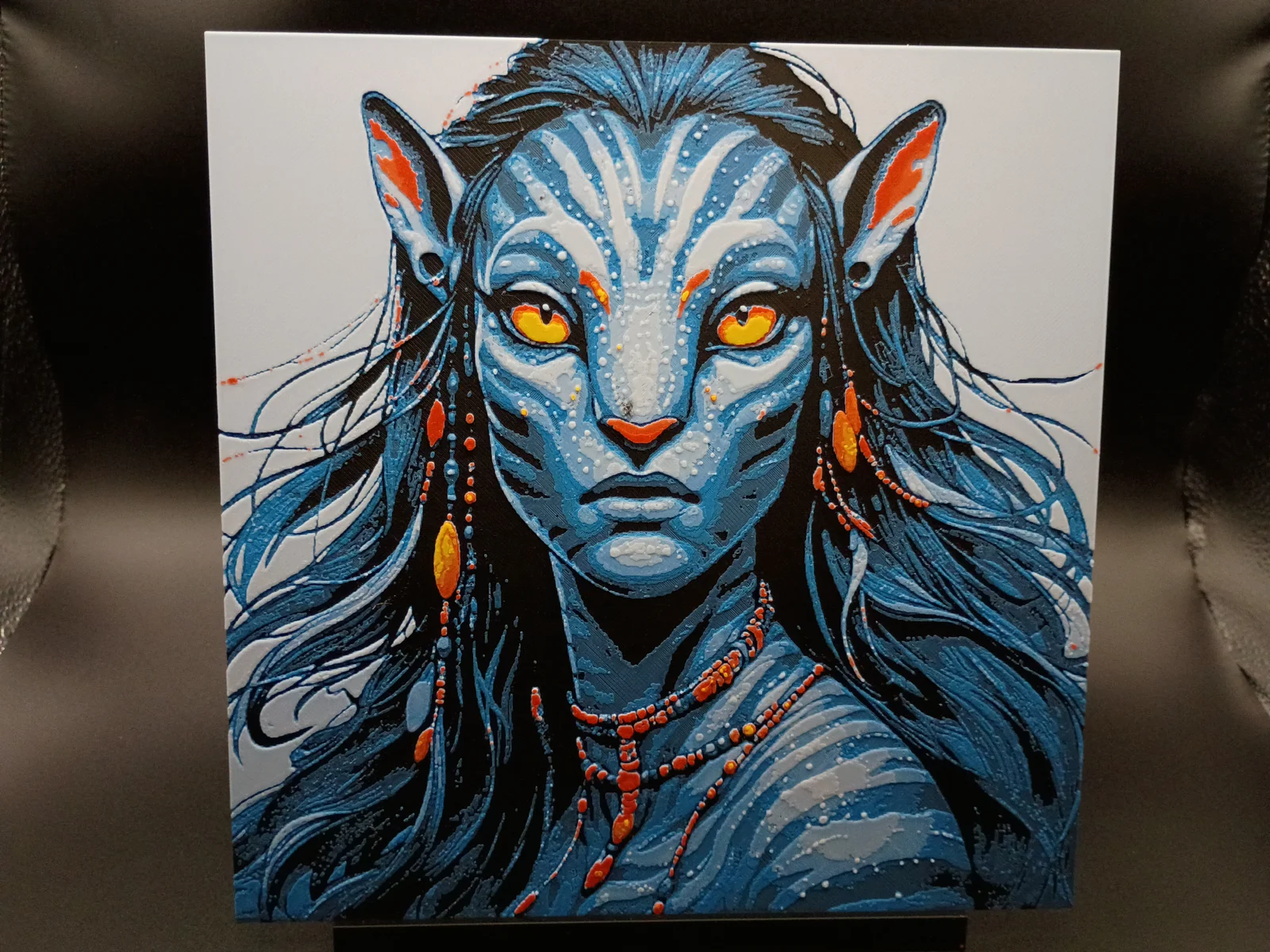
The new Avatar movie - Fire and Ash is coming out in December 2025. Perfect timing to launch a mini Avatar collection in those vibrant blues.
Pictures shown are printed in an 0.4mm Nozzle
Print at 100% infill with a layer height of 0.08mm with a base layer of 0.16mm
Filaments Used:
PLA BambuLab Basic Black Transmission Distance: 0.6
PLA BambuLab Basic Cyan Transmission Distance: 3.5
PLA Default White Transmission Distance: 5
PLA BambuLab Basic Red Transmission Distance: 4
PLA BambuLab Basic Yellow Transmission Distance: 6
This print uses 5 unique filaments
Swap Instructions:
Start with Black
At layer #8 (0.8mm) swap to Cyan
At layer #12 (1.12mm) swap to White
At layer #16 (1.44mm) swap to Red
At layer #19 (1.68mm) swap to Yellow for the rest.
To print more than 4 Colors in 1 AMS, Use this sample for this print:
Load filaments Black in slot 1, Cyan in slot 2, White in slot 3, and Red in slot 4
When choosing yellow(the 5th Color), select Slot 1(black) as it is the first filament to finish printing
After layer 8, Black in slot 1 is finished printing and cyan in Slot 2 has started printing, swap out the black filament for yellow. When it is time for yellow to print, the printer will pull from Slot 1.
This is a five color print. Use this tutorial by Cloudy Nostalgia to print more than 4 colors on 1 AMS.
Can be resized to accommodate your printer or preference by adjusting the X and Y axis the same percentage while leaving the Z axis at 100%. The best way to achieve this: With Uniform Scale checked, adjust the Y axis to the desired size (this will ensure the X axis is the same proportion as the Y axis), uncheck the Uniform scale, adjust the Z axis back to 100%, slice plate, and print. Stringing may occur with Hueforge, just use a lighter to whisk them away.
More prints: Bookmarks -- Portraits -- Coasters -- Clocks -- Puzzles -- Display Stands -- Display Frames
They are sorted and can be found in my Collections - https://makerworld.com/en/@3djd/collections
ByCodyMeyer_2545340Likes163Downloads720

 Bythecodedkid_388190Likes219Downloads254

 ByDrewmundLikes833Downloads4.6K

 Bykallekubinsk_3569049Likes37Downloads182

 ByMrCoolGaming_2947996Likes47Downloads170

 ByJous42Likes35Downloads112

 ByMichael Phillips PhillipsLikes26Downloads109

 ByStreamMovieY_3470525Likes30Downloads119

 Bylame_3949573Likes42Downloads100

 ByFastRaccoon_718321Likes461Downloads1.5K

 Byjimreurink1_902740Likes25Downloads74

 ByvexanixLikes168Downloads1.3K