



Thùng rác in Vase Mode
 BybobmakesLikes2.5KDownloads17.5K
Build another version of this model.
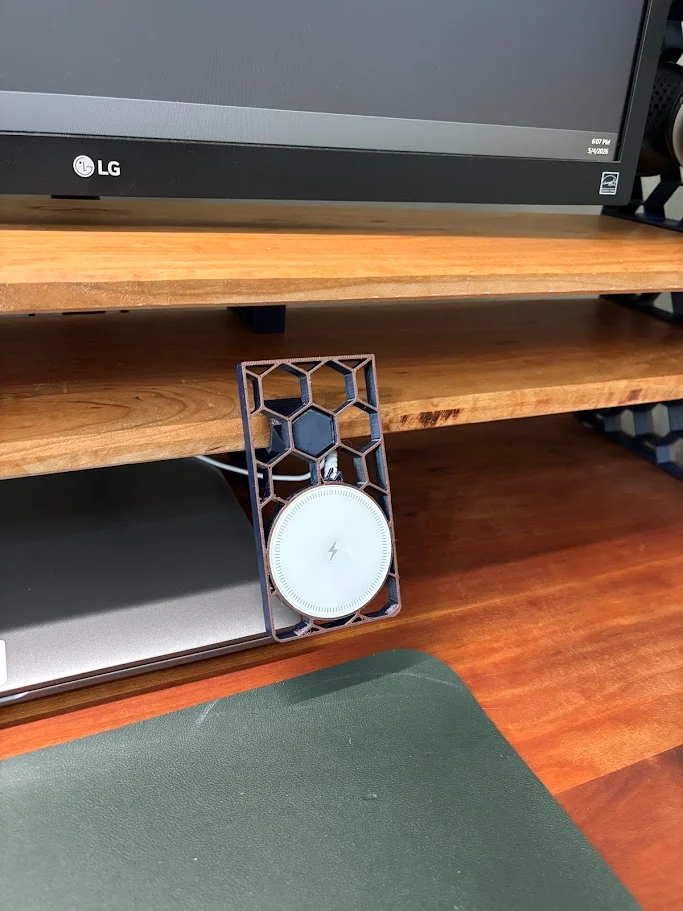
Honeycomb Side-Clip Phone Stand & MagSafe Charger Holder
A side-mounting phone dock that clips onto the side edge of a shelf or monitor stand and turns it into a permanent charging spot for your phone. The body has a built-in pocket sized to hold a round MagSafe-style wireless charging pad — drop the charger in, snap your phone onto the magnets, and you've got a clean wireless charging station that doesn't take up any desk space.
Unlike the other accessories in this series, this one mounts to the side of the shelf, so the top stays free for the shelf rack, headphone holder, or whatever else you've got up there. Once clipped on, it stays put — no daily re-fitting.
Designed for this charger Built around this specific round MagSafe-compatible pad on Amazon: Magnetic Wireless MagSafe-Compatible Charger (B0GBYRJ4WZ). It's an ultra-slim 7mm pad, 15W fast charging, works with iPhone 12 through iPhone 17 series. Most other round MagSafe-compatible pads with similar dimensions (~55–60mm diameter, ~7mm thick) should also fit, but I designed and tested specifically with this one.
Honeycomb series
🔹 Honeycomb Monitor Stand by Erl — the original
🔹 Honeycomb Clip-On Shelf Rack — books & laptops (my design — link your listing)
🔹 Honeycomb Dual Headphone Holder (my design — link your listing)
🔹 Honeycomb Side-Clip Phone Stand — this model
What it's good for
Permanent wireless charging spot at your desk
Keeping your phone visible and within reach during work
Watching/reading on your phone while it charges (acts as a viewing stand)
Freeing up desk surface area
Pairing with the rest of the honeycomb series for a unified setup
Features
Side-clip mount — frees up the top of the shelf
Integrated pocket for round MagSafe-style charger pads
Honeycomb cutout pattern (matches the series, saves filament)
Sized for 1.5 cm thick shelves (same as the rest of the series)
Cable routing channel for tidy charger cable management
Holds phone in portrait orientation for charging + viewing
Print settings (what I used)
Material: PETG recommended (PLA can soften near a warm phone over long sessions)
Layer height: 0.2 mm
Walls/perimeters: 3 (clip needs the strength)
Infill: 25–30%
Supports: None needed
Orientation: Print flat against the bed for cleanest honeycomb faces
Assembly
Print the part(s)
Drop your wireless charger into the pocket and route the cable through the channel
Slide the clip onto the side edge of your shelf
Plug in the charger and snap your phone on
Credit Inspired by Erl's (@Erl_81180) Honeycomb Monitor Stand — go check out the original.
Drop a Make if you print one — would love to see your desk setups!
BybobmakesLikes2.5KDownloads17.5K

 ByKittenRaeeLikes381Downloads903

 ByWaffleDude_496342Likes54Downloads136

 ByVeco_2904087Likes46Downloads105

 ByVinors3DLabLikes393Downloads995

 ByHydratedMini_1690513Likes173Downloads718

 ByScooLikes35Downloads179

 ByKavSin_3319402Likes63Downloads132

 ByJoakimEllner_4508414Likes23Downloads112

 Byquibeck_3353173Likes1.5KDownloads11.5K

 ByowlartLikes527Downloads1.3K

 ByTomas_tntLikes10Downloads43