



Hộp Trượt Tham Số Tùy Chỉnh – Giải Pháp Lưu Trữ Thông Minh
 ByRobertoGalloc_356815Likes549Downloads1.8K
Build another version of this model.
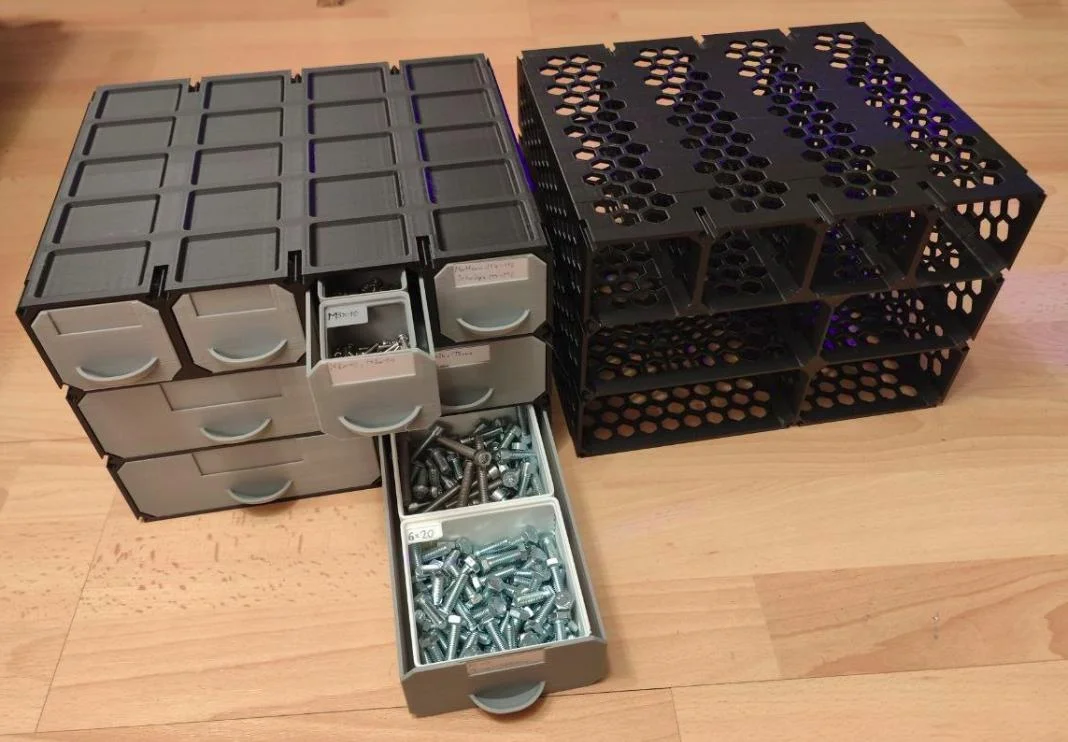
Almost everything is changeable via list of over 30 parameters at the beginning of the main script. The default settings are my preferred ones, which are optimised for least material-use and fastest printing, while still printing really solid out of PLA. All parameters are described in detail in the script. I can not guarantee that every possible parameter combination works, since i have only tested some combinations. Especially when going into extremes with some of the secondary dimensions, it might result in some unexpected outcomes.
There are many pre-generated models to choose from which all use the default parameters.
This is inspired by "Improved modular gridfinity drawers" by @PhilCraft. The main drawback by his design is, that every drawer has its own box. With my approach, the overall material usage for the boxes can be reduces by roughly 40% and can even be printed a lot faster when not using the hex-perforations, but instead the embossed cavities wall setting. The single boxes with hex-perforation setting are basically the same as the ones by PhilCraft.
The main script is "ParametricGridfinityGenerator.py" with all the parameters. This will generate and export only one model (can be chosen which). There are also some scripts "batch_export_XXX.py" which can be used for batch exporting many different models. The settings for each batch run are saved in a json file for further recreation.
When wanting to connect multiple boxes next to each other, there are connector wedged. Setting the CREATE_PARTS parameter to "wedge" generates those connectors. I recommend to print those out of TPU.
There are cutouts for 64x23mm paper labels in the frontplate of the drawers, which reduzes in size if the drawer gets too small.
Settings for the box:
basic size of the box and drawers (how many gridfinty units width, height, depth)
basic layout of the drawers (how many drawers per row, how wide each drawer, number of rows)
wall modifications to save on material and print time
solid walls
hex-perforation, which is slow to print but uses less material than solid walls
embossed cavities (thin walls mostly with thicker surrounding walls), which is the fastest to print and uses the least material (faster than solid walls and less material than hex-perforation)
can choose some dimensions for each kind of wall modification
can choose which walls to modify
wall thickness of outer and inner walls
add an extra gridfinity baseplate on the top surface of the box
and some more, just look in the script
Settings for the drawers:
wall thickness (bottom and side seperate)
embossed cavities on the side walls to reduce material use
baseplate settings like magnets, screw holes
and some more
If you want to modify something custom, claude is pretty good with cadquery scripts.
Naming convention for the exported multi boxes is "box_multi_DEPTH_FLOOR1_..._FLOORn", where FLOOR has the format of AhB-C-D..., where A is the height and B,C,D... is the width of the individual drawers.
ByRobertoGalloc_356815Likes549Downloads1.8K

 ByMatthew_GhostLikes350Downloads942

 ByExtrutimLikes0Downloads185

 Bydona3d_Likes456Downloads680

 ByVC_DesignLikes721Downloads2.9K

 ByUpcrid3D_1585693Likes808Downloads2.1K

 ByWilko_SLOLikes935Downloads2K

 ByshoheiyLikes0Downloads427

 BymindthelightLikes251Downloads391

 ByTater_364200Likes486Downloads1.6K

 ByfifindrLikes709Downloads1.7K

 Bywhilex_1739192Likes644Downloads1.1K