

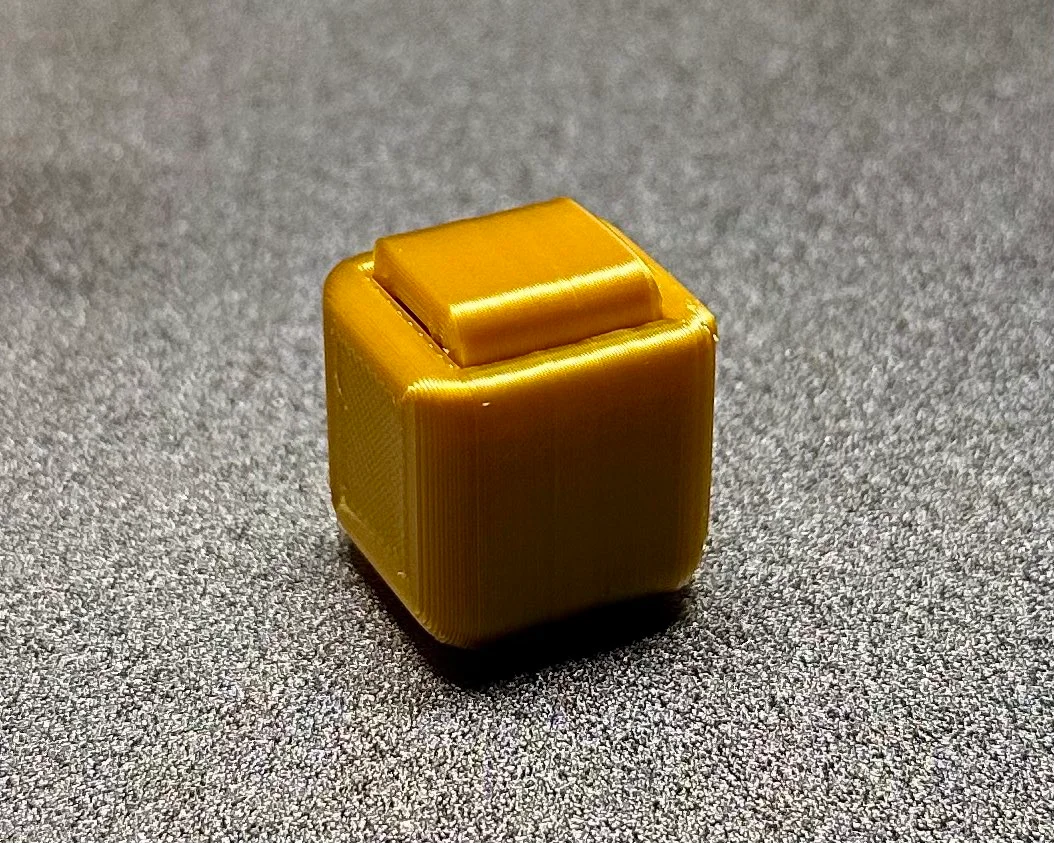


Thằn lằn cử động linh hoạt - In tại chỗ (Không cần support)
 Bycream110_291842Likes924Downloads7.7K
Build another version of this model.
*update 4/8/24: Added a version 2 and 3. Version 2 uses Chamfers instead of Fillets to make it a little easier to print. Version 3 is just a straight up box haha. I've also included a .STEP file for the box design without my logo, as well as changed the licensing to allow for remixing.
A fidget toy you can print in under 30 minutes! Test your finger strength and fidget away. Designed to have very loose tolerances so anyone can print on any printer.
Print Settings:
-Print at .2 layer height with .4 line width. If you're using any form of horizontal expansion, I would advise you turn this off (if you have horizontal expansion on, it might make this more difficult to print than it needs to be)
-Print with 4 walls.
-Set your infill to 10% and set the pattern to “Line”
Post Processing:
-WAIT UNTIL THE PRINT HAS HAD TIME TO COOL BEFORE TAKING IT OFF THE BUILD PLATE!
-Once cool, remove from build plate and press down on the button. That should pop off the superficial support and you're ready to fidget away to your hearts content.
Calibration Tips:
-Having trouble printing this? If you need more help with your print calibration, try out this calibration cube that I designed: https://www.printables.com/model/650696-deathly-hallowsharry-potter-calibration-cube
Happy Printing!
Bycream110_291842Likes924Downloads7.7K

 BySzvmkn_3779340Likes231Downloads1.4K

 Byne-3d-x-f-f-3dLikes0Downloads295

 ByflexiozzLikes0Downloads953

 Byfluffytails37Likes184Downloads775

 BystinovlasLikes125Downloads478

 ByTheMakerStuffLikes315Downloads1.9K

 ByOnemoredaveLikes861Downloads6.9K

 ByHacker Man ManLikes248Downloads1.5K

 ByAristotelisNellasLikes18Downloads710

 ByNoNameIdea_4437934Likes124Downloads698

 ByDFW777Likes64Downloads372