



Mẫu tranh treo tường nghệ thuật phong cảnh thiên nhiên Nature Decor
 ByCodyMeyer_2545340Likes163Downloads724
Build another version of this model.
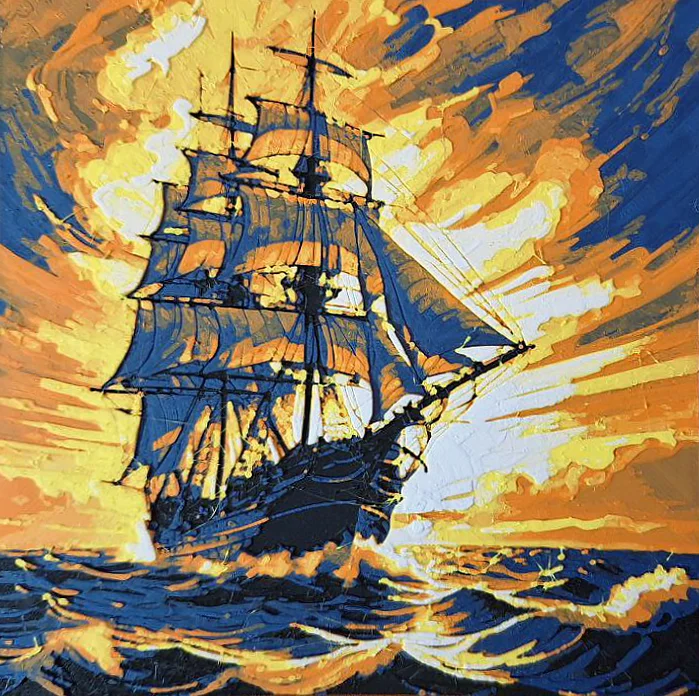
Hueforge filament painting (5 colors) of a 19th-century clipper.
The photo shows an actual print of the model (scaled down to 130x130mm).
I like the more cartoon-ish look when printed with matte filaments - you will get smoother transitions with non-matte filaments.
For this print I used the following filaments:
Other filaments that I have tried also worked well... experiment with what you have!
The following PLA filaments also work great:
How to print:
The original STL is 200 x 200 mm. If you want to scale it down, please scale only X and Y - do not scale z (height).
Print with a layer height of 0.04mm and a first layer at 0.24mm. 100% infill (aligned rectilinear), 0.4mm nozzle. I recommend the slicer/speed settings from this Youtube video by the maker of Hueforge:
https://youtu.be/CGS7Adhyz2w?t=348
As usual, first slicing can take quite a while (> 2M triangles).
ByCodyMeyer_2545340Likes163Downloads724

 ByDrewmundLikes833Downloads4.6K

 ByFastRaccoon_718321Likes461Downloads1.5K

 Bykallekubinsk_3569049Likes37Downloads186

 Byr_squared_1123188Likes89Downloads198

 ByMrCoolGaming_2947996Likes47Downloads175

 Bybychr1s_568275Likes243Downloads187

 ByCederbLikes32Downloads185

 ByTomYumLikes33Downloads159

 ByvexanixLikes168Downloads1.3K

 ByIvoLikes196Downloads1.1K

 ByAllenM_581301Likes40Downloads139