



Còi Tàu Hơi Nước Mini
 ByfifindrLikes500Downloads4K
Build another version of this model.
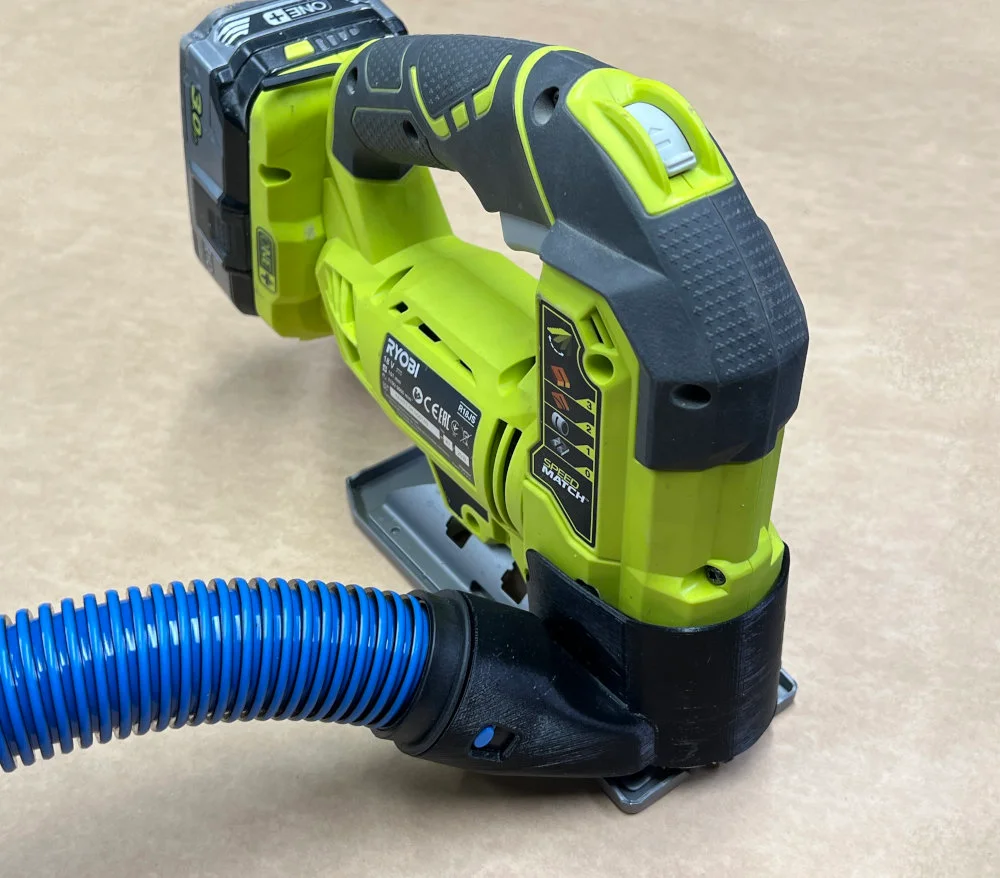
Adapter for connecting a Cen-tec Quick-Click dust extraction hose to your Ryobi R18JS Jig Saw. It might fit the other jigsaw they make, but it is not tested.
Prints well standing flat on the bed. It needs support and since the “shield” is thin you might need a brim. The print needs to be strong, 4 perimeters will make it almost completely solid. It might be fine printed with PLA, but will benefit from a stronger material like PC-Blend.
The jig saw don't have good places to attach a dust extraction so it might be tricky to mount.
ByfifindrLikes500Downloads4K

 ByVC_DesignLikes679Downloads3.6K

 ByDan Schwartz SchwartzLikes744Downloads3.4K

 Bychubbs8697_2027893Likes585Downloads1.7K

 Byquibeck_3353173Likes965Downloads1.9K

 ByJPMakesStuffLikes80Downloads346

 ByteookieLikes297Downloads293

 ByRungeKuttaLikes229Downloads1.2K

 ByEadubsLikes228Downloads1.3K

 ByJeremyVillalo_760366Likes68Downloads767

 ByZED4EverLikes313Downloads5.2K

 Bysaiganesh_pan_830533Likes65Downloads154