



Pumpkin – Bộ 12 Jack-o'-lantern Halloween nắp tháo rời
 ByAJK_129752Likes77Downloads638
Build another version of this model.
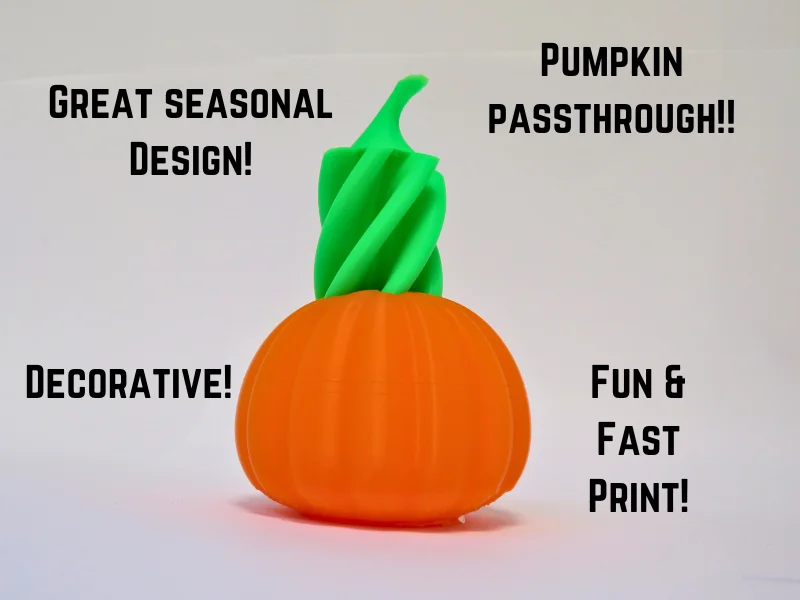
This is a great model that is really fun to use and print! I really enjoy this model because of all the decorative features it has and the all around great look! Its a very easy print especially if the right settings are applied!
I would definitely make sure to use a good color scheme. For example, print the pumpkin orange and the vortex part green. Then the colors contrast each other to have a great look! Or another option would be to print the pumpkin orange and the inner part your would print most of it orange then insert a color change near the top and print the top part green! That would be a very great looking model to use and print! 🎃
Make sure to check out my patreon page! If you join for free you can receive (free) exclusive models only on my patreon! Also have access to more updates, polls, requests, and many other things! [My Master Printer Patreon](https://patreon.com/MasterPrinter?utm_medium=unknown&utm_source=join_link&utm_campaign=creatorshare_creator&utm_content=copyLink)
Here I have a collection of vortex models made by me! Enjoy! Impossible Vortex Passthroughs
Print Settings:
Infill: Pumpkin- 10%-75%… Vortex- 0%-10%
Infill Type: Gyroid
Layer Height: Standard
Brim: If you have a Smooth PEI sheet your more likely to have adhesion issues, but don't worry because the brim is extremely easy to remove of this.
Supports: NO, as long as you have a well calibrated printer, you'll be fine.
Filament: PLA
Advanced Setting: Also, if you want a better turnout for your print, and your using prusa slicer, got to ‘print settings.' Then go to ‘advanced settings’ and navigate down until you reach ‘XY Size Compensation.’ There turn it down to ‘-0.1’, this will help improve the print tolerances even further. 🤓
Happy printing!
ByAJK_129752Likes77Downloads638

 ByFlorianProchn_367378Likes180Downloads541

 ByLayerModels_505486Likes39Downloads106

 ByCaroCell_213946Likes26Downloads37

 ByCrazy3DLikes321Downloads1.1K

 ByTotallyRidiculousLikes30Downloads105

 BydiesimLikes321Downloads1.3K

 BymeafdesignsLikes445Downloads1.2K

 ByTigFur_454218Likes26Downloads218

 ByMadMaxLikes185Downloads795

 ByncsandorLikes122Downloads712

 ByTripleGWorkshopLikes9Downloads31