



Bộ xúc xắc khổng lồ (Complete Giant Dice Set)
 BybobmakesLikes4.3KDownloads16K
Build another version of this model.

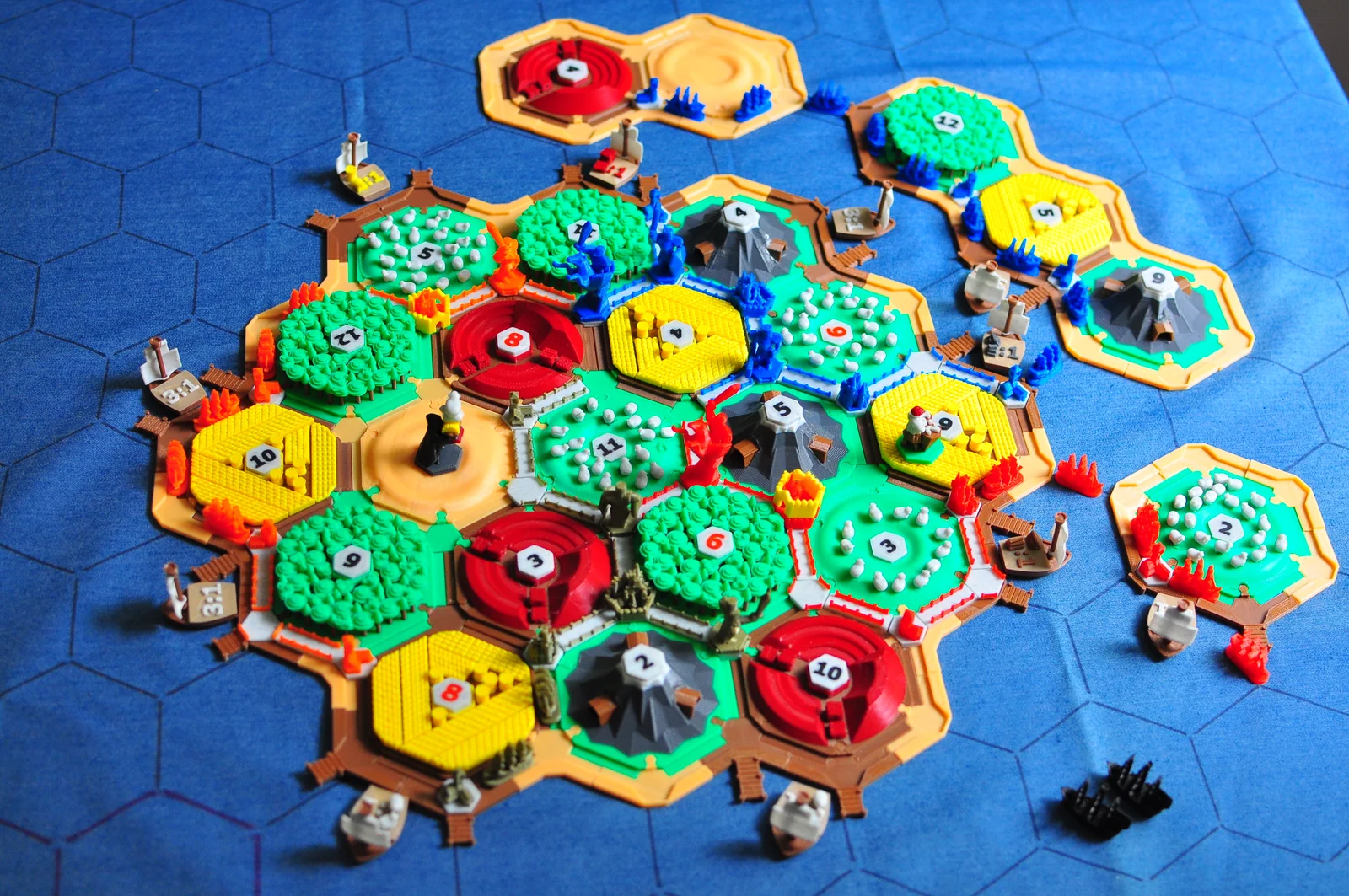
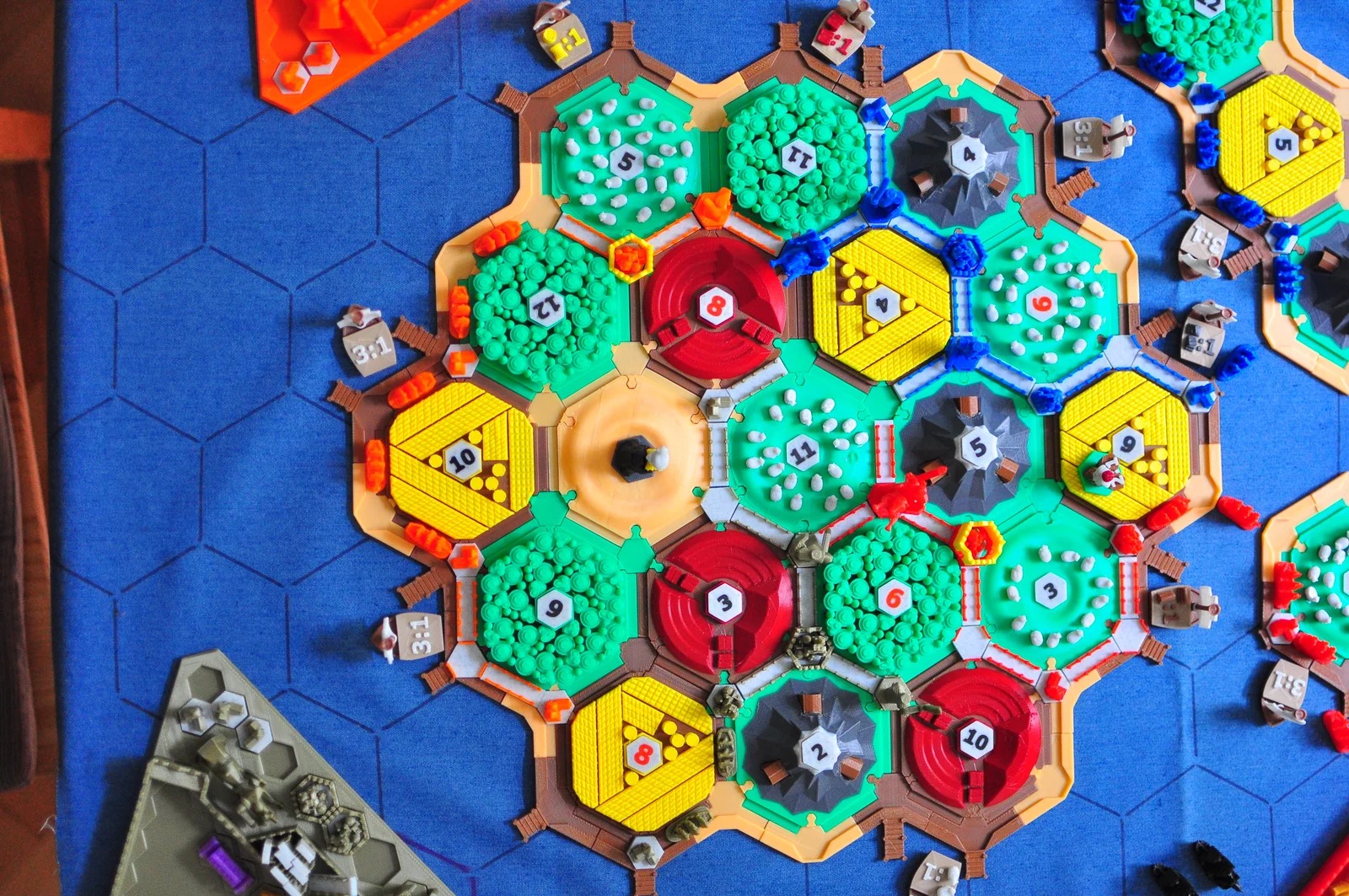
Catan is one of my favorite board games of all time, and even thou there are already plenty of version of 3D printed Catans out there, I really wanted to make my own. I found a lot of inspiration and I have remixed a lot of designs that I found online, but at the same time I designed a large portion of models, so I will try to provide as much references as possible in this description.
My main goal with this design was to relay on color change command (M600, but I prefer to use M600 {if layer_height<100}Z100{endif}, since it gives you 100mm of Z offset while you are changing filament so that you can clean the nozzle more easily etc.). I found a lot of nice designs online, but almost all of them relayed on you printing models in white and then paining them with the colors you like.
I have also designed all parts to have 0.3mm fit offset so that you don't have to use XY Size Compensation in order to make things fit. Most models do not require any supports. I used SuperSlicer for most of the prints since it is based on PrusaSlicer and it has a lot of nice features that are still not available on PrusaSlicer. I also wanted to try out non-planar printing technique on some models, so I used this Slicer for those models (more on this bellow). In case anyone is interested I could also provide .3mf files for SuperSlicer prints.
lets get to the models!
Lets talk about non-planar slicing. I really find this the most exciting way to 3D print, so I wanted to try it out on my desert model. I set up this Slicer on my ubuntu machine and the results were phenomenal. There are plenty of instructions online on how to do this, and if anyone is interested I would also be willing to help them out with some problems that I managed to overcome. I have also tried to integrate the non-planar functionality into the SuperSlicer and PrusaSlicer, but this work is not finished yet.

For sheep fields, I printed the sheep pieces separately (~15 per field), applied some heat to the field with an soldering hot end and fused the sheep to the field.

Bricks, Wheat, Woods and Ore - These are fairly straight forward for printing. They are designed for an easy color change as you can see bellow:

Classic
C & K
Seafarers
Total
3-4
5-6
3-4
5-6
3-4
5-6
Desert
1
+1
+2
+1
5
Brick
3
+2
+2
7
Sheep
4
+2
+1
7
Ore
3
+2
+2
7
Wheat
4
+2
+1
7
Wood
4
+2
+1
7
Joints
36
+28
64
In order to print these simply load the model in your PrusaSlicer, position it where you like, click on: Split to Objects (it should make 2 objects) and deactivate the main body (should be the first object, do not delete it!). The other object is the number. You should be able to see something like this when looking at the plate from underneath:

You can go ahead and print this in a filament color you like at a first layer height of 0.2mm. Make sure that you don't turn off the heat-bed at the end of printing and don't remove letters from the heat-bed! Once this first print has finished, change the filament to a different color, and in slicer, deactivate the number object and activate the main body object. Keep the first layer height at 0.2mm and print the main body. The following is the result:

Classic
C & K
Seafarers
Total
3-4
5-6
3-4
5-6
3-4
5-6
Numbers
18
+10
+10
38
These boats are another example of how color changes can be very cool. I also introduced a single layer of a relatively transparent material in order to make a distinction between brown colors. Print sails for boats with brim since they are very fragile at the base:

I also like to print the mast horizontally for strength. The final results look like this:

Classic
C & K
Seafarers
Total
3-4
5-6
3-4
5-6
3-4
5-6
Port In
6
+8
+some
+some
14+
Port Out
12
+12
+some
+some
24+
Beach In
6
+8
+some
+some
14+
Beach Out
6
+6
+a lot
+some
12+
Boats
9
+1
+some
+some
10+
These are simple to print, and with the exception of Knight, you wont need any supports for these.

Knights have been designed so that the sword position indicates weather they are active in the game. These are the only pieces that need supports.

I have also design a holder for all pieces together with a box.


City Development pieces indicate how far you have progressed in the development of your city in Science, Politics and Economy. Add them inside the walls on the holder in order to mark that you bought them:

(per player)
Classic
C & K
Seafarers
Total
3-4
5-6
3-4
5-6
3-4
5-6
Village
5
5
City
4
4
Road
15
15
Crossroads
7+
7+
Walls
3
3
Knights
6 (2 each level)
6
City Improvements
1 of each
15
Boats
15
15
Again, simple pieces to print and with a box:


Classic
C & K
Seafarers
Total
3-4
5-6
3-4
5-6
3-4
5-6
Brick
20
+5
25
Sheep
20
+5
25
Ore
20
+5
25
Wheat
20
+5
25
Wood
20
+5
25
Books
12
3
18
Coin
12
3
18
Cloth
12
3
18
Bandit is printed with 2 parts, so that you can play with even more layer changes (Merchant too :))

Just an indicator of how much each thing costs in Catan. Print it in the same way as number tokens but with even more colors :)

I look forward to adding more to this design including more detailed descriptions on how to print!
Thanks a lot for checking out my design and I hope you have fun printing it and playing it with your friends :)
BybobmakesLikes4.3KDownloads16K

 Byewr2sanLikes208Downloads825

 Byrezips_533396Likes52Downloads398

 ByJoe_84156Likes38Downloads246

 ByGraFabLabLikes0Downloads13

 By3DVision1_3962855Likes2Downloads11

 ByMZ4250Likes147Downloads922

 ByGabrielGuaran_808519Likes22Downloads152


 By3d-eLikes0Downloads107

 ByFishManooo_1312296Likes172Downloads593

 ByYuri_13983Likes24Downloads124