



Thằn lằn cử động linh hoạt - In tại chỗ (Không cần support)
 Bycream110_291842Likes924Downloads7.7K
Build another version of this model.
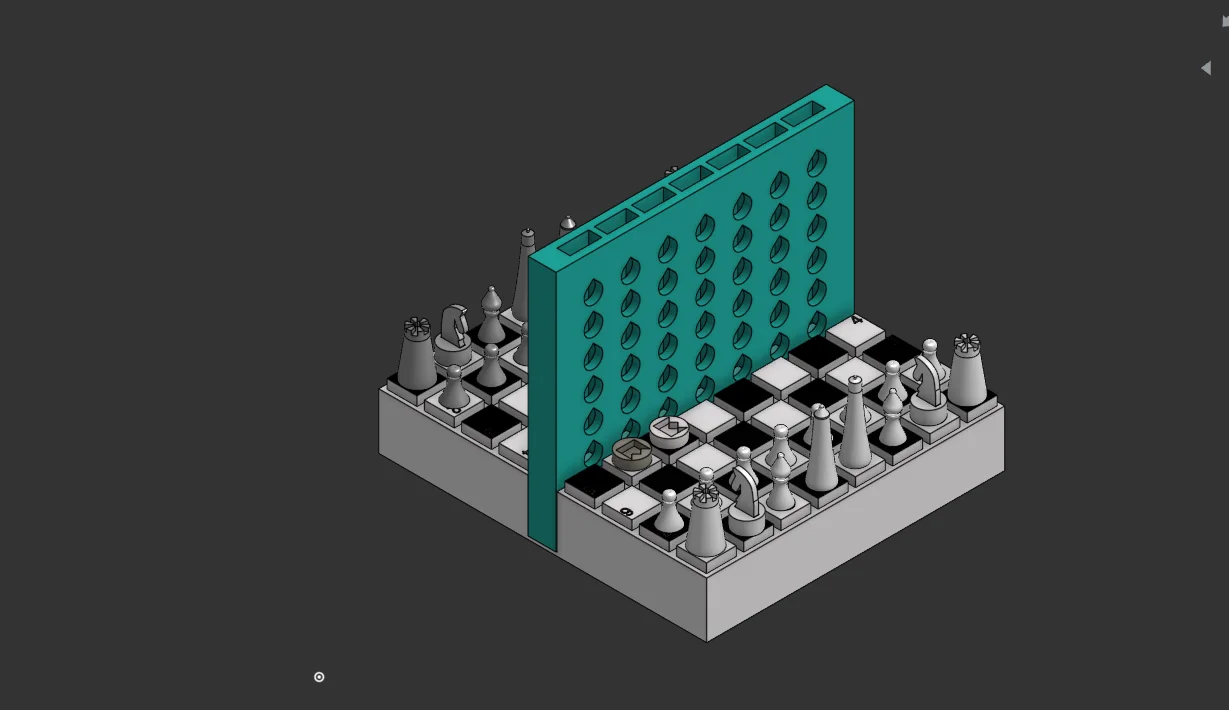
READ THIS BEFORE PRINTING THIS MODEL - This model is printable on the Bambu Lab A1 MINI in 2 prints while for others it can be done in a single print. If you are printing with a printer other than the A1 Mini then print NON-A1M PRINTERS [SINGLE PRINT PLATE] model file whereas if you are using the A1 Mini then print the FOR A1M PRINTERS (1) [PRINT PLATE 1] followed by FOR A1M PRINTERS (2) [PRINT PLATE 2] and you should be good to go.
NOTE: Only the white pieces (which only includes a single pawn, a single bishop, a single rook etc) and a black checkers' disc and a white checkers' disc have been uploaded to the main print files. These are only for saving filament while testing demos but for a real game you must print more of these pieces which can be found in the EXTRA PIECES and EXTRA CHESS PIECES files.
Whichever path you take, after printing, you will be left with:
1. Chessboard
2. Two discs with king symbols engraved into em
3. A single set of chess pieces
4. A connect 4 board
5. A disc with a rectangular slot in it
6. A knight-like flat solid
ASSEMBLY:
1. Take the connect 4 board and insert it into the male slots of the chessboard which will be approximately in the centre region
2. Take the knight-like solid chess piece and insert it into the disc with a rectangular slot
3. These are supposed to be press-fits, and after this ur good to go!
HOW TO PLAY
At the beginning of the game use the checkers disc (with the crown engraved) to toss, regardless of the game you will be playing with the other person. Whoever wins gets to choose white i.e go first in all Chess and Checkers and Connect 4 and Battleship.
1. CHESS
The winner of the toss chooses white and then the game proceeds as normally using the chess pieces. The other person gets to choose co-ordinate priority i.e which side of the chessboard's row numbers will be followed, since theres a mismatch between either sides, which is obv for a reason. You might want to print Extra Chess Pieces 3mf file from model files to proceed with the game as the project only has a single set of chess pieces to save filament for the demo.
2. CHECKERS
The winner of the toss gets to choose white and the co-ordinate priority system also follows here. Here you use the discs with king symbol face down and when a piece kings i.e reaches the end of the board you just flip the disc over to show the piece is now a king.
3. CONNECT 4
Connect the board, and proceed just like any connect 4 game ever with the same discs. The toss winner gets the first turn.
4. BATTLESHIP
Connect the connect 4 board to create a visual barrier or use any other household object for the same in the central ridge. Place your discs king engraving up in ur halves of the board just like you would place your ships, in order. For example line up two discs crown up vertically or horizontally to resemble the Destroyer 3 for the Cruiser etc. Then both players call out their moves using the co-ordinate system [Row number on their right preceded by the column letter, for eg if the row number on their right reads 2 and the column is H they call H2!] and the opponent calls out MISS or HIT. If its a hit they flip the disc over to crown side down to show that square has been hit. In this version, the players must remember their own moves to prevent wasting turns so it becomes more than just a game of a luck and strategy - a game of memory too!
Bycream110_291842Likes924Downloads7.7K

 ByOnemoredaveLikes861Downloads6.9K

 Byjs14581_2767550Likes118Downloads3.3K

 Byquibeck_3353173Likes351Downloads2.1K

 ByTheMakerStuffLikes315Downloads1.9K

 ByGoolow_295072Likes598Downloads1.6K

 ByMikWantecLikes264Downloads1.5K

 BySzvmkn_3779340Likes231Downloads1.3K

 ByHacker Man ManLikes248Downloads1.5K

 Bycentarico_3241219Likes257Downloads973

 Byfluffytails37Likes184Downloads767

 ByAristotelisNellasLikes18Downloads703