



INDX Calibration Cube(s)
 ByswimLikes0Downloads110
Build another version of this model.
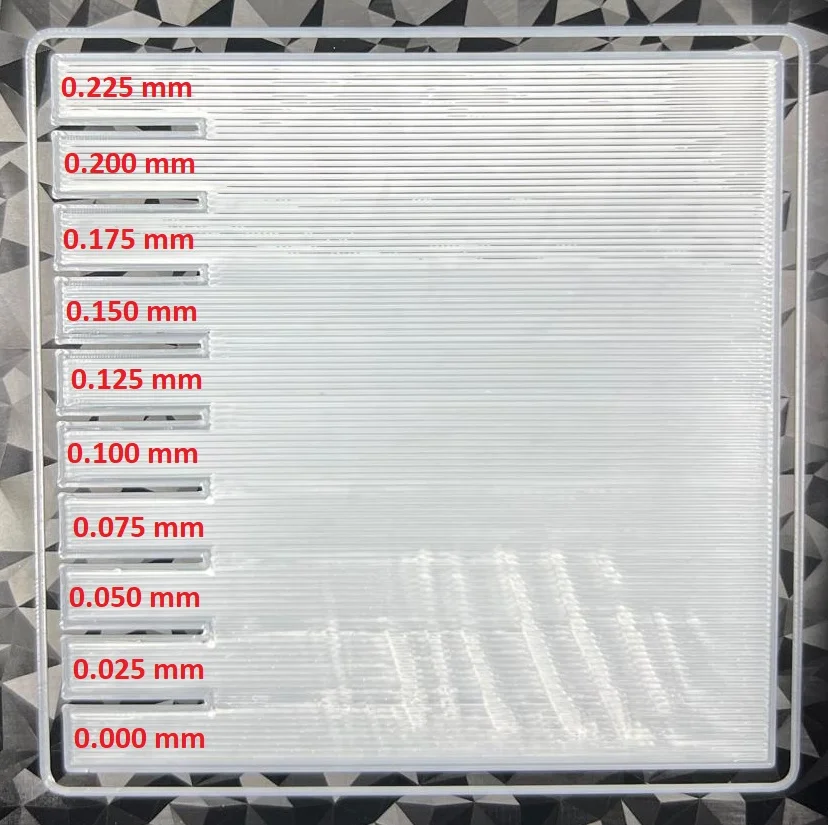
The model consists of 10 sections separated by small indentations on one side, allowing enough time to manually adjust the Z offset between sections. This also makes it easier to identify the different sections later.
Use 1 Wall.
Set the infill direction to 0 degrees so that the lines will be printed horizontally.
Lighter filament colors make it easier to observe the results.
In the attached test case, the Z offset ranges from 0mm to 0.225mm, with increments of 0.025mm. At lower Z offsets, the nozzle is too close to the bed, resulting in rough surfaces and ridges. At higher Z offsets, the nozzle is too far from the bed, causing the lines to be separated.
ByswimLikes0Downloads110

 ByKRYS_3DLikes8Downloads49

 Bytinx_1344834Likes1.2KDownloads6K

 Bygafyx3dLikes0Downloads125

 BylaserbaconLikes0Downloads175

 By3d-mmakerLikes0Downloads119

 Bynadir-cn3dLikes0Downloads117

 ByHrstWrst_493142Likes2Downloads13

 BytheodorLikes0Downloads148

 Byprusa-researchLikes0Downloads2.7K

 ByteteomatLikes0Downloads140

 ByFonnPrintsLikes4Downloads26