




New
Pocket-Size Third Hand Mini Spring Loaded Vise
 ByrjunLikes0Downloads299
Build another version of this model.
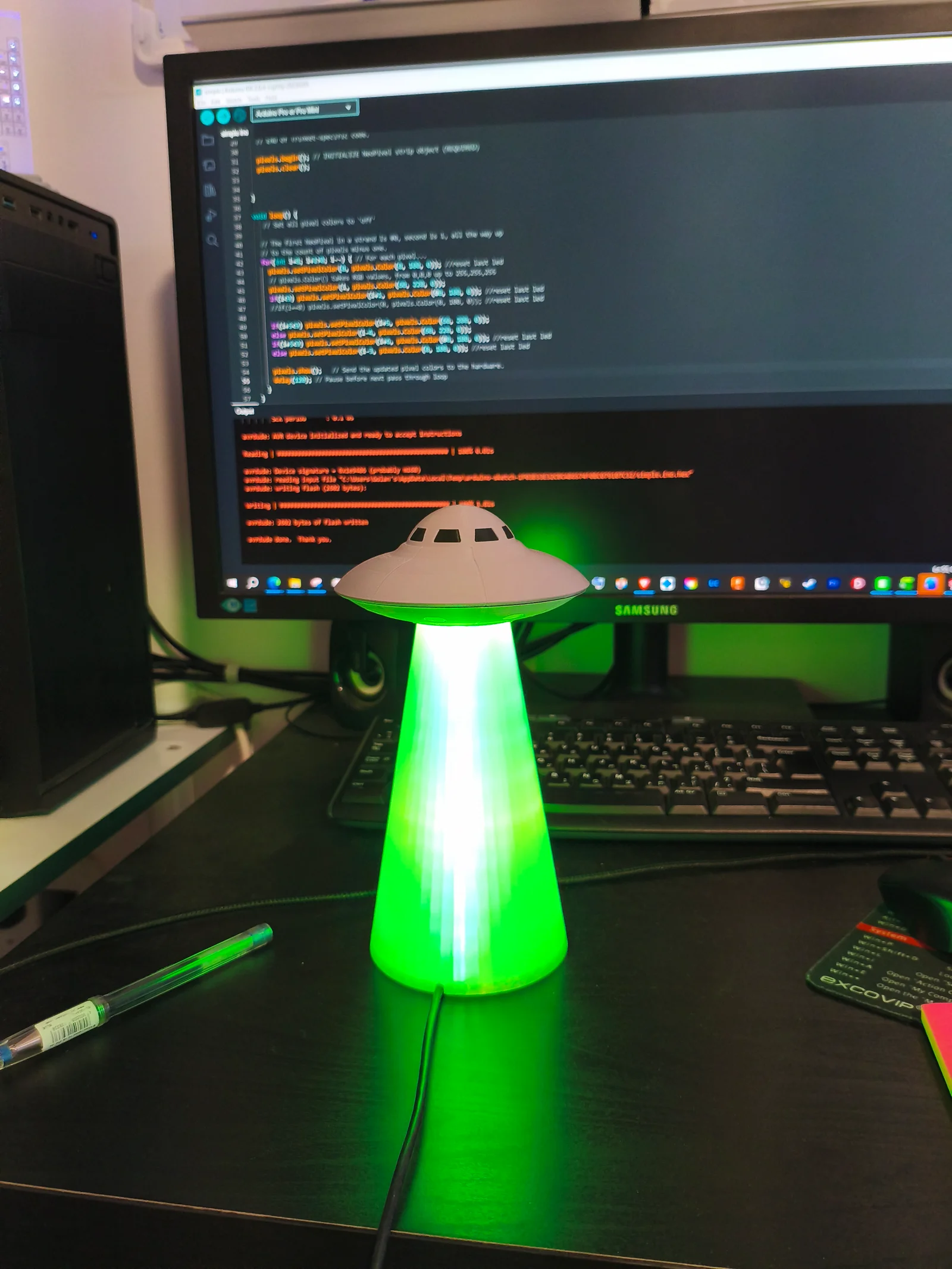
UFO lamp using Arduino and WS2812B LED
To build this you need:
1 Arduino pro mini
3 WS2812B LED strip, 60LEDs/meter, each with 9 LEDs
The UFO closes with 10*2mm magnets or you can just glue the 2 halves together.
Connect the data pin of the three LED strips together to pin 11 on the Arduino.
----------------------------------------------------
Arduino code
----------------------------------------------------
// Adafruit NeoPixel library
#include <Adafruit_NeoPixel.h>
#ifdef AVR
#include <avr/power.h> // Required for 16 MHz Adafruit Trinket
#endif
// Which pin on the Arduino is connected to the NeoPixels?
#define PIN 11
// How many NeoPixels are attached to the Arduino?
#define NUMPIXELS 9
Adafruit_NeoPixel pixels(NUMPIXELS, PIN, NEO_GRB + NEO_KHZ800);
void setup() {
// These lines are specifically to support the Adafruit Trinket 5V 16 MHz.
// Any other board, you can remove this part (but no harm leaving it):
#if defined(AVR_ATtiny85) && (F_CPU == 16000000)
clock_prescale_set(clock_div_1);
#endif
// END of Trinket-specific code.
pixels.begin(); // INITIALIZE NeoPixel strip object (REQUIRED)
pixels.clear();
}
void loop() {
for(int i=8; i+1>0; i--) {
pixels.setPixelColor(0, pixels.Color(0, 100, 0)); //reset last led
//First wave
// pixels.Color() takes RGB values, from 0,0,0 up to 255,255,255
pixels.setPixelColor(i, pixels.Color(60, 220, 0));
if(i<9) pixels.setPixelColor(i+1, pixels.Color(00, 100, 0)); //reset last led
//Second wave
if(i+5<9) pixels.setPixelColor(i+5, pixels.Color(60, 200, 0));
else pixels.setPixelColor(i-4, pixels.Color(60, 220, 0));
if(i+5<9) pixels.setPixelColor(i+6, pixels.Color(00, 100, 0)); //reset last led
else pixels.setPixelColor(i-3, pixels.Color(0, 100, 0)); //reset last led
pixels.show(); // Send the updated pixel colors to the hardware.
delay(120); // Pause before next pass through loop
}
}
ByrjunLikes0Downloads299

 ByleonicLikes0Downloads1.4K

 ByZED4EverLikes313Downloads5.2K

 ByVC_DesignLikes271Downloads755

 Bywibot-3dLikes0Downloads516

 BymiceciczeLikes0Downloads593

 ByfifindrLikes500Downloads4K

 Bymrfixit_324954Likes65Downloads476

 Bylab-96Likes0Downloads104

 ByDan Schwartz SchwartzLikes744Downloads3.4K

 ByBrokentooth_designsLikes83Downloads450

 Byvc-designLikes0Downloads3.2K