


Mẫu gảy đàn Guitar (Guitar Pick) in 3D tùy chỉnh độ dày
 ByWolf_115355Likes513Downloads8.4K
Build another version of this model.
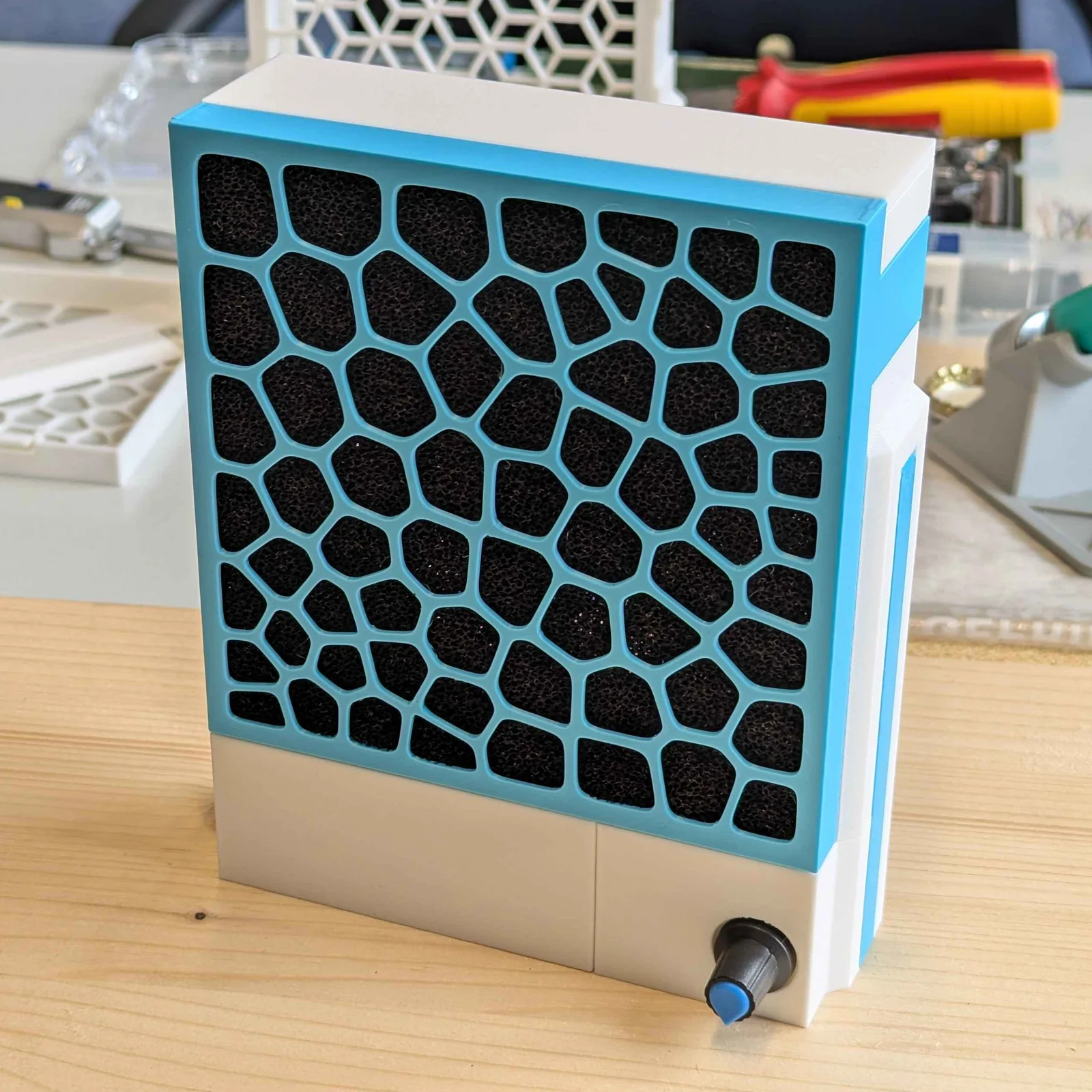
This is a simple modular solder fume extractor using readily available parts and minimal soldering. It is powered via USB-C and has a speed controller.
I got my parts from Amazon Germany, but they should be available everywhere on AliExpress.
Part
Amazon DE link
120mm PWM-controlled fan
https://www.amazon.de/-/en/gp/product/B0DJDDCG4M
USB-C 12V PD trigger module
https://www.amazon.de/-/en/gp/product/B0D9NSC3QP
PWM fan speed controller
https://www.amazon.de/-/en/gp/product/B0D8PRTCV7
Activated carbon filter
https://www.amazon.de/-/en/gp/product/B0DSP7FR11
PWM fan extension cable (optional)
https://www.amazon.de/-/en/gp/product/B09SKYRB3V
Additionally, you'll need a USB-C charger capable of delivering 12V, a soldering iron, two short wires, and solder wire.
Parts have been oriented for printing
30% Gyroid infill
0.3 layer height
Supports recommended. Omitting them for the honeycomb pattern specifically should be fine
Soldering first. Diagram:
Optionally, plug in the fan and test if everything works
Insert electronics into PSU box. Remember to screw down the potentiometer of the speed controller
Plug the PWM extension cable into the speed controller
Put the PSU lid onto the PSU box. Inserting the side with the long clipper first helps. Make sure to route the extension cable through the hole on the left side
Insert the fan into the fan box. Make sure to pull the fan's PWM cable through the rectangular hole on the right side first
Connect the fan's PWM cable with the PWM extension cable sticking out of the PSU box
Slide the cable box onto the left side of the PSU box
Cram the excess cable into the cable box. Route the cable over the notch on the PSU lid
Place the fan box on top of the bottom assembly. Make sure not to accidentally squish the PWM cable
Slide the sliders into the grooves on the sides. Make sure you use the slider with the cutout on the side with the cable
Put the fan box lid on top of the fan box
Insert the activated carbon filter into the filter cover. If your filters are too large, you might need to squish them. If they are too small, you might want to print shims to hold them in place
Clip the filter cover onto the fan box
Congrats, you're done
While a PC fan is usually good enough, it's worth considering replacing it with a more capable fan, like the Noctua NF-F12 iPPC. I haven't personally tested this, but it should fit into the fan box without any modifications.
The sliders are meant to be replaced to extend functionality without reprinting anything else. You could make sliders with a big foot for better stability, or ones with a swivel in the middle for better air direction.
ByWolf_115355Likes513Downloads8.4K

 ByZED4EverLikes313Downloads5.2K

 ByVC_DesignLikes271Downloads748

 ByfifindrLikes500Downloads4K

 Bymrfixit_324954Likes65Downloads471

 ByDan Schwartz SchwartzLikes744Downloads3.4K

 ByBrokentooth_designsLikes83Downloads446

 ByUpcrid3D_1585693Likes808Downloads2.1K

 ByAdam Záhořák ZáhořákLikes39Downloads250

 ByWilko_SLOLikes935Downloads2K

 Bychubbs8697_2027893Likes585Downloads1.7K

 Byquibeck_3353173Likes965Downloads1.9K