



Dino Snack Clip - Kẹp miệng túi hình khủng long siêu đáng yêu
 ByTommy3DLab_2023125Likes636Downloads2.5K
Build another version of this model.
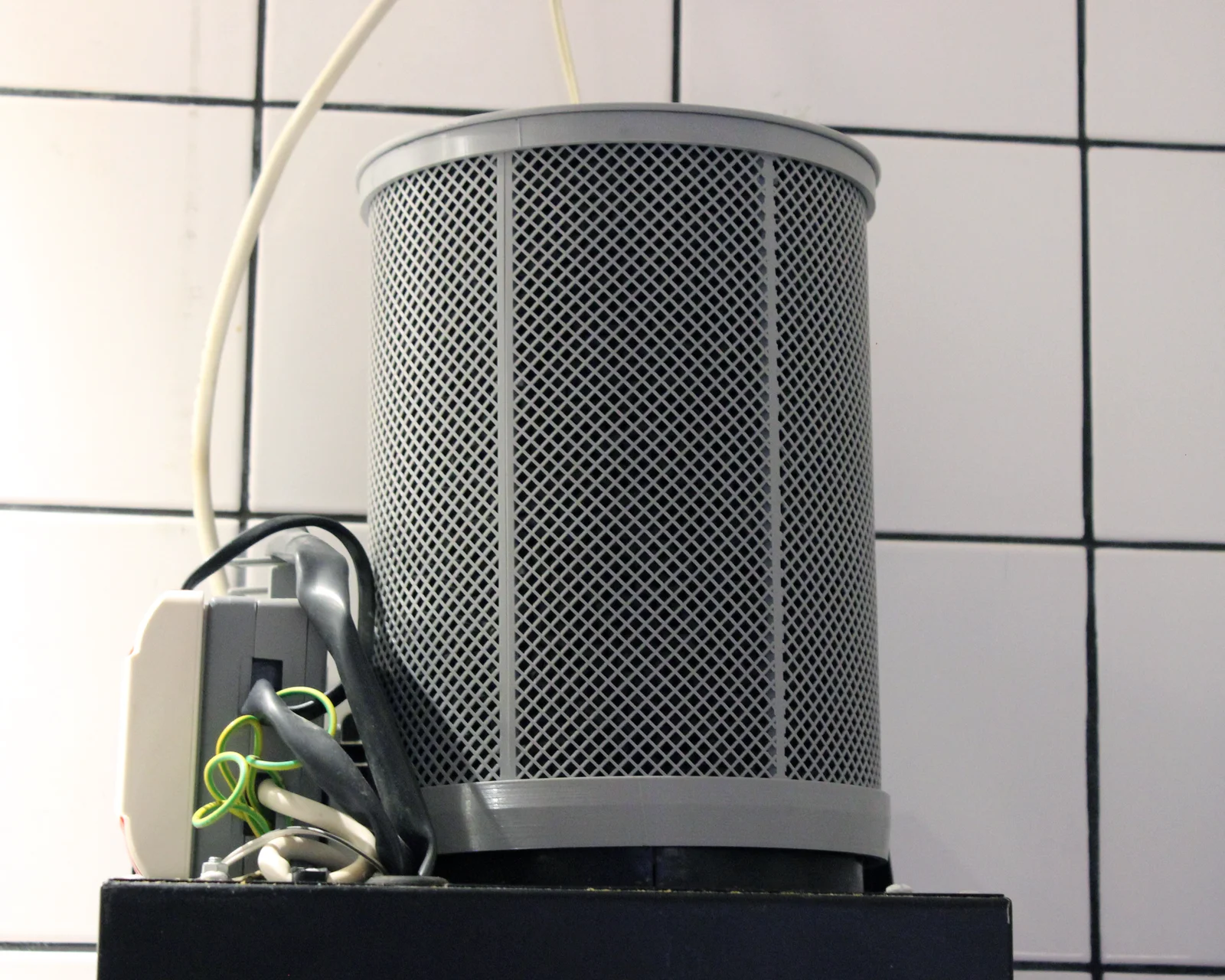
The filter fits on top of a 150 mm exhaust pipe and holds ~350 g (~0.7 l) activated carbon pellets (4 mm diameter). It is printed from PETG.
An accessible print bed area of at least 220x200 mm is required if the "Outer mesh (small bed)" model is used. For the standard "Outer mesh" model, a bed area of 250x200 mm is required.
Onshape CAD project: https://cad.onshape.com/documents/612c5982591ffb8612258f40/w/41888351bdc14d1af8645851/e/d516c0d2ddaf5545494accb8
When replacing the filters in my kitchen hood I realized it uses proprietary cartridges that hold only a tiny amount of carbon pellets and are ridiculously expensive to replace. I decided to get rid of them and print a cage that can be refilled with pellets. I found a previous filter cage model here on printables, but did not like the idea of printing a thin standing mesh as it would likely end up quite brittle. The model would also run a high risk of severe stringing or print failure, especially when using tricker filaments to print than PLA. While PLA would probably work fine in this application I think PETG is preferable as it has better resistance to heat, moisture and grease.
My design is inspired by the previous example, but the mesh is printed separately, laying flat on the print bed. The mesh parts have integrated ribs to provide stability and are bent into their final tubular shape when installed in the rigid parts. The parts are connected through push-fits, without glue or any additional material. Printing the cage in several parts does add some printing and assembly work, but I believe it is a worthwhile trade-off to get a sturdy cage that can printed easily from PETG.
All parts are printed from PETG. No supports are required. I used a Qidi Q2 with a smooth build plate and a 0.4 mm nozzle, but a textured plate is probably also OK. Print the following parts quantities:
1x Bottom
1x Top
1x Lid
2x Inner mesh
2x Outer mesh
12x Clip
If your bed too small for the standard "Outer mesh". Instead print 3x "Outer mesh (small bed)" and a total of 18 clips.
Bottom, Top, Lid and Clips can be printed with standard settings and self explanatory orientations. Some slicer trickery is required to print the meshes efficiently. We will utilize the sparse infill feature to generate the mesh. I have included instructions for Orca slicer below. I believe the procedure is identical in Prusa slicer, Bamboo studio, etc.
Add the mesh model, right click it, and select Split -> To parts.
Select the mesh parts and set their Only one wall on top surfaces = false, Top/Bottom shell layers = 0, Wall loops = 5. This will expose the sparse infill and leave a solid edge around the mesh.
Select the rib parts and set their Wall loops = 10.
Then, we will setup the sparse infill in the global process settings. The infill density required to generate a sufficiently tight mesh will depend on your Sparse infill line width (mine was 0.45 mm). I suggest that you add a 4 mm diameter cylinder primitive to the build plate to verify that your sliced mesh is tight enough. I used Grid infill, Density = 22%, Fill multiline = 1. This worked alright. However the grid lines in a layer will cross over each other, which creates weak points in the mesh. The weak points will be more severe at higher print speeds. I suggest that you use infill Honeycomb pattern, Density 22%, Fill multiline = 1 instead. The honeycomb pattern has continous lines that do not cross over, but takes longer to print. Your sliced mesh model should look something like this.
Insert inner mesh halves into the bottom ring.
Slide 4 clips onto the split ribs on either side of the mesh to secure them. Space the clips evenly over the rib.
Insert the outer mesh halves into the bottom ring. Then snap the split ribs into the clips by pressing.
Slide clips onto the top ends of the clip-free ribs. These will stabilize the ribs to simplify fitting the top ring.
Install the top ring by fitting the meshes into their sockets and finally pressing the assembly together.
Fill the cage with pellets and place the lid on top. Vacuum clean the outside of the mesh to remove carbon dust. Then install the filter!
If "Outer mesh (small bed)" is used. The inner and outer mesh joints won't match and additional clips will be needed to secure them. In this case the assembly procedure will not match the images.
ByTommy3DLab_2023125Likes636Downloads2.5K

 BybobmakesLikes2.5KDownloads17.5K

 Byquibeck_3353173Likes1.5KDownloads11.5K

 ByTony Bullard BullardLikes465Downloads673

 Byeli_667847Likes171Downloads364

 ByRMJourney_762911Likes140Downloads361

 ByKickin_Prints_525470Likes62Downloads348

 ByMateuszTokarzLikes46Downloads294

 Bymoleculecrtr_1215658Likes544Downloads2K

 ByJanStecha_4316168Likes90Downloads235

 By178222178222_2484344Likes449Downloads1.7K

 ByEldordLikes499Downloads1.4K