

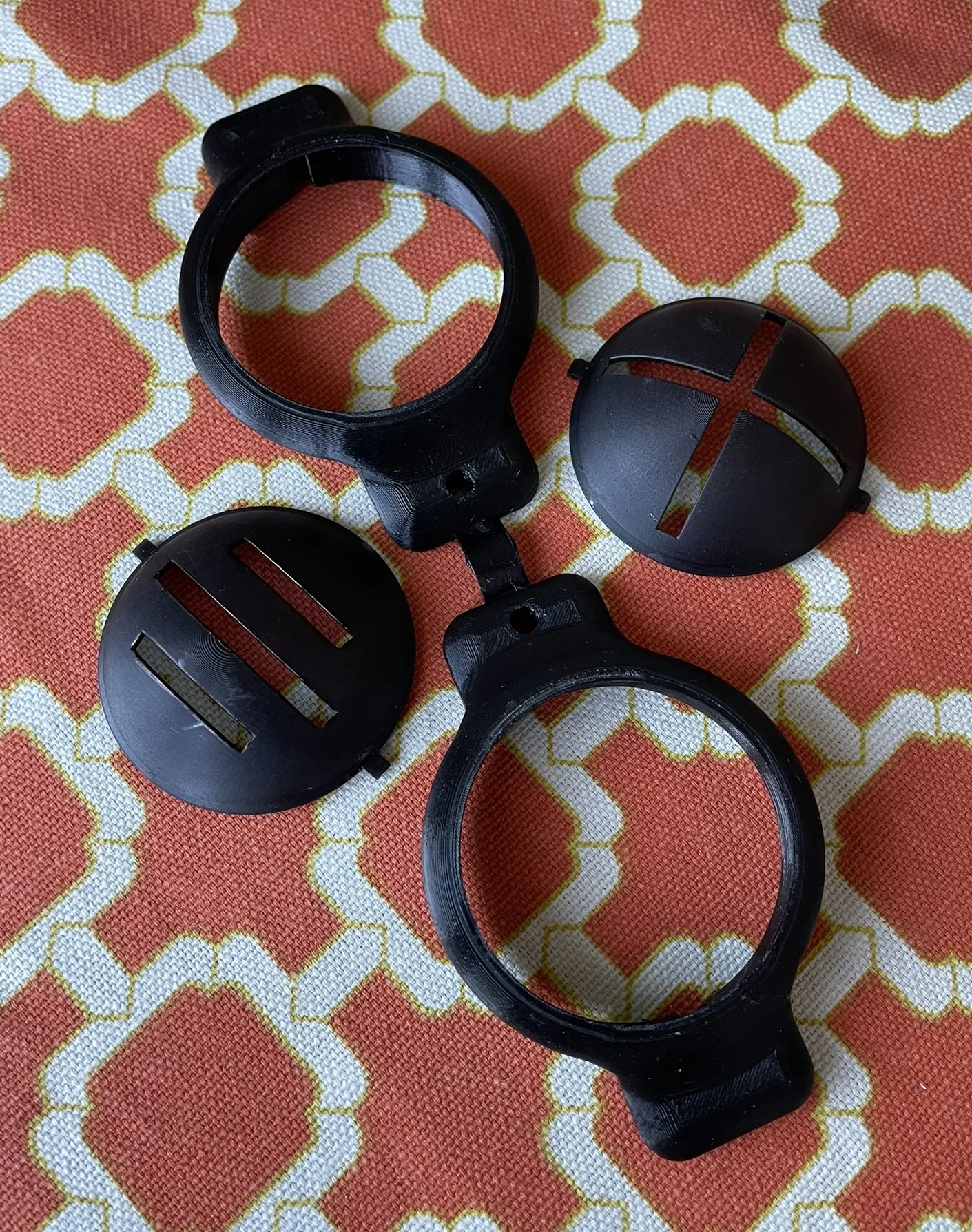


Kẹp giữ gậy golf cho túi đựng gậy
 ByCubaLibreee_2869176Likes125Downloads1K
Remix of Golf - Khuôn tô bóng golf - Holder - bản nam châm lộ & nam châm âm/che By PrintSphere
Build another version of this model.
For multi-filament printers version 3 of the magnetic golf ball stencil holder designed using Fusion 360 is made up of two ball holder halves connected with a flex hinge (requires a flex filament). When the two halves come together they are magnetically held in place using 8 6mm x 2mm magnets. Into each of the two halves different stencil inserts can be interchanged (see below links for different stencils).
For single filament FDM printers please use the Golf Ball Holder (V2a or b) model.
Usage
This model was extensively tested and tweaked over the course of a golf season and worked really well with a number of different inserts images.
Does not work for oversized Golf Balls (eg. Callaway Supersoft Max)
Recommend to use a fine and/or ultrafine Sharpie marker pen or Milwaukee 48-22-3100 Inkzall marker pen for insert stencil imagery. Can also be used with Golf Ball Spray Paint Holder Jig and either enamel/acrylic spray paint or airbrush acrylic paint
Can be used with the following stencil logo inserts.
Below is a photo of the majority of stencils (Grey resin SLA printed) that work with the Golf ball stencil holder.
Create your own stencil logo inserts using the stencil template that can be downloaded.
Video on how to insert stencils into the V3 Golf Ball Marker Holder
Assembly
8 6mm x 2mm magnets (available at Amazon.ca) need to be placed into preset holes during the pause in printing. I recommend marking the sides of the magnets with a sharpie marker to aid when placing the magnets into the slots so that they have the correct orientation to attract instead of repelling when the two halves are brought together.
optional lanyard (not part of the model) can be attached via the holes in the handle.
Printing Tips
Multi-filament FDM printer (eg PRUSA XL dual head) with the golf ball holder printed in PETG and the flex hinge printed in a flex filament (eg. TPU).
Requires a pause print at layer 16 (2.4mm) to allow magnets to be inserted.
Place model in slicer on print bed with inside of holder facing down (as per image)
Use painted snug supports (see image - blue) for TPU hinge and PETG ball marker holder underside wings.
Using PETG print settings it is recommended you add a modifier over TPU print area (see image - yellow zone) to slow speed of TPU print (20mm/s) versus PETG print area.
Recommend 0.2mm layer height, 2 perimeters with 10% infill for non TPU areas.
TPU areas set layer height to 0.1mm from 1.6mm to 2mm model height
Print file included is for PRUSA XL includes pause print, painted supports, print speed modifier for TPU, Version ID (text embossed on inside edge) and is set for PETG and TPU.
Model Learnings
The initial foray into using the Prusa XL multifilament with TPU and PETG.
Initial video creation, editing (Microsoft ClipChamp) and posting to Youtube
Support
If you are interested in the Anycubic Photon M5s Pro SLA printer (I use this one for the inserts) or other Anycubic printers and want to learn more please go to Anycubic Store. For $25 off use this CPMTPFIZJP coupon code at the Anycubic Store.
ByCubaLibreee_2869176Likes125Downloads1K

 ByMauroVanDerG_4110408Likes378Downloads2.7K

 ByHassanSalehLikes260Downloads2.1K

 ByXDr4g0nXLikes198Downloads818

 ByGerhard_48223Likes240Downloads462

 ByBillRichardsLikes32Downloads379

 ByKorriLikes60Downloads609

 ByJammers_2686377Likes7Downloads4

 ByTarzLikes28Downloads577

 ByMachaki_1134160Likes36Downloads363

 BySmokerJoker2020Likes9Downloads109

 By3DGearSupplyLikes26Downloads440