



Kẹp giữ sợi Filament
 Bytinx_1344834Likes1.2KDownloads6K
Build another version of this model.
; hack-fix: write fake slicer info here so that preprocess_cancellation can process.
; generated by SuperSlicer 1.5.0 on 2023-04-21 at 13:13:47
M84 E ; Disable E Motor for probe accuracy on direct drive systems
G90 ; Absolute positioning
M117 Warming Bed
M140 S[bed_temperature_initial_layer_single] ; Warm bed without wait for temperature
M117 Warming Hot-End at 150 celsius for avoid oozing
M104 S150
M117 Home XYZ axes
G28
M117 Calculating Z_TILT_ADJUST...
Z_TILT_ADJUST
M117 Waiting for bed temperature...
M190 S[bed_temperature_initial_layer_single]
M117 Warming Hot-End at 165 celsius
M104 S165
M117 Calculating Adaptive Mesh...
; Always pass ADAPTIVE_MARGIN=0 because Orca has already handled adaptive_bed_mesh_margin internally
; Make sure to set ADAPTIVE to 0 otherwise Klipper will use it's own adaptive bed mesh logic
BED_MESH_CALIBRATE mesh_min={adaptive_bed_mesh_min[0]},{adaptive_bed_mesh_min[1]} mesh_max={adaptive_bed_mesh_max[0]},{adaptive_bed_mesh_max[1]} ALGORITHM=[bed_mesh_algo] PROBE_COUNT={bed_mesh_probe_count[0]},{bed_mesh_probe_count[1]} ADAPTIVE=0 ADAPTIVE_MARGIN=0
M117 Adaptive Mesh Done.
...
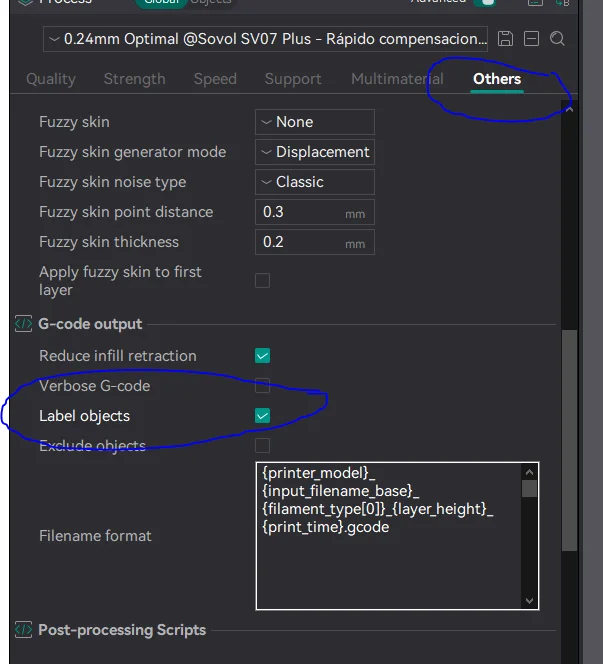
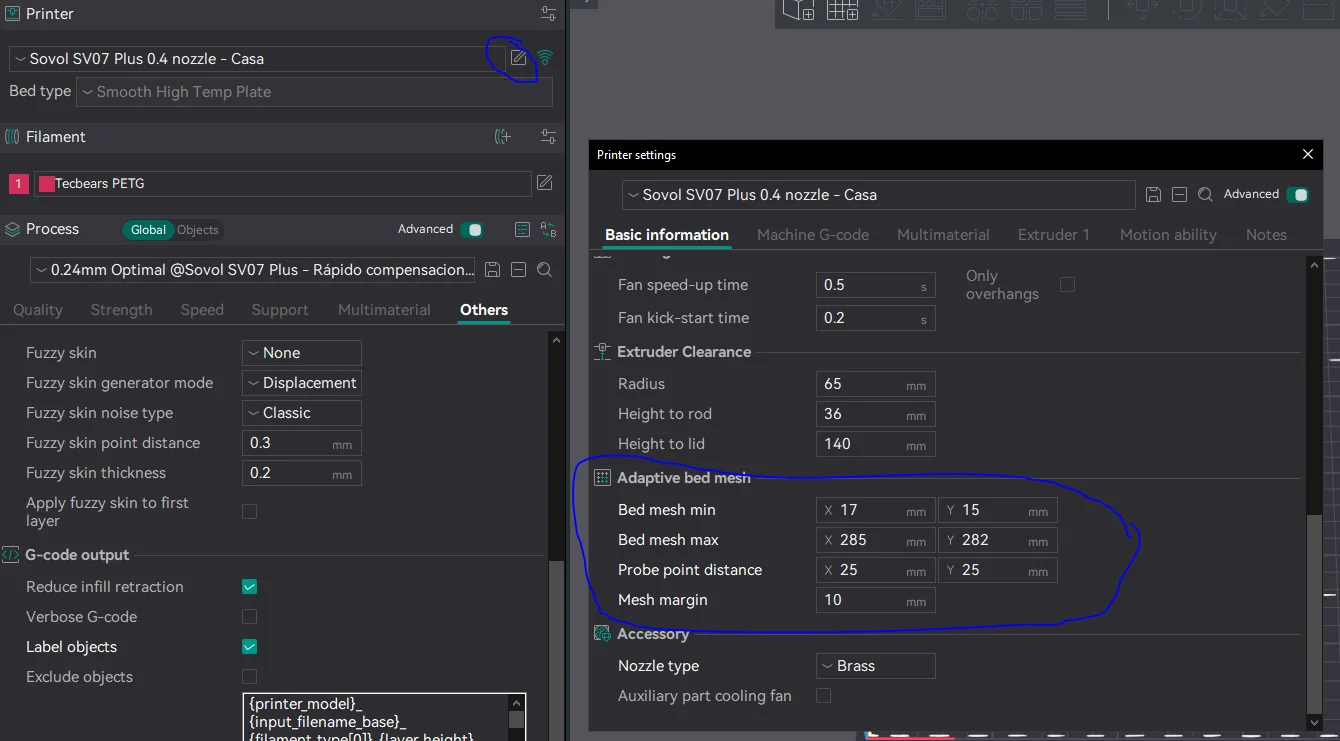
Put this code at start g-code of machine, find x-y min and max points (from printer.cfg) and set it up in adaptive bed mesh section, check label objects in others section and that's all, enjoy!
Tested with sovol 07 plus, min and max points for this are mesh_min:17,15 mesh_max:285,282, you can find out these values at bed_mesh section in your printer.cfg.
Bytinx_1344834Likes1.2KDownloads6K

 Byprusa-researchLikes0Downloads2.7K

 Byarhi_585078Likes64Downloads541

 ByHanzo3dLikes155Downloads414

 BydarienLikes0Downloads1K

 ByGeek5DLikes147Downloads485

 ByNadirLikes25Downloads114

 ByBrokentooth_designsLikes23Downloads407

 Byla-cave-au-chatLikes0Downloads965

 Bycrawler-3903250Likes0Downloads906

 ByvertigomakesLikes0Downloads562

 By3DSourcererLikes48Downloads377