




Vải In 3D Cấu Trúc Hình Bát Giác (Octagon Fabric)
 ByDrewmundLikes833Downloads4.6K
Build another version of this model.
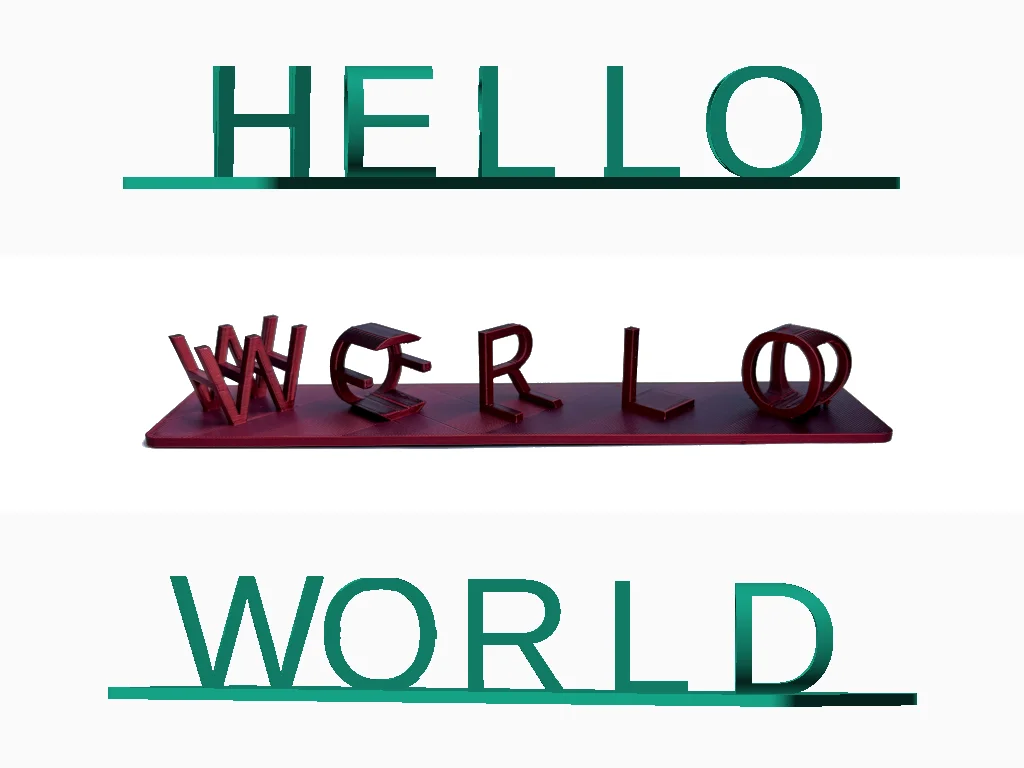
This generator is able to generate 3D ambigrams with the words you would like.
An ambigram is a text, image or model which illustrates an image or a text, but when viewed from a different perspective, another word or image appears.
This generator works with two words/sentences of your choice.
Three files have been uploaded:
Spaces and unequal word/sentence lengths will result in a solid which can be customized to either a solid, a star, or a heart.
Please use uppercase letters for the best result.
Note that some special characters/symbols might not work.
Supports will most likely be necessary when printing.
Feel free to share your custom 3D ambigrams and leave a comment/like :D
ByDrewmundLikes833Downloads4.6K

 ByFastRaccoon_718321Likes461Downloads1.5K

 ByvexanixLikes168Downloads1.3K

 ByIvoLikes196Downloads1.1K


 ByshoheiyLikes0Downloads211

 Bynonoobybut_3307010Likes364Downloads1K

 ByvojtagrecLikes289Downloads902

 ByCodyMeyer_2545340Likes163Downloads728

 Byelizabeth3dLikes0Downloads153

 Bykarma-artLikes0Downloads156
