
Tấm Hông openGrid Core One
Remix of openGrid - Khung & Hệ Sinh Thái Gắn Tường/Bàn Làm Việc By DavidD
- Downloads
- 162
- Likes
- 145
- Views
- 2,901
- Remixes
- 0
- Comments
- 0
Files 9 3 MB
- opengrid-10x2-header-baseplate_1766324775.stlSTL · 211.8 KB
- opengrid-10x2-header-baseplate_1766324775.stepSTEP · 990.6 KB
- opengrid-10x2-header-baseplate_1766324776.f3dF3D · 943.5 KB
- opengrid-angle-magnet-latch_1766324777.stepSTEP · 43.4 KB
Make a variant with AI
Build another version of this model.
Details
- Model ID
- #171895
- Category
- Máy In 3D
- Published
- License
- Creative Commons — Attribution
Description
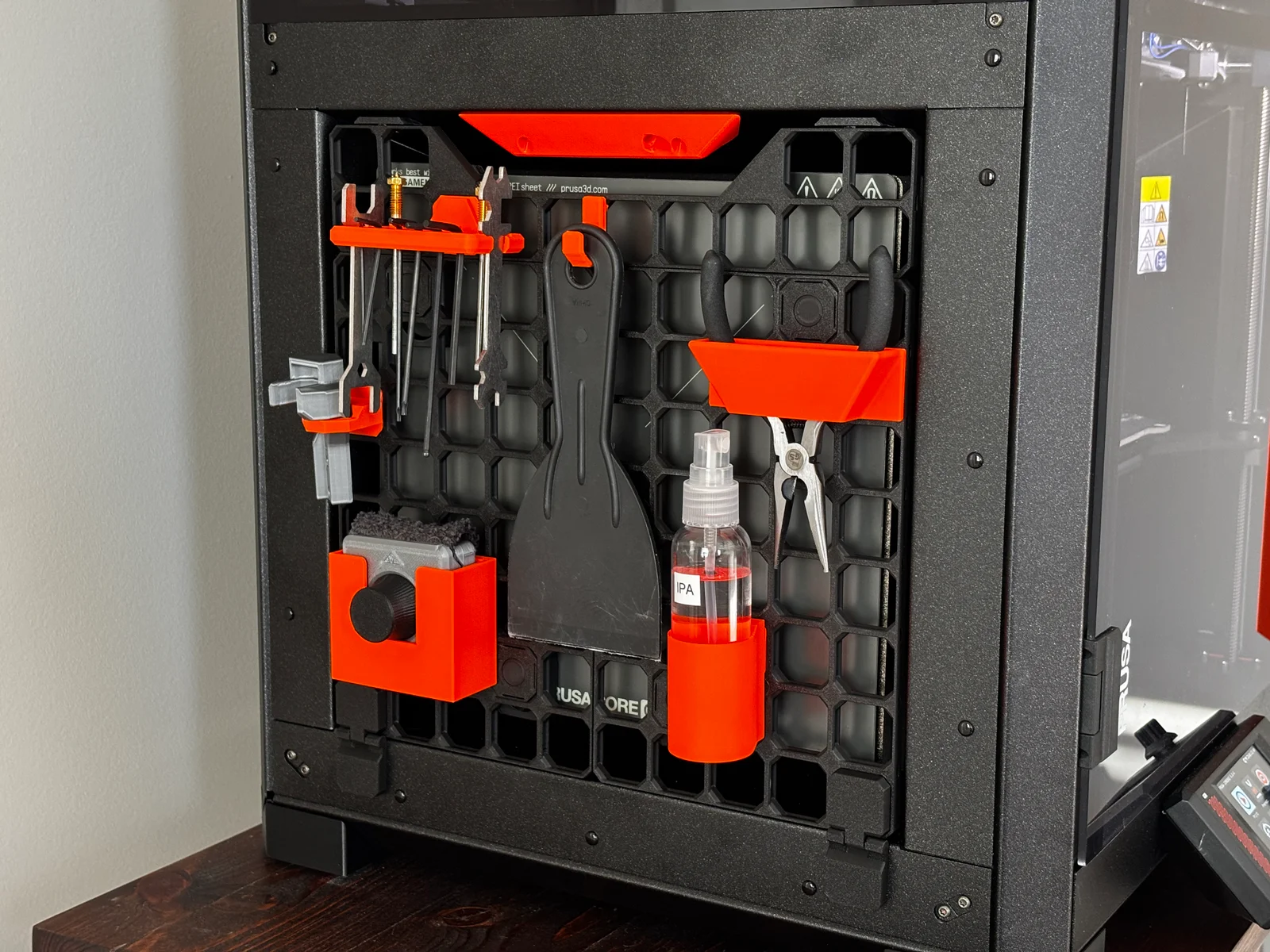
The Prusa Core One has a side cavity perfect for customization and accessory storage. The openGrid ecosystem is a great option for this purpose through the combination of native parts and compatibility with MultiConnect, HSW, MultiBoard, and Gridfinity,
Required Materials
- 10x 5mm diameter x 5mm tall magnets
- Filament of choice: PLA works great, PETG should work well too. I used American Filament PLA+ Matte Black and Jessie Premium PLA Orange,
Base Panel
The base panel is composed of a few different parts that snap together.
- 2x opengrid-8x5-baseplate from openGrid by @DavidD
- 1x opengrid-10x2-header-baseplate remixed from openGrid by @DavidD
- 2x opengrid-magnetic-snap-hinge by @mcberry23
- 2x opengrid-angle-magnet-latch (requires support material) by @mcberry23
- 4x opengrid-connector from openGrid by @DavidD
Print with 3 perimeter walls and 20% infill. No support material is necessary except for under the connector on the opengrid-angle-magnet-latch.
Assembly Instructions
- Press magnets into hinges and magnetic latch. Glue should not be necessary, but can be used if there is too much clearance.
- Put 2 connectors in long side of one of the 8x5 baseplates. Connect the two 8x5 baseplates together.
- Put the remaining 2 connectors on top of the joined 8x5 baseplates and connect the 10x2 header.
- Snap in the angled magnet latch on the top of the header. The angled side with the magnet will be flush with the top inner angled sheet metal on the Core One side panel when attached.
- Snap in the hinges so the magnets will face the metal on the Core One. The bottom corners work best.
- Place the entire assembly on the side of the Core One.
Accessories
Once the base panel is completed, feel free to customize with any holders and accessories you desire. Keep in mind how the hinged door movement will affect the hanging items. Here is what I used:
- openGrid MultiConnect Build Plate Holder by @mcberry23
- openGrid Core One Nozzle Tool Snap Holder by @mcberry23
- openGrid: minimal hook with more wrap by @mcberry23
- MultiConnect Spray Bottle Holder by @mcberry23
- HSW Nextruder Nozzle Holder by @Rhoddyn_1486825 and openGrid - HSW Snap by @DavidD
- OpenGrid Pliers Holder by @trentster_305388
- Build Plate Cleaner Opengrid Wallmount by Jed
Print spec
- Formats
- 3mff3dstepstl
- Model files
- 9
- Total size
- 3 MB
- Largest file
- 990.6 KB