



New
MINI 13 v.2026
 BysoozafoneLikes0Downloads858
Build another version of this model.
Hello makers!
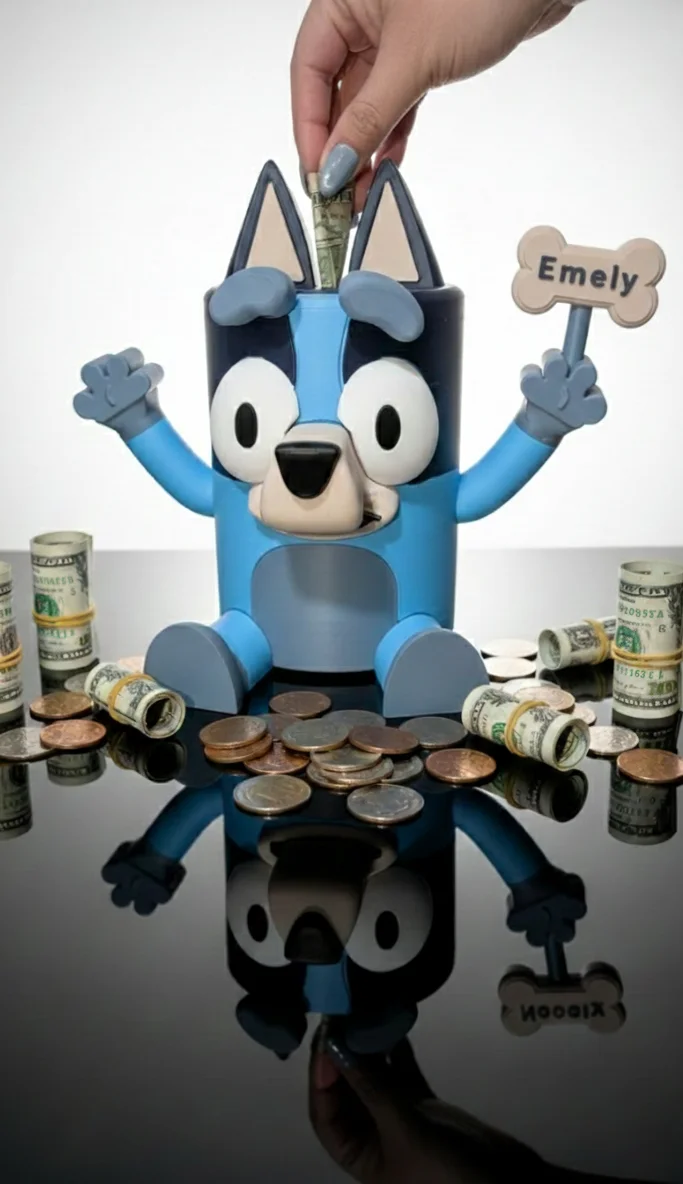
This is a special project I designed: a fun, multi-color piggy bank inspired by the beloved character Bluey. I originally created this for my niece, and now I’m making it available for the whole community to print. This design focuses on easy assembly and great print quality without needing an AMS.
Easy Assembly: The piggy bank is designed to be assembled easily using glue. No complex parts or hardware required!
Minimal Post-Processing: Only minimal tools are required for cleanup after printing, like a deburring tool or sandpaper to smooth out imperfections left by supports.
No AMS Required: Perfect for single-extruder printers. All parts are separated by color/material.
Customizable Name Tag: The bone piece is designed to hold a custom name!
Body Height: Approximately 22 cm (8.7 inches)
Body Width: Approximately 15 cm (5.9 inches)
Total Width (with arms): Up to 25 cm (9.8 inches)
Name Customization: You can easily change the name on the bone tag in your slicer!
Find the objects named name_cut (the piece that cuts the negative space in the bone) and name_part (the positive part of the name).
To ensure a perfect fit, make sure to use the same font, thickness, and spacing parameters as the original objects when you input your new name.
Support Cleanup: If supports are used, a light deburring or sanding may be necessary to achieve the best surface finish.
Z-Hop Recommendation: For optimal quality and to prevent nozzle collision with previously printed parts, I recommend setting your printer's Z-Hop to Normal mode in the printing configuration.
The included 3MF file is configured to achieve the best finish and print quality on a Bambu Lab P1S (or similar quality printer). Feel free to adjust the settings for your specific machine.
I'm not a professional 3D modeler; this project was a labor of love and a great learning experience for me. Designing this has taught me a lot, and I hope to continue improving and sharing more projects in the future.
Enjoy printing this fun piggy bank, and please share your makes.
BysoozafoneLikes0Downloads858

 ByChrisNolan_635249Likes334Downloads1.9K

 ByThePhabPhantomLikes469Downloads2.1K

 BybiocraftlabLikes251Downloads1.2K

 Byelizabeth3dLikes0Downloads199

 ByFountainhead_1621649Likes28Downloads694

 By23AFStudio_1082108Likes9Downloads121

 ByHoani3D_565607Likes22Downloads484

 ByMinusone_3987526Likes202Downloads353

 ByTorstenEdmond_616586Likes68Downloads314

 ByMorris_848897Likes19Downloads295

 By3DEagle_320399Likes14Downloads234