




Mô hình Rick Roll QR Code Prank - Bảng mã QR troll bạn bè độc đáo
 ByvojtagrecLikes289Downloads902
Build another version of this model.
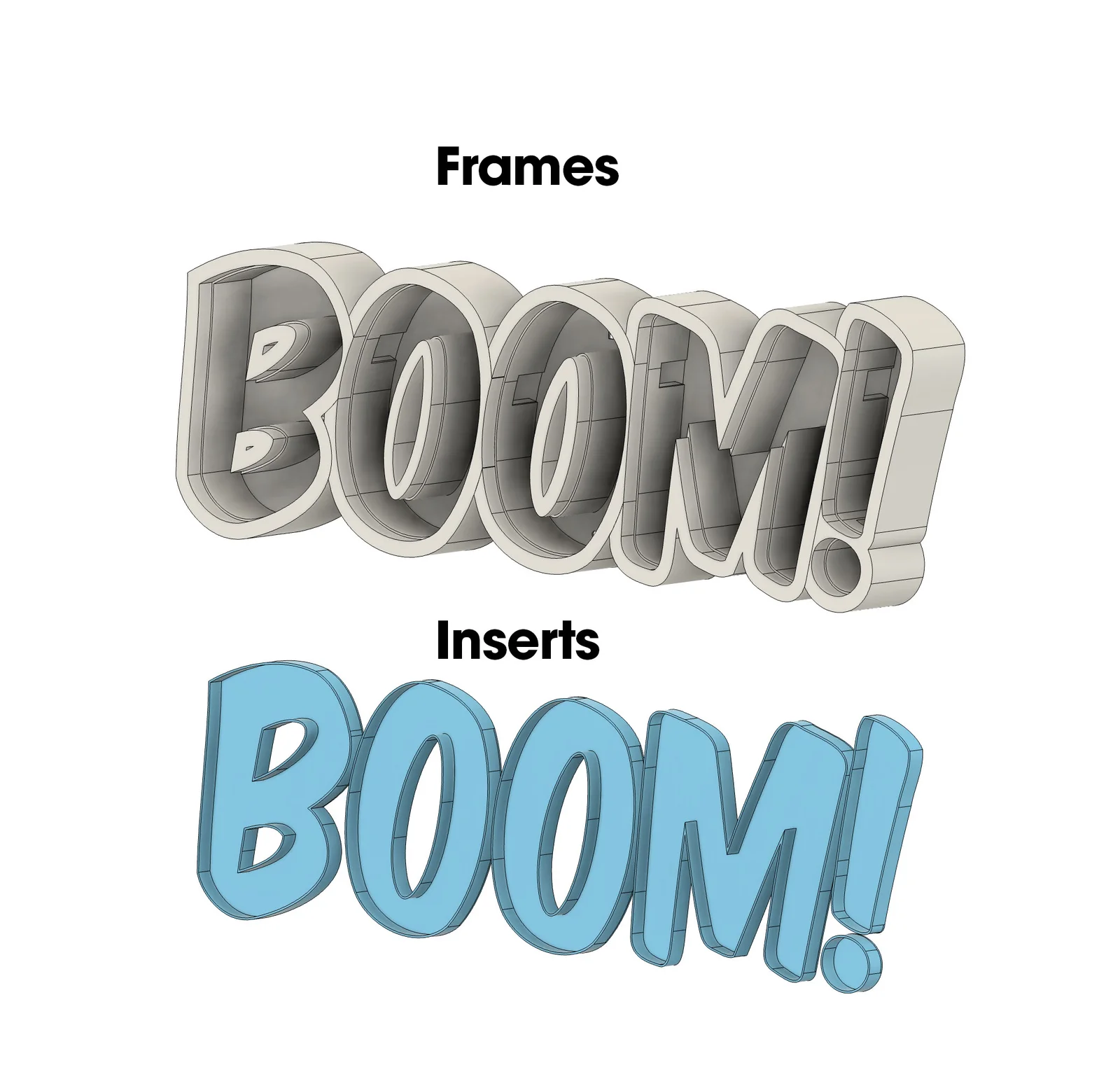
Boom! Here you have the files needed to print a large scale – 20" wide" – “Boom!” letter marquee. This is intended to be lit with an LED strip, but can also look great unlit.
This is made as an assembly as each letter frame (and insert) are separate prints, that are then assembled. All that is required to assemble the marquee is the following
Non-Printed Parts:
Assembly:
Learn how it's made, and how you can make your own letter marquees using Fusion 360!
ByvojtagrecLikes289Downloads902

 ByDrewmundLikes833Downloads4.6K

 ByawelshmanLikes74Downloads139

 ByS1m3DLikes74Downloads118

 ByHowler117Likes27Downloads350

 ByVojtechSkals_4144903Likes50Downloads250

 ByFastRaccoon_718321Likes461Downloads1.5K

 ByvexanixLikes168Downloads1.3K

 ByIvoLikes196Downloads1.1K

 Bynonoobybut_3307010Likes364Downloads1K

 ByDorn6_3545870Likes13Downloads119

 Bybychr1s_568275Likes243Downloads190