



Thùng rác in Vase Mode
 BybobmakesLikes2.5KDownloads17.5K
Build another version of this model.
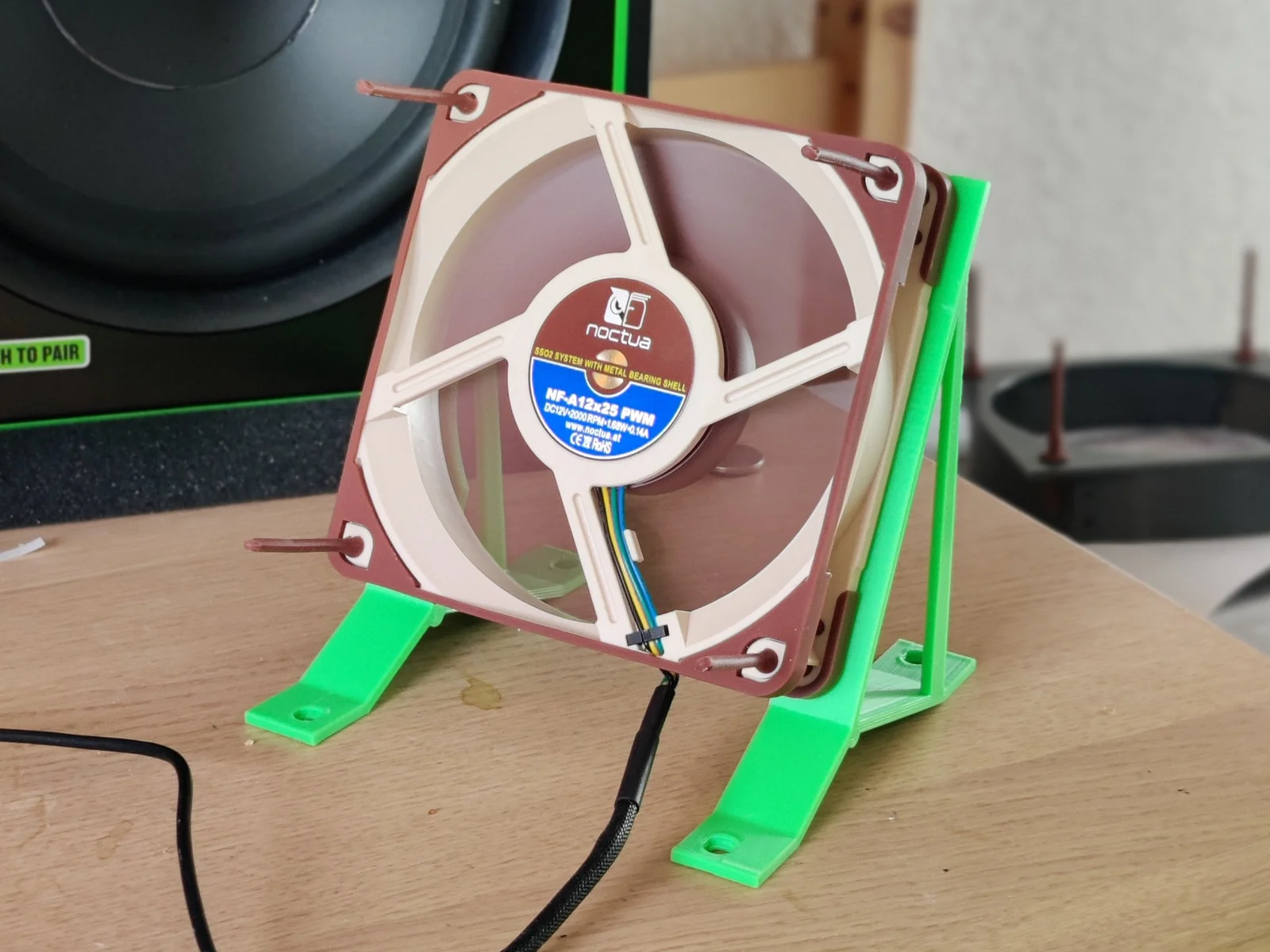
Use a common PC fan to cool myself on a hot day. Most offices do have air condition but some do not. This is especially true for the Home-Office.
This could have been a very simple design. However, me being me, I had to make it perfect not just for me but for more or less everyone.
The result is an OpenSCAD project that adjusts its design features according to the fan size and desired fan angle one chooses. The center of gravity of the fan is always exactly in the middle. Additionally the height of the feet is adjustable along with a lot of other things.
You can play around with the options in the OpenSCAD Customizer or you can choose one of the pre-made designs.
The files are grouped by the fan size.
Example filename: 120mm/fan_stand_120mm_65deg_left.stl is for
The feet also have fan mount holes in them so you can use another fan as a heavy base. There is however no need to do this.
Print a pair of matching left and right parts of the model.
Nothing special with the settings or filament type, basically anything works.
Mount the fan on the parts so that the “blowing” side facing you. Hook up the power supply. Get cooled down.
If you are wondering how I created all those stl files and the animated gifs. It is all done by a small perl script I wrote. Please find that file in the files section with the name “generate_fan_stands.pl.txt”. (Printables does not like “.pl” files, hence the “.txt”)
The script does these tasks
This one is not adjustable. Those are:
https://www.printables.com/model/511959-adjustable-perfect-desktop-fan-stand-for-120mm-fan
https://www.printables.com/model/564600-simple-adjustable-perfect-desktop-fan-stand-print-
Compared to the alternative these are the differences
Model
Simple (this)
Print time
2.74h
10.43h
5h6m
Filament
28g
112g
52.75g
CAD Software
OpenSCAD
Onshape
OpenSCAD
Fan size
80, 92, 120, 140mm
120mm
80, 92, 120, 140mm
Geometry
Simple
Complex
Simple-ish
Design Automation
Full
none
Full
Looks
discrete
massive
flimsy
Customisation
Fan Size; Angle
Text
Fan Size
Coolness
What do you think? Let me know in the comments!
BybobmakesLikes2.5KDownloads17.5K

 Byquibeck_3353173Likes1.5KDownloads11.5K

 ByVinors3DLabLikes393Downloads995

 ByHydratedMini_1690513Likes173Downloads718

 ByJackLikes145Downloads757

 ByTommy3DLab_2023125Likes636Downloads2.5K

 Bymoleculecrtr_1215658Likes544Downloads2K

 ByTheMerchant_560996Likes104Downloads270

 Byextrablind_178817Likes40Downloads221

 Bygleb_sexy_1069616Likes42Downloads232

 By178222178222_2484344Likes449Downloads1.7K

 ByEldordLikes499Downloads1.4K