




Kẹp giữ sợi Filament
 Bytinx_1344834Likes1.2KDownloads6K
Remix of Bambu Lab X1C G-code Khởi động Nhanh hơn - Không cần chờ bàn nhiệt nóng By Shenaniganz_1464779
Build another version of this model.
Bambu's 'Machine start G-code' preheats the headbed and wait for it to be heaten until the printer moves on with preparations. This change in the machines G-code will move the 'wait for bed temp' to a later position since this is an unnecessary delay.
Meanwhile the printer can continue with preparations and you safe time on print-duration.
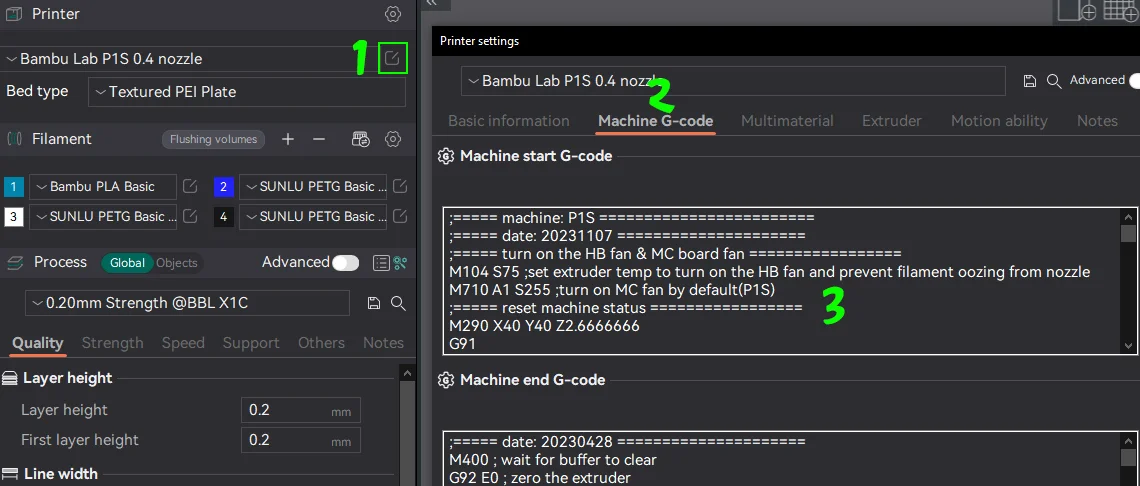
Go into BambuStudio or OrcaSlicer and search for your printer (should work an all Bambu printers)
- click the 'little icon' next to the printer (1)
- In the printer settings, click on 'Machine G-code' tab (2)
- In the 'Machine start G-code' section (3), scroll down and look for the lines
;===== heatbed preheat ====================
M1002 gcode_claim_action : 2
M140 S[bed_temperature_initial_layer_single] ;set bed temp
M190 S[bed_temperature_initial_layer_single] ;wait for bed temp
- Now cut-out (ctrl+x) the following line
M190 S[bed_temperature_initial_layer_single] ;wait for bed temp
- and paste it right befor the section of the bed leveling
M190 S[bed_temperature_initial_layer_single] ;wait for bed temp
;===== bed leveling ==================================
- now safe your 'new' printer profile (use a different end naming or such) and select it as your 'printer' in the dropdown menu.
Notes:
- If you do more small single objects, the gained print time saving is great.
- Bambu may change the printer profiles in the future, make sure you always check if they added this feature (maybe?!)
- I recommend after a firmware/software/profile upgrade to do this steps again - so you make sure to benefit from the latest versions and dont mess up things
If you wanna get less poop on multicolor-prints, check this out:
https://makerworld.com/en/models/91241
Bytinx_1344834Likes1.2KDownloads6K

 Byprusa-researchLikes0Downloads2.7K

 BydalleLikes0Downloads147

 ByhumebeamLikes0Downloads128

 Byarhi_585078Likes64Downloads543

 ByHanzo3dLikes155Downloads415

 BydarienLikes0Downloads1K

 ByGeek5DLikes147Downloads488

 ByBrokentooth_designsLikes23Downloads410

 BylaserbaconLikes0Downloads172

 Byla-cave-au-chatLikes0Downloads967

 Bycrawler-3903250Likes0Downloads907