


Bộ sưu tập linh kiện K'NEX (Thanh nối & Đầu nối) cho thiết kế 3D
 ByHugoS_588209Likes108Downloads1.4K
Build another version of this model.
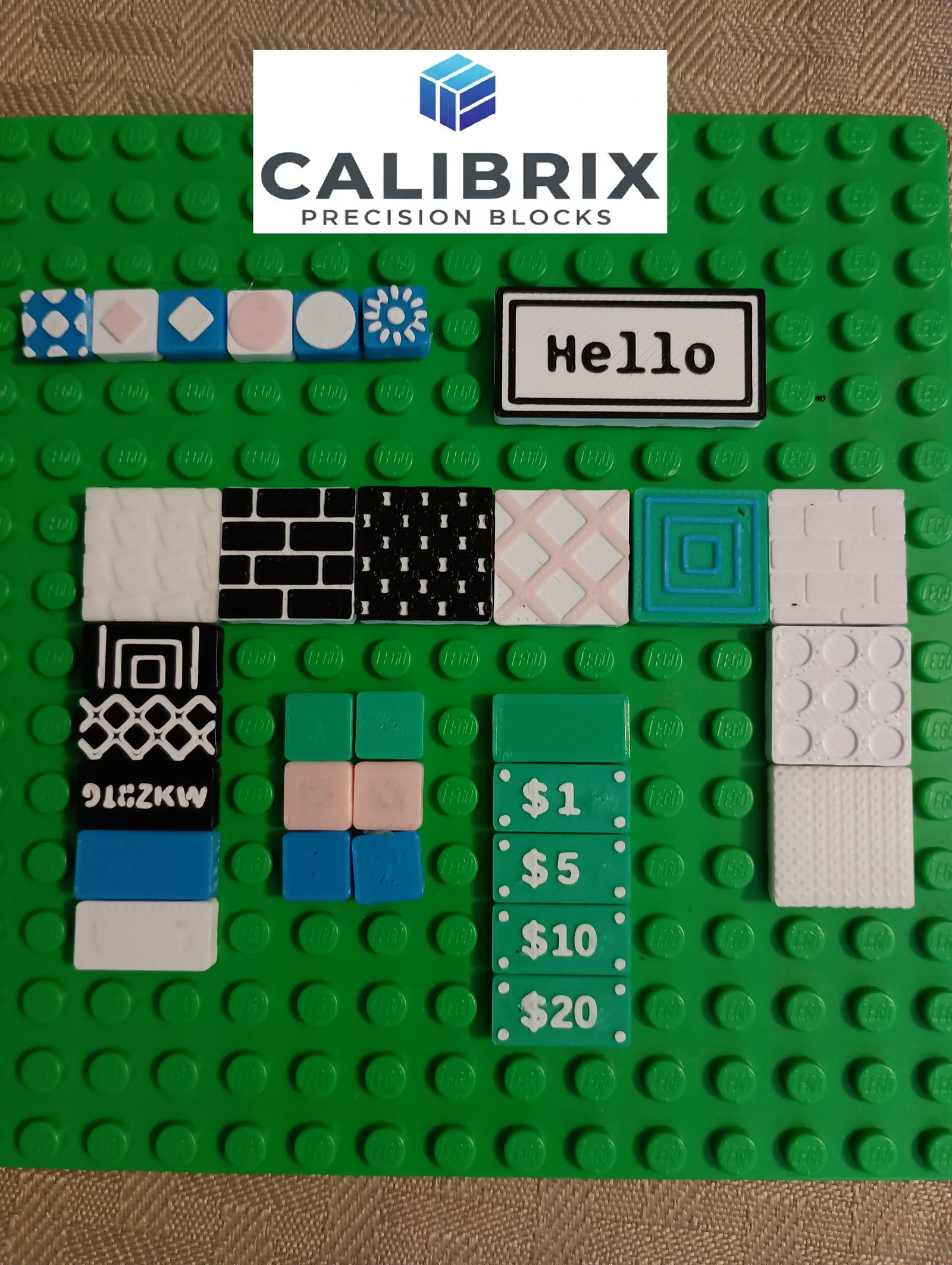
The Calibrix Modular Tiles & Textures suite is a fully parametric OpenSCAD library designed for high-precision, cross-compatible building. Engineered as part of the wider Calibrix ecosystem, these tiles provide the foundation for building complex, custom structures that interface seamlessly with other Calibrix tools.
There are many great tactile textures in this library. This library gives you options that do not just look great, but they also have fun feeling potential for someone that's looking for a fidget to touch.
At the heart of this suite is our Anti-Stud and Stud Calibration System. Unlike mass-produced alternatives, every tile is generated with calculated tolerances to ensure a consistent "snap" and clutch power across your entire Calibrix collection.
Parametric Design: Dynamically adjust length, width, and bevels to create tiles that fit exactly where you need them.
Calibrix Ecosystem Sync: Whether you are building houses, cars, or something else, these tiles are calibrated to match the mechanical standards of our wider toolset. They are tested to have a tight fit with the "Danish" variety.
Modular Texture System: You can easily add etched or embossed textures to your tiles, or you can generate pieces that are flush (in-line) with you plan to use an MMU/AMS for multicolor printing. No MMU/AMS, no problem because you can easily use the emboss features then GCode a color swap for neat multicolor pieces.
All filaments and printers can vary in ways that make certain parts looser or tighter than my machines and filament. I have tested these pieces on a Prusa Mk3s and Bambu A1, but you are always recommended to use my calibration tools to get the right numbers for your machine instead of trusting my numbers. A special note for high speed machines like the Bambu A1: Due to the speed of cooling and other factors, the 1x1 size pieces should be calibrated smaller (about 0.1 mm) than the larger part counterparts due to the rapid cooling of the smaller pieces. My .3mf print profile has this compensation already in place, but if you are using my .SCAD file, you need to keep this in mind. 1x1 pieces have less grip in general since they only have one stud to grab, so they will need extra help at times.
Customize: Use the OpenSCAD Customizer to define dimensions and select from our library of surface textures.
Add Textures: The textures have options for scaling and position to get some truly unique and special parts. The best parts will use these options.
Fabricate: Print with high-precision settings. Because these tiles are part of the Calibrix ecosystem, you can count on them to behave predictably when attached to any other calibrated part in our library. For two color prints, it helps to set your layer height to 0.1 mm. You should do a color texture layer of 0.2 mm (some tactile feel) or 0.4 (much tactile feel) regardless unless you want it to be flush with the surface. If you want to play with engraving, I still recommend turning down your layer height.
These models are not "AI generated". They are created using the provided SCAD file. SCAD files are deterministic by nature, so they do not "hallucinate". The code and models provided have been rigorously tested on two different printers. The "AI" flag is due to the use of AI as a coding assistant for code generation. I use AI to help me with the precise math and geometry required to create the sophisticated models. A coding assistant helps to speed up my workflow and create a more precise, accurate product. All code is reviewed and edited by me even if an AI generated the code block initially. I am in control of the entire project.
ByHugoS_588209Likes108Downloads1.4K

 Bylordzogar_2610068Likes0Downloads0

 ByTripleGWorkshopLikes111Downloads249

 ByRedfully_1701430Likes717Downloads3.3K

 ByChristianS_2237751Likes502Downloads3.7K

 Bymtakashi_164009Likes176Downloads483

 ByGhostmanta_3143708Likes187Downloads335

 ByLimitSwitch_4355441Likes102Downloads285

 ByKT3DprintLikes109Downloads116

 ByDennisMLikes189Downloads1.7K

 ByJona32u4Likes82Downloads673

 Bythall72Likes30Downloads519