



Mẫu gảy đàn Guitar (Guitar Pick) in 3D tùy chỉnh độ dày
 ByWolf_115355Likes513Downloads8.4K
Build another version of this model.
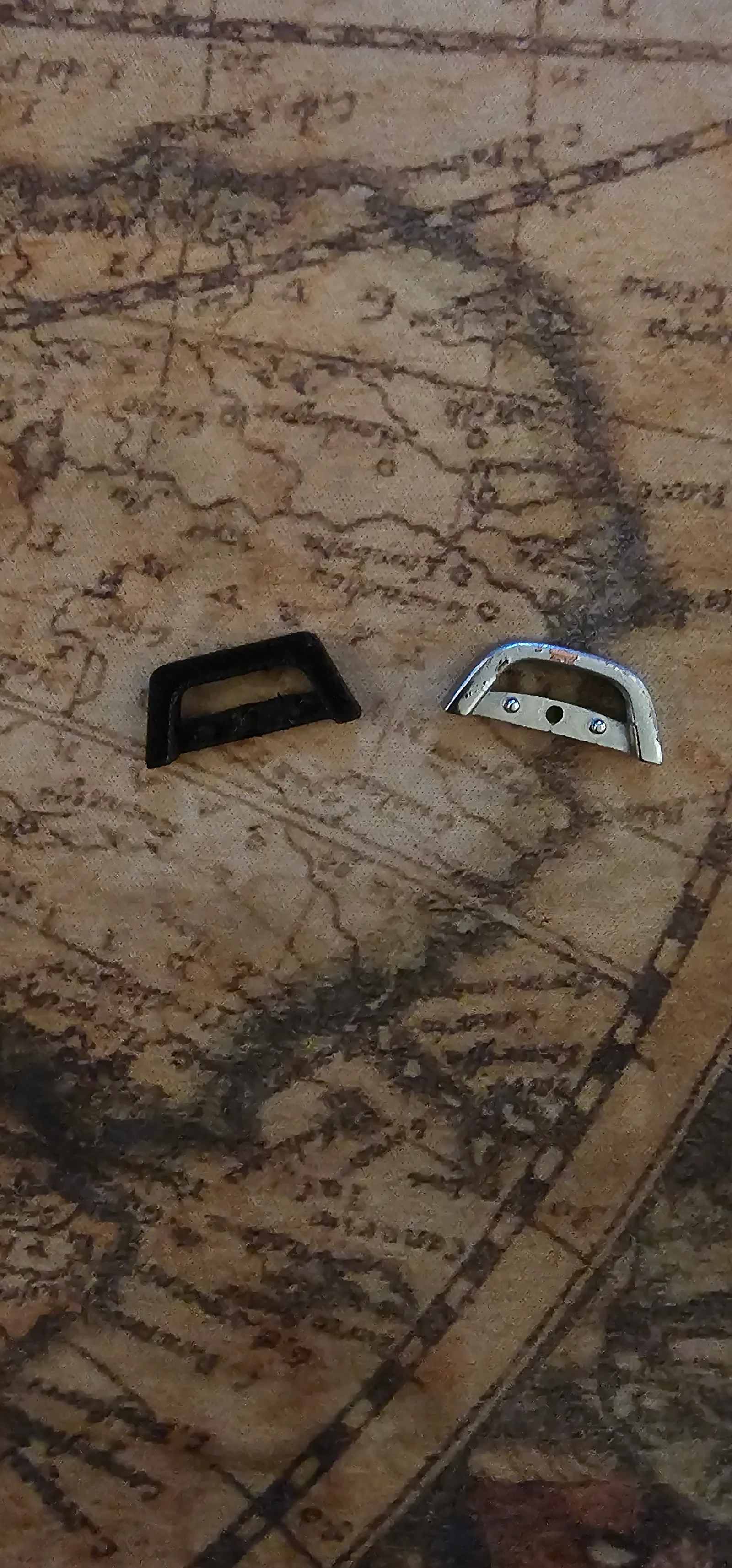
This is a 3D-printed replacement for the key-ring attachment loop found on remote starter key fobs commonly installed by dealerships, including Subaru models around 2016 and Ford vehicles using the same ELVATRKC 4360415-type fob.
The part replaces the small chrome/silver metal loop originally mounted to the fob. In the photos, the printed black piece is the 3D-printed version, shown installed as a direct swap.
The original metal loop on my fob eventually snapped, and I discovered that this component doesn’t seem to exist as a standalone replacement part. I couldn’t find a part number, a listing, or even a reference to it online—so I created one myself.
Designed as a functional replacement for the OEM loop.
Fits the ELVATRKC 4360415 remote starter fob.
Should also work with similar remotes installed by dealerships under various brands (Subaru, Ford, etc.).
Geometry is slightly reinforced compared to the original, to compensate the use of plastic instead metal, but keeps the same form factor and screw mounting pattern.
The example shown is printed in PETG.
A PLA draft tested strong enough for regular use, but PETG or ABS is recommended for better durability.
Supports are recommended, since the center section sits about 1 mm above the build plate.
Otherwise prints cleanly and requires minimal post-processing.
Replacing the key-ring loop is simple and only requires a small Phillips screwdriver and a plastic pry tool (a Flathead screwdriver would also work).
Remove the small screw
On the back of the fob, remove the single Phillips screw that holds the two halves together.
Open the fob
Use the notch on the side and insert a plastic pry tool.
Gently twist or lift to separate the top and bottom halves of the remote.
Take out the original key-ring loop
Inside, you’ll see the old metal loop held in place by two small side pegs that fit into two holes next to the central screw post.
Lift the metal loop out.
Install the 3D-printed replacement
Position the printed part so its two small cylinders line up with the two holes on each side of the screw post, and press it into place.
Reassemble the fob
Close the housing, making sure everything aligns properly.
Reinstall the Phillips screw to secure the enclosure.
Attach your key ring
Once the printed loop is in place, you can reattach your keys as usual.
ByWolf_115355Likes513Downloads8.4K

 ByZED4EverLikes313Downloads5.2K

 ByfifindrLikes500Downloads4K

 ByVC_DesignLikes679Downloads3.6K

 ByDan Schwartz SchwartzLikes744Downloads3.4K

 ByJordanK_858807Likes42Downloads430

 ByMAFIXMAFIX_337316Likes130Downloads379

 ByMaxTheSpyLikes57Downloads528

 ByUpcrid3D_1585693Likes808Downloads2.1K

 ByWilko_SLOLikes935Downloads2K

 Bystephenhiras_1439037Likes15Downloads233

 Bychubbs8697_2027893Likes585Downloads1.7K